| Updated: | 05-15-10 07:21 PM |
| Created: | unknown |
| Downloads: | 17,437 |
| Favorites: | 153 |
| MD5: |

File Name |
Version |
Size |
Author |
Date |
Type |
0.9 |
363kB |
10-17-10 10:58 AM |
Patch |
||
1.0 |
8kB |
05-16-10 10:08 AM |
Addon |

File Name |
Version |
Size |
Author |
Date |
0.8 |
366kB |
iindigo |
05-12-10 03:13 AM |
|
0.7 |
365kB |
iindigo |
02-21-09 07:26 AM |
|
0.6 |
365kB |
iindigo |
12-01-08 06:20 PM |
![]() |
Comment Options |
|
|
|
|
A Kobold Labourer
Forum posts: 0
File comments: 5
Uploads: 0
|
PortalBox Fan Update by dodzilla
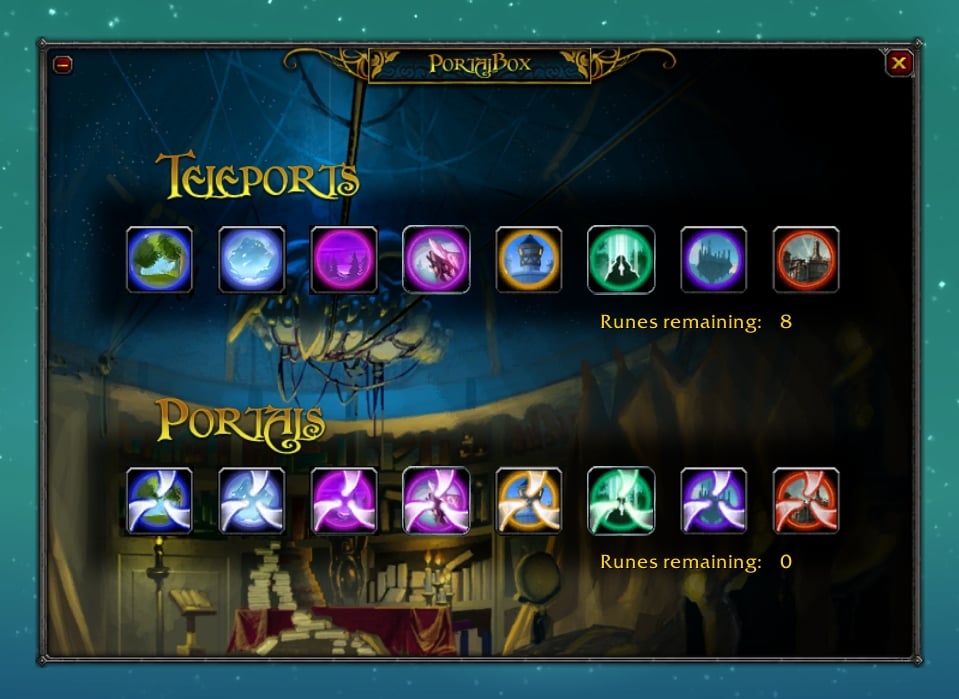
* added TOL BARAD buttons * updated level requirements tooltips for unknown spells * adjusted layout to accomodate 1 extra button per row * adjusted right graphic to cover the new required space * right-justified rune labels * groomed portalbox.xml - fixed indenting, removed line spaces,.. * incremented version from 0.9 to 1.0 www.wowinterface.com/downloads/info19180-PortalBoxFanUpdate.html works perfect with 4.0.3a! |
|
|
|
|
||
![]()
__________________
FujiUI 藤 (Retired) |
||
|
|
|
|
|
|
I posted a version that fixes all the errors in 4.0.1.
http://www.wowinterface.com/download....0.1patch.html
Last edited by Kharthus : 10-18-10 at 11:56 AM.
|
|
|
|
|
|
|
|
Any chance of including an option to lock the location of the minimap button? It would be especially nice for those of us who don't attach it to the minimap.
|
|
|
|
|
|
|
|
Nice addon, I just found it a few days ago and I love it. It is one of those simple, goodlooking addons that just does what it should do.
This made me remove the ugly portalbar I had on the screen before. Only thing I felt missing was an LDB launcher so I could remove the minimap icon. I like to click, but I also like a clean minimap :-) So I made a simple LDB launcher for PortalBox and uploaded it as an additional addon over here (http://www.wowinterface.com/download...PortalBox.html)
Last edited by Robsato : 05-16-10 at 10:13 AM.
|
|
|
|
|
|
||
|
||
|
|
|
|
|
|
A Kobold Labourer
Forum posts: 0
File comments: 18
Uploads: 0
|
When I DL this It doesn't come up as Portal BoX... but just the files itself.
|
|
|
|
|
||
Nice work!
__________________
|
||
|
|
|
|
||
|
A Deviate Faerie Dragon
Forum posts: 13
File comments: 190
Uploads: 0
|
|
|
|
|
|
|
|
|
A Kobold Labourer
Forum posts: 0
File comments: 5
Uploads: 0
|
Great addon, was wondering if you could add a option for hearth stone.
|
|
|
|
|
|
|
I wanted to thank you for this addon. I recently decided to try my hand at building a UI that was close to the original in-game aesthetic as possible while still being functional and pleasant to look at. This meant I didn't really want to deal with FuBar-esque bar mods or oPie, as wonderful as those addons are. PortalBox is perfect for what I had in mind. It looks lovely and is easily accessible with a simple slash command.
My only qualm is as other people have mentioned, the "Keep Window Open After Casting Portal or Teleport" box being not checked still means the window is kept open after casting and has to be closed manually. Thank you again for all your hard work. PortalBox is something that looks and feels like it should be part of the base game, you should be proud!
Last edited by treelet : 07-18-09 at 06:34 PM.
|
|
|
|
|
|
|
|
I'll see about changing it to close window at the start of any port/teleport cast.
A free-floating minimap button is already in progress and should be in the next version. As for the window, I might make compact mode much more compact in the next version, but the original window will remain its original size. It was designed with minimum UI scale in mind... I find it surprising that so many run WoW with UI scaling disabled. Besides that, I was trying to make a break away from the scores of addons that are so utilitarian that they're horribly ugly. |
|
|
|
|
|
||
I had to make those scale changes in both the .lua and the .xml file. Otherwise, when I closed and re-opened the mod using the mini-map button or slash command, the scale reverted back to defaults. I did also try to see if I could find the issue with the window staying open. Code:
if (KeepWindowOpen == "0") then PortalboxMainFrame:Hide(); PortalboxHordeFrame:Hide(); end This code I saw in the .lua didn't look right to me. It seemed like == "0" should be == "1" or = "0". But I really don't know much about programming or .lua myself, and neither of those changes coupled with checking or unchecking the box in-game made any difference. The window always stayed open. |
||
|
|
|
|
||
|
At the moment I use some bars I set up in AutoBar for portals/teleports, but since I use another mod for bars, I wanted to drop AutoBar for a lighter-weight option. I tried PortalBox 0.6, and had hoped 0.7 would work well for me. But IMO there are a few issues that need to be addressed before Portalbox will be a good replacement for me. Here are my issues/thoughts about this mod:
This just isn't working for me. There is no "close window upon portal cast" option. And just like another poster said, my "Keep Window Open After Casting Portal or Teleport" box is NOT checked, but the window stays open until I close it with the X. It does not go away on its own, period - not at the start of the cast or even after the cast finishes. I'd prefer it to go away immediately. In the rare event I click the wrong destination, I can just bring up the window again. That's FAR better than staring at the window for any length of time at all, or having to click the X each and every time, during the hundreds of casts where I do pick the correct destination. Mini-map button. It would be nice to have the mini-map button be completely detachable. But in my personal opinion it's not a high priority, especially since I usually prefer slash commands. Opening Options. Regardless of where the mini-map button is, a left-click should open the portal window, and a right-click should bring up the mod's options. That would be a lot easier than pressing Esc > Interface > Addons > Portal Box. Also, for the slash command users, adding a "/port config" option would be quicker too. (Of course, not to be mean, but the options need to work for this to matter.) NOTE: As has been mentioned by others, /port works, but /portalbox does not. Which isn't surprising, since the .lua sets /port and /portals as the two slash commands. But since /port is the shortest, it's the only one that I really need anyway. Window layout. Sure, the window with its background is pretty. But to be honest it's fluff. I don't need a background picture taking up screen space, nor do I need to see the title of the mod - I know what mod I use for what. I'm here on this forum, right? The window needs to be a LOT smaller. Even with the "compact" option in 0.7 it's way too big. (I will look at modifying the .lua as the previous poster mentioned.) The buttons should be closer together. The background space at the top, at the bottom, on the sides, and in between the two rows of buttons all needs to be trimmed to a minimum. Which row is for Teleports, and which is for Portals is obvious too, from the icons. But I would like to see small captions though, for which location is which, even if abbreviations were used: Sw, If, Darn, Exo, Ther, Dal. I also don't care about seeing how many reagents I have. I use other mods for tracking those, and I always have plenty. But if that is kept, then IMO it should be squeezed in at the side of each row. That's about it. I hope the feedback was useful. . .
Last edited by Raging_Sage : 06-09-09 at 12:51 AM.
|
||
|
|
![]() |
You have just downloaded by the author . If you like this AddOn why not consider supporting the author? This author has set up a donation account. Donations ensure that authors can continue to develop useful tools for everyone.


