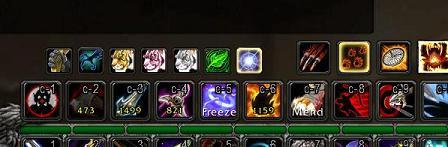
Aspects bar for a level 70 hunter showing all spells and the repositioned pet bar
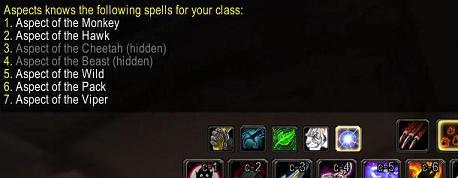
Customized spells on the Aspects bar using the aspect /set command
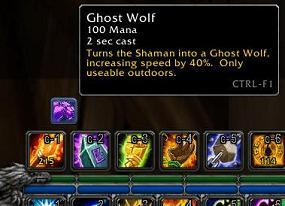
Aspects bar for a shaman with the Ghost Wolf spell, showing the tooltip
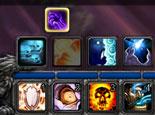
Aspects bar for a shadow priest in Shadowform
Cirk's Aspects
Rate:
Aspects is an addon that places your hunter's aspects, shaman's Ghostwolf, or shadow priest's Shadowform spell up above the default Blizzard action bars in the same place that the stealth button for a rogue, stances for a warrior, forms for a druid, and auras for a paladin are shown.
Aspects was written to replace Shadowshift, which was shadow priest specific, with a complete rewrite of the code to make it leaner and cleaner, and to let it support hunters and shamans in the same way that it had for shadow priests before.
For hunters, Aspects provides the ability to change which aspects are shown, and in what order, using the /aspect set command. It also moves the pet action bar over to the right by enough space to fit in your aspects, so you may need to reduce your scaling size if you run out of room.
Aspects's slash commands
Aspects supports the following slash commands:
/aspect help shows these options. /aspect on enables Aspects for your current character (the default if you a hunter, priest, or shaman). /aspect off disables Aspects for your current character. /aspect scale changes the scaling of the Aspects buttons. /aspect list shows the spells you and Aspects know. /aspect set <name> <#|on|off> sets order and visibility of your aspect spells (hunter only). /aspect reset resets the order and visibility of your aspect spells (hunter only). /aspect status shows you whether Aspects is enabled or not currently, and how much addon memory it is using.
What hotkeys will it use?
Aspects uses the same keys as the equivalent shapeshift buttons would use, which for a windows client would be CTRL-F1, CTRL-F2, etc. For easy reference, the hotkeys corresponding to each Aspects button will show up at the bottom right of the tooltip that you see when you mouseover the aspects buttons.
You can change the assigned keys easily under the Key Bindings option of the main menu - look for the Special Action Button entries, and change them to whatever you'd like. Note that since those buttons are also used for other class skills (such as for a rogue's Stealth) you may want to make any changes to these key bindings character specific by checking the box on the top-right of the Key Bindings screen.
Notes
If you are using Blizzard's default UI layout and are using tabbed chat frames, you might find that you need to move your chat window up a bit to fit the shapeshift bar in under the chat frame. You can do this by right clicking on the General tab at the top of the chat frame, selecting Unlock, then left-clicking and dragging on the General tab to move the chat windows where they won't be in the way. After you are done, right-click on the General tab again and select Lock to relock your windows again!
If you can't see the General tab at the top of your chat window when you mouse over the chat window, your chat windows might have been locked from being changed. To unlock them, open the Main menu (via the ESC key) and select Interface, chose the Chat option, and clear the Lock Chat Settings option. After you have moved your chat frame, you can relock them again if you want.
Compatibility
Aspects is only (currently) compatible with the default Blizzard action bars, but if you'd like to see it support other bars and addons, please let me know!
Localization
Currently Aspects only has locale information for the US english client, but its ready to support other client languages - all I need are the appropriate translations for the entries in the localization.lua file. So if you'd like to see it work on your client, please have a go at modifying this file, and when you think its all working for you, post it here and I'll merge it into the official version!
Change history 2.4.1
Fixed problem with Aspects trying to modify buttons when entering combat while on a mount (triggering an addon action prevented message).
Fixed problem where key bindings weren't being updated correctly when your spells list changed.
2.4.0
First release as Aspects, taking over from Shadowshift.
I'm using Dominos for my action bars so it would be nice if there was support for it's class bar. Aspects is a nice idea but right now I'm finding it unusable because its putting a button right in the middle of my action bars and I can't move it.
Love what you did (I tried to do this myself hacking Shadowshift, but it turned out to be too much of a hassle). However, I have to second the people asking for this addon to work with Bartender 3.
The current version...makes a mess of my UI
I've not added the "buttons on other side of pet bar" option yet.
Also, several of you have posted about Bartender (which I don't use) and I'm not sure exactly what you mean by "addressing the stance bar". Do you mean put the stances into Aspects (thereby replacing the default Blizz one) or ?
I do like the other suggestions for other classes too - totems for shamans, buffs for mages, etc. I'll have a think about that (particularly for shamans - totem management is a pain).
Oh and a quick note about the chat box - you might just need to move it up a bit yourself (see the addon description for details if you aren't sure how to do that yourself). Unfortunately, I can't have Aspects move that automatically, because if it touches any of the Blizzard code that handles that stuff, it will prevent all sorts of things from working properly when you enter combat
Originally posted by Tassleoff Hello, I use Bartender3 for my action bars. your mod looks like it would be really helpful, except that id doesn't address the Stance bar from Blizzard ;( if you address the stance bar, then all the Bar mods will instantly have access to your mod.
please think about adding this functionality
Tassleoff
I too use Bartender and would use your mod if it addressed the Stance Bar... otherwise it is useless to me since I have customized by button layout.
Hello, I use Bartender3 for my action bars. your mod looks like it would be really helpful, except that id doesn't address the Stance bar from Blizzard ;( if you address the stance bar, then all the Bar mods will instantly have access to your mod.
i got it and tried it and i work fine but the only porblem is when you dont have your pet out it block thelast line on the chat box so it would be nice if you could move the chat box up or move it to the right of the pet action bar
This addon can be really useful to most as right now it's limited to just a few classes. You could try the following:
Druids: Stances including Prowl
Hunter: Covered maybe adding another bar for traps
Mage: Buffs
Priest: Shadowform and buffs
Paladin: Auras, Blessings (ties in with Blessings)
Rogue: Stealth, Poision
Shammy: Ghost Wolf, Totems (up to an X number that the user can set)
Warlock: Fears
Warrior: Stances
Quote:
Originally posted by Cirk Hmmm, putting the aspects on the right of the pet bar might be possible - I'll have a look into that.
If you want to change which keys are used for what, just change them in the Key Bindings page - Aspects will use whatever you have assigned to the Special Action Button entries.
__________________
"Science is organized knowledge. Wisdom is organized life." - Immanuel Kant
Originally posted by dpmpv this is nice but being a hunter i was want the aspect to be to the right for the pet toolbar not the other way around becuase i would use the pet attack butten more then then change my ascpets so i would rather the pet attack be Ctrl 1 not the ascpets or you could have the acpsect use alt 1-what you have and the pets keep ctrl 1 torough whatever you have
Hmmm, putting the aspects on the right of the pet bar might be possible - I'll have a look into that.
If you want to change which keys are used for what, just change them in the Key Bindings page - Aspects will use whatever you have assigned to the Special Action Button entries.
this is nice but being a hunter i was want the aspect to be to the right for the pet toolbar not the other way around becuase i would use the pet attack butten more then then change my ascpets so i would rather the pet attack be Ctrl 1 not the ascpets or you could have the acpsect use alt 1-what you have and the pets keep ctrl 1 torough whatever you have