| Go to Page... |

| Updated: | 12-05-08 10:33 PM |
| Created: | unknown |
| Downloads: | 53,043 |
| Favorites: | 144 |
| MD5: |
Paranoia Enemy Player Alert 

Development Resumed
I've renewed my WoW subscription and I'll probably begin working on Paranoia again. Add the addon to your favorites list to be notified of when a new version is released.
WotLK Compatability
This addon may or may not work with WotLK/Patch 3.0+. It was last updated in December 2008, at the release of WotLK and future patches have probably broken it. I plan on fixing by August.
Missing Localizations
I am missing localizations for Korean (krKR) and Traditional Chinese (zhTW). If you can translate Paranoia into one of those languages I'd greatly appreciate your help!
There are also some machine translated or missing lines in the other translations as a result of new strings that were never translated. Please send corrections to [email protected]. Thanks. ^__^
About Paranoia Enemy Player Alert
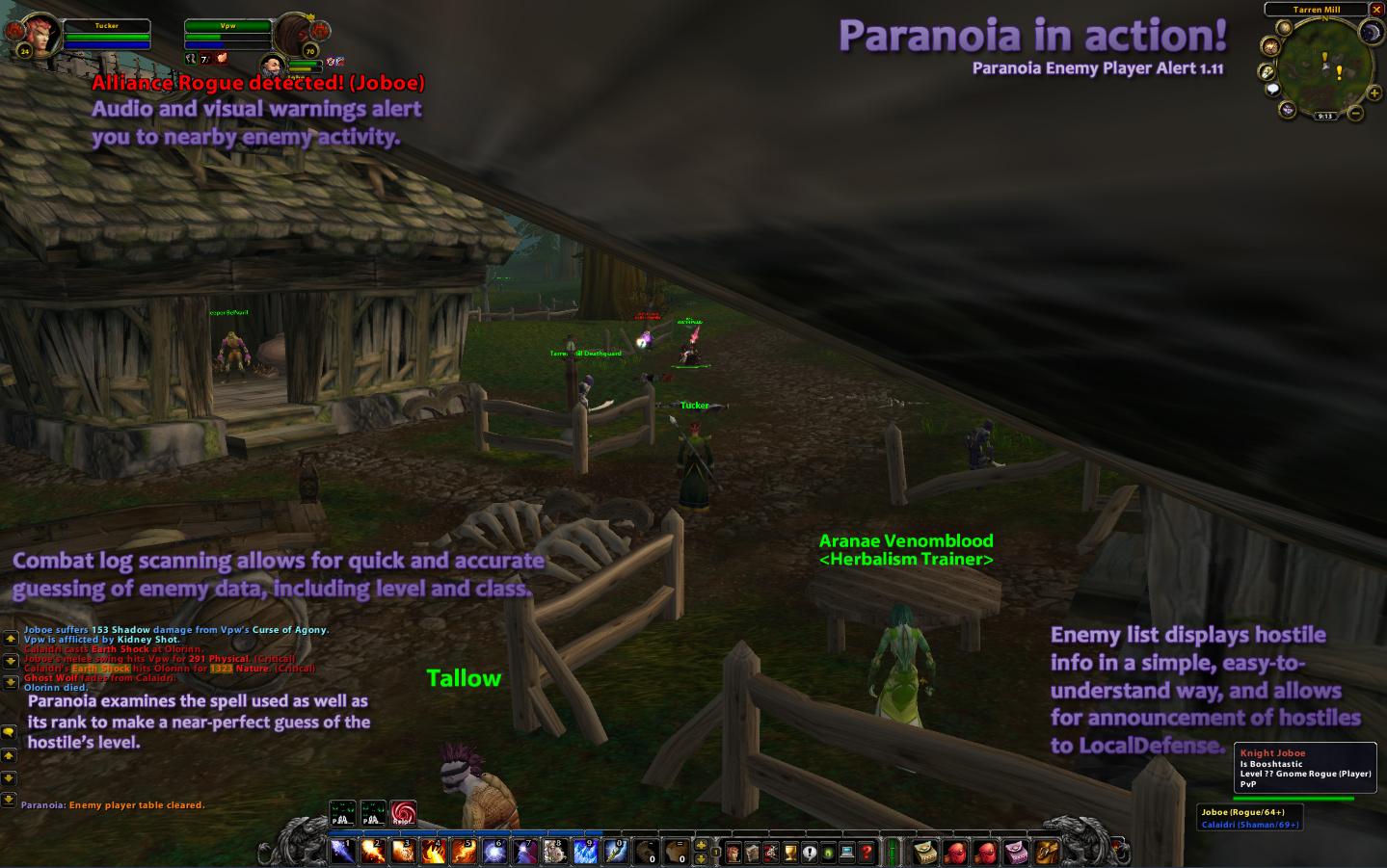
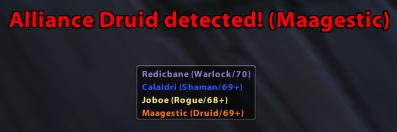
Paranoia Enemy Player Alert, or just Paranoia, or perhaps even PEPA, is an addon that attempts to keep a constant lookout for players of the opposite faction nearby. If a nearby player is detected, Paranoia will try to guess their class and level, and it will warn you by playing a sound and displaying a "Hostile Player Detected!" message on-screen.
Paranoia works by scanning all incoming combat log entries for any event caused by a hostile player. This includes hits, misses, dodges, parries, spellcast starts, buffs or debuffs being applied or removed, tradeskills, or kills. For example, "Skillzdatkillz gains Stealth", "Ipwnface begins casting Pyroblast", or "Hurrdurr begins Mining", will all trigger Paranoia's warning.
In addition, Paranoia will try to guess the class and level of nearby players by examining the ability they are using. If a nearby enemy begins casting Frostbolt rank 6, Paranoia will tag them as a level 32+ Mage. If they begin casting Frostbolt rank 14, Paranoia will tag them as a level 70 Mage. As they use more skills, Paranoia's guess will become more accurate.
Paranoia will also begin fading out the names of units on the enemy list as more time passes without any activity from them. This is especially useful during situations when there are multiple enemies on the list, allowing you to see who is a larger and more recent threat.
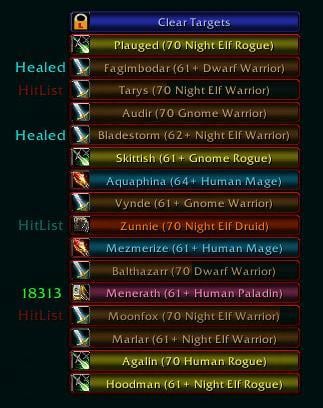
Once an enemy has been detected and is on the hostile list, you can easily target them (if you are out of combat) by clicking on their name, allowing you to quickly make a decision of whether or not you want to run, hide, or fight. While Paranoia is mainly intended to prevent hostiles from sneaking up on you and ganking you, it also happens to be great for sneaking up on others and ganking them!
Paranoia also makes it easy to warn allies of nearby enemies. By right clicking on a name on the enemy list, a menu appears allowing you to send an announcement to /say, /yell, /guild, /battleground, /raid, or the LocalDefense channel. In addition, if other players in your party or guild are using Paranoia, it will communicate with them and share hostile data (for guild members, this is only if they are in the same zone).
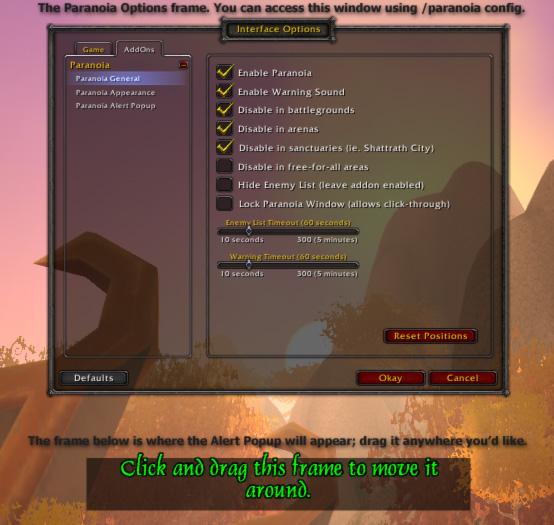
Since there are places where knowledge of nearby enemy players is not needed or wanted, Paranoia can be configured (and is by default) to disable itself in Battlegrounds, Arenas, free-for-all zones such as Nagrand Arena and Gurubashi Arena, and sanctuaries such as Shattrath City, Ebon Hold and Daralan.
Paranoia allows you to disable the warning sound, alert popup message, or the enemy list, so you can choose to use only the features you want. You can also modify some aspects of Paranoia's appearance such as panel opacity, border opacity, or maximum number of hostiles. The alert popup can be moved anywhere on the screen, and you can choose exactly how long you want it to display for. You can modify the format of the announcement, and you can also disable communication for party/guild members.
Paranoia Enemy Player Alert was previously known as Paranoia and was written by rmet0815 (http://www.xs4all.nl/~rmetzger/paranoia) until patch 2.4. Fixes and additions after patch 2.4 were made by Lifetapt @ Alterac Mountains (http://www.leetsoft.net).
Usage
Paranoia should work fine out of the box. The Paranoia enemy list is a small, rectangular window on the bottom right corner of the screen. You can move it around by clicking and dragging. To configure Paranoia, you can use the /paranoia slash command, right-click on the Paranoia window, or right-click on the Paranoia minimap-button.
To target an enemy, left click on their name (only works while out of combat). To announce an enemy, right click on their name and select the appropriate channel.
If you cannot see Paranoia when you first install it, it is probably because you are in an area where Paranoia is set to be disabled, such as Shattrath City. You can use /paranoia config to bring up the options menu.
Slash Command List
You can use /paranoia or /para for commands.
/paranoia - Prints command list
/paranoia config - Displays the configuration frame
/paranoia enable - Enables the addon
/paranoia disable - Disables the addon, it will not detect enemy players or make sound
/paranoia debug - Toggles debug mode. If you are receiving errors while using Paranoia, please try to reproduce the error with debug mode on, and send me some of the output along with the usual error message text.
/paranoia debuglist - Prints debug command list.
FAQs
These are frequently asked questions regarding Paranoia. While none of these questions were asked to me frequently, indeed, none were really even asked at all, I'll take a guess.
What is Paranoia?
In it's simplest form, Paranoia is an addon that keeps a constant lookout for enemy players. When Paranoia detects a nearby enemy, it will warn you.
How does it work?
Paranoia scans all incoming combat log events looking for hostile players. For example, if you're a level 25 Blood Elf warlock questing in Hillsbrad, minding your own business, and a level 27 Alliance rogue passing by happens to notice you, he will probably Stealth if he has the intention of ganking you. This shows up in the combat log as "Skillz gains Stealth". Normally you wouldn't really notice, especially while fighting a mob, however, Paranoia will notice, and it will play a warning sound and show a message in big red text that says "Alliance Rogue detected! (Skillz)". You can then Blink away from the mob you're fighting and make a break for Tarren Mill, and while you're running you can right click on Skillz and announce his name, class and location to LocalDefense. Or of course you could start spamming Arcane Explosion and engage him if you're feeling confident.
I just logged in after installing Paranoia and I don't see it anywhere!
If you login after installing Paranoia, the addon should be located near the bottom right corner of the screen, it's a small, gray, rectangular box. If Paranoia isn't there and is installed correctly, it's probably just hidden because you are in Shattrah City or a Battleground/Arena/Free-for-all zone. If this is the case Paranoia will warn you in the chat log that it is currently hidden and a popup message on the screen will ask you if you want to open the options frame.
Sometimes Paranoia reports an enemy, but when I go to target them, there's no-one there.
This could of course be because the enemy is using Stealth or Prowl, but if you didn't get wtfpwnt shortly after, then more likely it was a combat log bug. Occasionally the combat log will report events from players in completely different zones, or flag a friendly player as hostile. This shouldn't happen too often, however as it is a bug in the combat log's data and not Paranoia there is nothing I can do.
Some stupid Horde just ganked me! Q_Q How can I announce him to my guild so we can corpse camp him for three hours?
If Paranoia detects a hostile, you can announce them to whatever channel you want by right clicking on their name in the Paranoia enemy list and choosing the channel you want (in this case, /guild). The alert message sent to the channel will include the player's name, level and class (if known), last seen subzone (for example Nesingwary's Expedition if you're in Stranglethorn) and coordinates.
The right click dropdown only shows /say and /yell.
The dropdown will dynamically add and remove channels depending on what you have access to. /party, /raid, /guild, /battleground, and LocalDefense will only appear when you are in a party, raid, guild, battleground, etc.
Is Paranoia compatible with non-enUS WoW clients?
Paranoia is compatible with all WoW clients, and it has translations for English, Spanish, German, French, Russian, and Simplified Chinese.
If you want to submit a correction or a missing translation, please send me the localization-xx.lua file at [email protected].
Is Paranoia legal? Is this mod considered an exploit or a cheat? Can Paranoia see through stealth?
Paranoia is completely legal, since it is written completely in Lua and runs inside of WoW's built in Lua interpreter, just like any other addon. Blizzard has specifically designed WoW so that addons can only perform functions Blizzard allows them to, and they are blocked from many of the more powerful functions such as auto-casting, auto-targeting, etc. Paranoia does not take advantage of any exploit in any way, since it only uses data that is already available to the player in the default UI. Even without Paranoia, you can detect nearby enemies simply by setting your combat log to "Everything" and keeping an eye on it. Enemy players will show up in red whenever they cast a spell or skill, use a tradeskill, or attack something (you can change the color to something like pink so they stand out from enemy mobs, which also appear as red). This is the same exact method that Paranoia uses to detect enemies. Also, Paranoia cannot see through stealth... some people seem to confuse this with the old Paranoia skill for Warlock Felhunters and think that this addon can target stealthed players, when it cannot. When Paranoia finds something like "Allirogue gains Stealth." it only knows that there is a rogue somewhere near you who just went stealthed. If you try to target them, it will fail, since Paranoia uses a /target macro to target enemies. However, if you detect a stealthed player (by detect, I'm talking about the "whoosh" sound you hear when you move near a stealthed player and the very faint outline of them you can see), Paranoia will be able to target them, if you click on their name. Otherwise, there is nothing Paranoia can do to target stealthed players.
Does Paranoia have a Kill-On-Sight or "Hatelist" feature?
Nope. Paranoia is designed to be simple and lightweight, and it will likely never have these features. There's always the possibility, though.
Localizations
If you would like to translate Paranoia, please send me a translated localization-xx.lua file via email to [email protected].
Current Translations
-esES localization by Miros.
-frFR localization by Minihunt (portions were machine translated).
-deDE localization by rom and AmmokK (aka Thoras H)
-ruRU localization by Swix.
-zhCN localization by www.wowui.cn
Contact Lifetapt
Use the comments section to leave suggestions, bug reports, or to request features. You can also send a whisper or mail in-game if you manage to find me, I'm Lifetapt on Alterac Mountains. You may also contact me via email at [email protected].
I really appreciate feedback, be it positive or negative. If you've don't like Paranoia for whatever reason, please tell me what exactly you don't like about it, I promise I'll do my best to remedy the issue!
Feel free to send me suggestions or feature requests, I often add features requested by users!
To-do List
These are features that will/might be added to Paranoia in the future. Some of these were added by the original Paranoia author and most were added by me. These are in no particular order, I just kinda added them as I thought them up.
- Provide different warning sounds via a Paranoia Sounds options tab
- Increase max number of enemies in the paranoia enemy list. maybe use a listbox to store them. (as of 1.09 Paranoia stores up to 15, but a different implementation will probabably be neccessary for more than that without being sloppy/ugly)
- Perhaps add a KoS list similar to ganklist or opium {halfway done?}
- KoS units need a different sound and a different popup message text
- further investigate causes of taint and fix them, disable options frame when in combat mode
- Allow the user to change the WarnFrame font
- Rewrite the ennntttiiirrreee enemy list system... the current system cannot update in combat and there does not seem to be any way around it thanks to StatusFrameButton's anchor, which taints StatusFrame, which in turn taints the main enemylist frame. So we cannot hide/show hostiles, modify text/button width, nor modify the Paranoia frame's height.
- finish the player db system, then add some way to browse the db similar to the /who frame.
- rewrite the entire hostile player handling system, it's bloated and buggy.
- limit the frequency of calls to onupdate to around 3-5 times per second, maybe a little less. possibly create a separate onupdate that does not update the hostile list that runs once per frame.
- more detailed stat tracking/calculating like Opium's PvP stats window (avg level, top10 killed players/guilds/classes, top10 killed by players/classes)
- allow user to change font of warnframe (fontlist is in 1.11 but not active)
Completed Goals
- at WarnHostilePlayer End, alwasy call Update() to update lists
- get warning sound from game data files to reduce download size (just got to dig it out again)
- option to hide list
- option to play sound or not
- alpha for the frame (border)
- when changing zones enemy list appears to fade in again, even if it is already visible
- Make a unit's name fade out the longer it's been on the list with no activity.
- a slider should allow player to change the time between warnings and the listTimeout
- add last seen coordinates/subzone to gHostileList table
- Add localdefense reporting
- Right clicking on an enemy should announce them to LocalDefense (or bring up a context menu with several options, LocalDef, Party, Raid, etc. and perhaps add to KoS list, etc.)
- add chat channel detection and dynamically update enemy announce dropdown
- Find another way to determine active battlefield reliably, without using too much CPU
- Detect on mouseover (use "UPDATE_MOUSEOVER_UNIT")
- Provide support for localization, and hopefully find some nice people willing to localize Paranoia
- Scan tooltips for additional information on hostiles
- Add frame scaling.
- Allow the user to change the alpha of the WarnFrame font
- Add party coop detection, ie. if a party member has Paranoia installed, then share hostile player data with them and add their hostiles to our list.
- Disable in instances
- Dont detect players on your faction you are dueling
- Add player database. Previously seen enemies will already have their class/level known from the last time they were seen (this also makes up half the the kos feature)
- Player guild storage
- Kill/death tracking for every player
- Prompt on death to add killing player to KoS (the code exists in 1.11 but is not active)
Keywords: detect, alert, warn, hostile, hostiles, enemy, enemies, player, players, warning, alliance, horde, faction, ganking, gank
-Fixed Lock Frame checkbox bug, self was not being passed.
-Removed the declaration for Paranoia as an ace addon, hopefully this will fix most ace conflicts.
V1.12.1 (October 20, 2008) - Minor update for some new patch 3.0.3 changes.
-Replaced all instances of this: with self:.
-Fixed an issue with the Config frame not being show that was a result of Blizzard renaming an InterfaceOptionsFrame function.
-Removed the defaultValue property from all of the sliders, it caused weird things to happen sometimes.
-Updated the Ace2 libraries included with the addon, apparently they were so old they were causing conflicts and the addon was not loading properly sometimes when mixed with other Ace2 addons.
v1.12 - Patch 3.0.2 update.
All previous versions of Paranoia may be broken an incompatible when the Wrath of the Lich King expansion ships!
-Updated ToC number to 30000.
-Made the required modifications to the code for the addon to work with Wrath of the Lich King and patch 3.0.
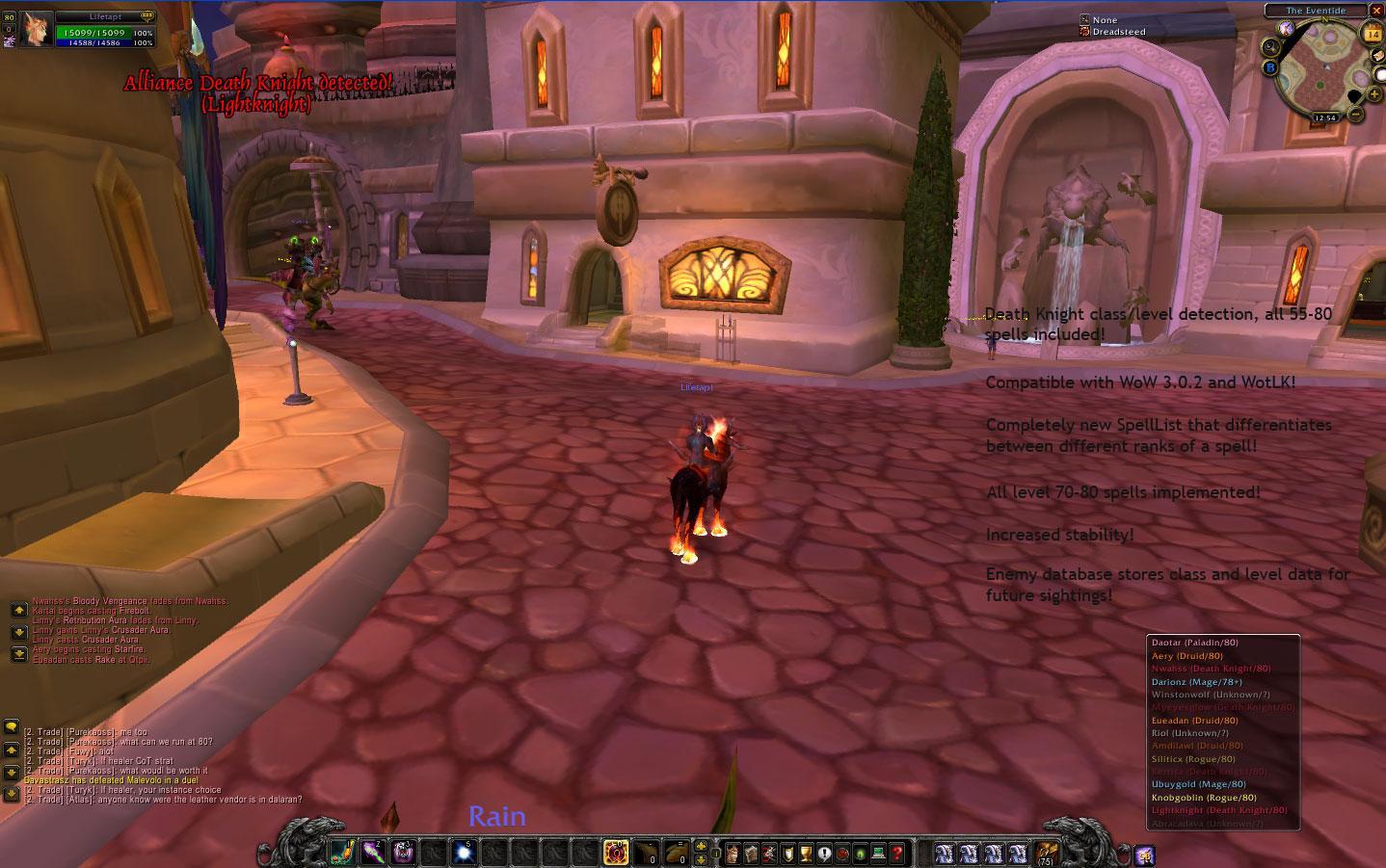
-Updated the SpellList to include all level 71-80 spells for the nine original classes, and included all 1-80 spells for Death Knights. Spells are up to date as of 3.0.2 r8926.
-Added class coloring for Death Knights.
-Moved Alert Popup test button down about 20 pixels, it was on top of a slider.
v1.11 (April 2008-September 11, 2008) - Major update.
Sorry this took so long. Thanks to everyone who submitted localizations, I appreciate it, even if I had to omit some (I just got so many of them... I couldn't use all of them :P)
Please note that this list only contains major changes. Since this was a rather large update, minor modifications to code may not be documented here. You can see all changes via the PEPA FishEye log at WoWAce.com.
-Added a German localization translated by rom and AmmokK.
-Added a Spanish localization translated by Miros.
-Added a Simplified Chinese localization translated by www.WoWUI.cn.
-Added an updated French localization by Minihunt, which fixes/shortens some strings. I have also had to machine translate the strings for the Paranoia Communication tab and the new Alert Popup settings, so excuse the poor grammar for those tabs.
-Added a Russian localization translated by Swix.
-Added the addon to WoWAce.com wiki, the SVN, and the WoWAceUpdater. You can now download beta versions of Paranoia via the WoWAce wiki page for Paranoia. (click betas in the box on the right of the page)
-Added basic communication support. Paranoia will now communicate with players in your guild or party who are also using Paranoia, and will share detection data with them. For example, if you are in a group with someone else who is using Paranoia, and they are attacked by a hostile player, Paranoia will alert you and the popup text will display ” Friendlyplayer (party) detected a hostile Rogue! (Allirogue, 54,90)”. If there is a guild member (in your zone) who is using Paranoia, you will be alerted in a similar manner. Communication is done using ChatThrottleLib to avoid disconnects. You can modify settings for the new communication feature using the new Paranoia Communication tab in the Interface Options menu.
-Added a Paranoia Communication options tab. You can choose to disable communication, only receive warnings from party members, only receive warnings from nearby guild members, or receive warnings from both.
-Added a new command, /paranoia ping [party|guild|player] [playername]. This command will allow you to find out if anyone in your party or guild, or if any specific player, is using Paranoia with communication enabled. The command is currently in the debug command list because there are no translations for the responses.
-Added a minimap button. The minimap button allows you to quickly enable or disable Paranoia by left clicking, or open the options window by right clicking. The minimap button can be hidden in the Paranoia Appearance options tab.
-Added a slider to change the alpha level of the Alert Popup text. You can find this setting in the Paranoia Alert Popup tab.
-Added enemy player data storage. Paranoia will now store class/level data for all hostiles it detects (excluding arenas, battlegrounds, free-for-all zones and duels). This data will be used in a future version when a KoS list/hostile player browser is added, and it will also be used to remember an enemy’s level and class the next time you see them.
-Started work on the player database/kill-on-sight system. It is not done yet, but as mentioned above Paranoia will begin storing data for future use in this version.
-Paranoia will now disable itself when you enter an instance, since there is no reason to have it enabled.
-Completely rewrote the spell list. It now includes all nearly all spells/skills for every class, including spells with the same name but multiple ranks. This means that Paranoia's level guessing will now be much more accurate, since it will now know the difference between something like a Rank 1 Sinister Strike (detected as a level 1+ Rogue) and a Rank 10 Sinister Strike (detected as a level 70 Rogue). It also now uses spell IDs instead of spell names, meaning it will work with any localization. The downside to all of this is the size of the spell list (and thus it's memory usage), which was initially 42kb, and is now around 78kb. However, the increased guessing accuracy (it will pretty much be spot on unless a player is deliberately using lower ranked skills) and the compatibility with all localizations should be worth it.
-Fixed the cancel button in the options frame, it will now reverse changes when clicked.
-Paranoia will now load the spell list only when it is needed, and will unload it after 3 minutes of no enemy activity to reduce memory usage.
-Made attempts throughout the addon to improve speed, efficiency, and memory usage. Unfortunately, before learning Lua, I primarily programmed in VB6/VB.NET, where I practically never worried/cared about performance and memory usage. As a result, I don’t know too much about writing efficient code so there are probably many more changes that can be made. I would really appreciate any help by a Lua coder who knows what they’re doing. :P Note for myself: warnHostilePlayer sucks and needs to be completely redone.
-Changed the internal name of the addon from ParanoiaRevived to Paranoia_EPA. All settings, including the custom announce, will be reset to default. Better this happens now than later when people have started building up enemy databases.
-Rewrote the entire function that deals with hiding and showing Paranoia. Previously it was ugly and inefficient since it was originally designed to only hide/show Paranoia in BGs, but since adding sanctuaries, arenas, and free-for-all areas, I just kept adding unnecessary code to make it work with more than one location. It is now smaller, simpler, and perhaps a little bit faster since it involves fewer nested if/then statements. It’s also nicer to look at and easier to understand… it’s a bad sign when you don’t know what’s going on in code you wrote yourself.
-Changed the color of Paranoia's chat text to make it a little more readable.
-Fixed the /paranoia memory command (now /paranoia mem), it was not updating memory usage correctly.
-Removed click-through when the Paranoia frame is locked. Ticking the Lock Paranoia Frame option will now only lock the window in place.
-Removed the checkbox for coloring units by class, I can see no reason why anyone would NOT want the units colored by class and the checkbox just wastes space.
-Released the addon under the GPL.
-Various other changes and modifications.
v1.10b
Localization update/bugfix.
-Includes French localization, thanks to Minihunt EU@Ner'zhul. The spell list is not included, so class guessing will not work. However, I plan on converting the spell list to use spellID's instead of names soon so other languages will be able to have class detection. There is some overflow in some of the configuration frame texts, I am aware of it and I'm looking for a workaround. I really need people with frFR clients to test the new localization out and see if you have any problems. Like I said, everything but class guessing should work.
-Fixed a couple strings that were hard-coded in English and were not being localized.
-Fixed a major bug where Paranoia was detecting friendly players, sorry for the huge delay it took me to fix this =/
v1.10
Major update.
-ADDED LOCALIZATION SUPPORT! WOOT! Paranoia now supports multiple localizations, however, there are no translations yet so there isn't a noticeable change to those of you using non-english clients. If you know English and another language, and would like to translate, PLEASE feel free to do so! You can send a translated localization file to lifetapt [at] gmail [dot] com. If I don't get translations, I'll go ahead and BabelFish the localization file, but it's going to be pretty ugly so I'm going to hold out for human-translation for at least a week or two. Also I'm interested in how Paranoia will handle accented characters and script, SciTE doesn't seem to want to display them when I copy-paste so we might have a problem with that.
-Added mouseover detection. Paranoia will now add targets you move your mouse over to the enemy list with class and level data known. You can mouseover a clump of enemies to quickly add or update all of them. Also, mouseover counts as "activity" so you can keep units from fading out by mousing over them.
-Added target detection. If you target a unit that has not done anything to trigger Paranoia's combat log detection, Paranoia will add them to the list. Targeting counts as "activity" so you can keep units from fading out by targeting them.
-Added an ignore feature. You can right click on a hostile in the enemy list and hit ignore for this session and they will not trigger Paranoia until you logout, reload the UI, or after three hours. This is useful for quickly getting rid of units that are triggering Paranoia from different zones, at least until Blizzard fixes that bug.
-Added a Paranoia Announce options tab. You can now change the announce message. Read the instructions on the actual tab to learn how to create a custom message.
-Changed the enemy list to show the complete class name instead of the first three letters.
-Added dynamic resizing of the enemy list's width. The enemy list will now resize to fit the longest line of text inside it.
-Added enemy list scaling to the Paranoia Appearance tab. You can now set the scaled size of the Paranoia enemy list to make it smaller or larger, independent of your regular UI scale.
-Changed some default values in the XML file, I had previously set them to zero in 1.09 but that apparently caused problems with savedvariables loading so they're now back the way they were.
-Changed the default position of WarnFrame, it's now anchored to TOPLEFT with a 100, -100 offset.
-Changed a couple incorrectly defined global variables to locals.
-Changed the default announce message.
-Fixed a problem with the Lock Paranoia Window option, I had not modified that option to work with the ten extra buttons I've recently added so even with that option checked the last 10 buttons did not allow clickthrough.
-Fixed a fairly large bug where empty buttons still intercepted mouse clicks i.e. if there are five visible enemies, then the space underneath the Paranoia window (where the next 10 hidden buttons are) will still receive mouse clicks. Buttons are now hidden instead of just set to have no text.
-Added significantly more commenting to the code, mostly for my benefit but also for anyone looking through it.
-Fixed a bug where if Paranoia's sound was disabled the warning message would not appear.
-Fixed a bug in detection that was causing Paranoia not to trigger in certain situations.
-Paranoia now only looks for the last three bits of a unitflag, so it will now catch all hostile players regardless of whether or not they're targeted, focused, targeted and focused, etc.
-Other miscellaneous fixes and changes.
v1.09
Major update.
-Added basic hostile player announcing functionality. When you right click on a player in the enemy list, you can choose a chat channel to announce them to, including /say, /yell, /party, /guild, /raid, /battleground, and /localdefense (chat channels will be added and removed from the list dynamically according to which channels you have access to). The announcement will include the player's name, level (if known), class (if known), and last seen coords and subzone. The last seen coordinates and zone will be wherever you were standing when Paranoia last detected the player, since there is no real way to get the coordinates of another unit. Will add things like message customization, custom channels, and possibly autoannouncing soon.
-Moved the inactivity fading checkbox to the Paranoia Appearance tab from the Paranoia General.
-Added sliders to modify the enemy list timeout (how long Paranoia keeps an enemy in the list) and warning timeout (minimum amount of time between alert popup/alert sound) to the Paranoia General
-Increased the maximum number of enemies the enemy list can hold to 15.
-Added a slider to change the maximum number of enemies the list will display.
-Added value display to the sliders in the options frame, so you don't have to guesstimate what the value is currently set to.
-Added some Ace2 libraries to the addon, however, I'm not really using any features of Ace2 at the moment and really only need AceAddon,
AceOO and AceLibrary to use Dewdrop. I've also thrown AceLocale in there since I'm probably going to add localization support very soon (despite what I said about it being last on the ToDo list) and AceDB as I'm planning to add an enemy player database where Paranoia will store enemies it has previously seen to the addon in the near future.
-Fixed the "Interface action failed because of an AddOn" message. Paranoia was causing taint because of it trying to resize itself and update the hostile list while in combat, which is apparently something that cannot be done. While in combat, Paranoia will not visually update the enemy list, but behind the scenes, Paranoia is still detecting and tracking enemies and will still be able to alert you with the warning sound and popup message. However, the enemy list itself will not update until you leave combat mode. This may be slightly misleading, since Paranoia might display "No alliance detected." even if there is an enemy standing in front of you attacking you. Paranoia will still taint if you try to alter settings while in combat mode, will get to that later.
-Made quite a few modifications to the detection code, I was able to test it in a controlled environment with an Alliance friend of mine and fixed several problems with detection, guessing accuracy, and display. Paranoia should now guess classes and levels more often and more accurately, and when guessing levels should work much more smoothly (previously, the first guessed level would not change until the hostile was targeted, now the guessed level will get progressively higher as the enemy uses higher leveled skills). Also, Paranoia will be able to detect two enemies at once, for example, if an enemy priest heals another enemy, Paranoia will detect the Preist (and flag them as a Priest) and the other enemy (flagged as unknown).
-Fixed BG code, it should always detect correctly.
v1.08
Major update.
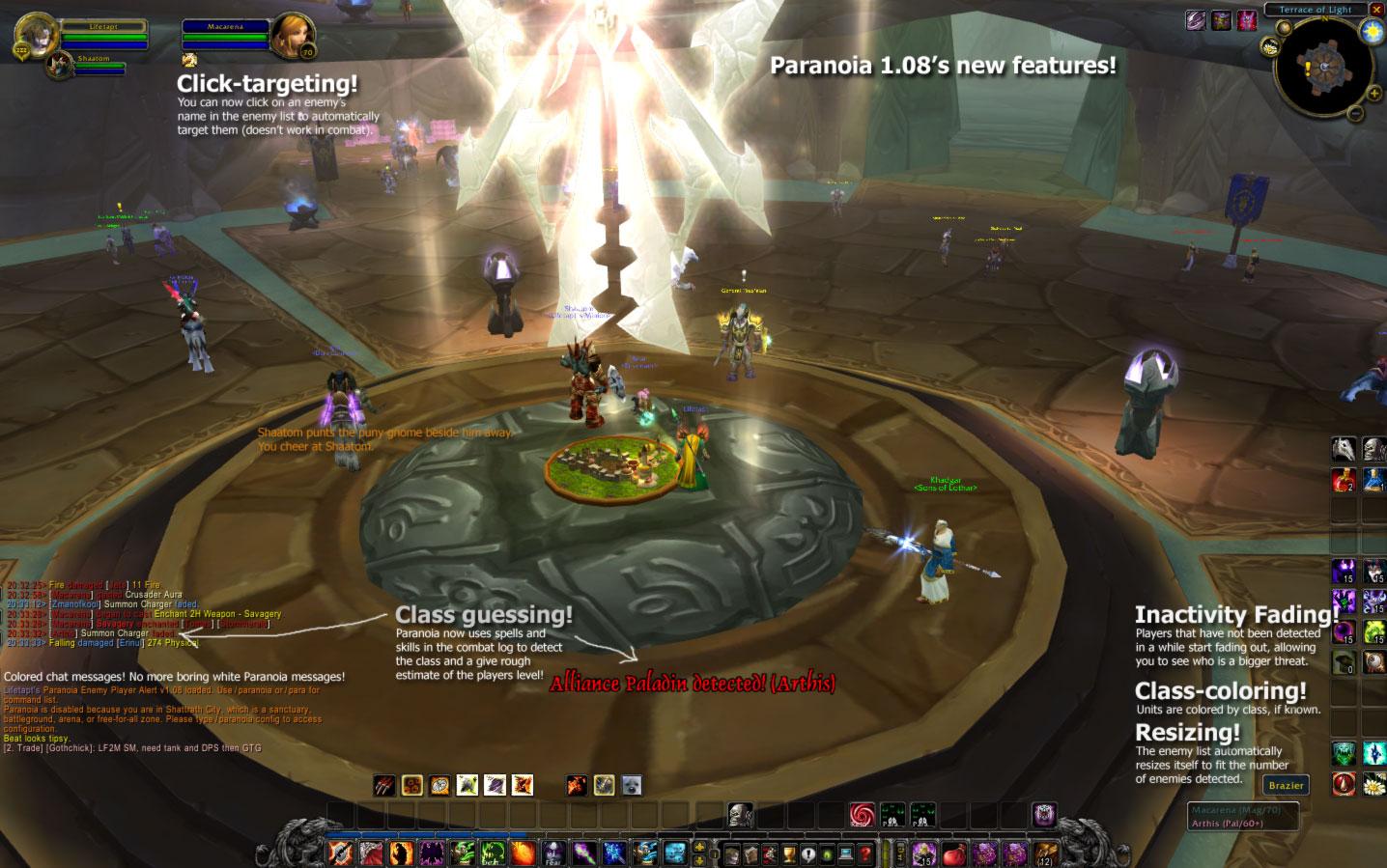
-Added click-targeting. You can now click on a player's name in the enemy list to target them. This feature only works while not in combat mode. Please note that if you click on a unit's name and nothing happens (assuming you are out of combat) then the unit is probably out of targeting range, as the combat log will sometimes report units not in range. Of course, they could just be stealthed. IMPORTANT: If the Paranoia window is locked, then it cannot recieve mouse clicks and this feature will not work.
-Added inactivity fading. Now, units on the enemy list will gradually fade out if no activity has been detected from that unit. The more faded a unit's name appears, the longer it has been since that unit was last detected doing something. You can disable this feature in the new Paranoia Appearance options tab.
-Added class coloring. Units in the enemy player list will now have colored names based on their class. Paranoia will only color a unit's name if it knows the unit's class. If the class is unknown, Paranoia will color the name gray. You can disable this feature in the new Paranoia Appearance options tab.
-Added class-detecting and level-guessing support. Paranoia will now check the spell/skill name of all enemy combat log events and use that to determine the player's class and minimum level. For example, if Paranoia detects an enemy using the skill Ice Lance it will guess that the enemy is a level 66+ Mage. Paranoia cannot detect an enemy's class if they only use melee swings or if it detects environmental damage. The class guess can sometimes be wrong when it detects buffs or debuffs (for example, if the slowing effect of Frostbolt fades from a Warrior, the Warrior will be incorrectly detected as a Mage). However, it will attempt to determine the correct class by looking at the spells the unit is using (if the incorrectly detected Warrior-turned-Mage uses Heroic Strike they will be detected as a Warrior and will stay that way).
-Added support for up to ten enemy units.
-Re-enabled enemy list autoresizing. This was already in the code but had been disabled by the previous author. Paranoia will now resize its enemy list based on how many hostiles it detects. If there are no nearby players, Paranoia will display "No [opposite faction] players detected."
-Added a /paranoia gc debug command. This command will force a garbage collection.
-Added ParanoiaSpells.lua, this is how Paranoia guesses classes and levels. Since this file has a list of most spells it is 42kb in size and boosts Paranoia's memory usage by about that much.
-Removed level difference display. Paranoia won't show the level difference between you and your target anymore and will instead just show the level. If the level was guessed by Paranoia or if the player has a skull level then Paranoia will display the guessed level and a plus sign (eg. if you are 37 and the enemy is a skull Paranoia will display 47+, or if Paranoia detects Death Coil then it will display 42+, which is the minimum level for Death Coil.) A "?" indicates an unknown level, as before.
-Moved Border/Frame opacity to the new Paranoia Appearance options tab.
-Created a new Paranoia Appearance tab in interface options.
-Changed functions from being globals to being located in the Paranoia: namespace.
-Reduced download size by removing ganker.wav from the Paranoia directory. Since the warning sound Paranoia uses (PVPWarningAlliance.wav) is a built-in sound the addon now just grabs the sound from the WoW data file instead of relying on an external file.
-Changed the enemy alert popup text from "Hostile player detected!" to "[Opposite Faction] player detected!".
-Split the Disable in BGs/Arena option, now there are two options: Disable in BGs and Disable in Arena.
-The BG detection still suffers from the GetBattlefieldInstanceRunTime() bug, I cannot find a way of getting around that that doesn't involve running a For loop every OnUpdate() which I imagine uses significantly more CPU than just calling an API fuction. I tried for about two hours to code a workaround but I ended up with code so messy and broken that I just reverted to the old 1.07 code.
v1.07
Minor update.
-Removed duplicate unnecessary code from the zone changed event in OnEvent. This fixes the bug where the Paranoia frame would re-fadein even if it was already visible and vice versa.
-Sorted out the disable-in-bgs/arena coding. Previously it only worked occasionally, I had never really changed it from the original code and I hadn't really tested the addon in a BG. It should now work properly, hiding Paranoia and not playing the warning sound anytime it is disabled.
-Fixed the disable-in-FFA code, which worked in the same way as the BG code and presumably had the same problem. It was broken anyway because it was checking for a boolean value and the API function was returning a 1 or nil so it simply didn't have any effect.
-After "fixing" the BG code, I've realized the reason why it's not always correctly detecting a BG: If you join a queue for two or more BGs and join the first one that pops up, when the next one pops (presumably while you're playing in the BG) it bugs the GetBattlefieldInstanceRunTime() api function, and it will always return zero. Paranoia then cannot determine if you are in a BG or not, so It'll show up anyway. I'm looking for a way around this, but in the meantime please use /paranoia disable if it's not cooperating. Arenas should work fine (though I haven't tested them at all), however please note that Paranoia will not hide itself in an arena until the prematch countdown reaches zero and the arena starts.
v1.06
Major update.
-added an enemy player popup alert feature. Now, when an enemy player is detected, a popup message displaying "Hostile player detected! (Playername)" will appear and fade out. You can configure the display duration, fadeout duration, and the location of the alert popup in the Paranoia Alert Popup configuration frame.
-added an option to disable the Paranoia enemy list, while leaving the addon still running. This way you can just use the sound and/or alert popup if you don't want the Paranoia enemy list.
-added a slider for the enemy list's border opacity.
-added a slider for the enemy list's panel opacity.
-added an option to disable in Free-For-All zones (Dire Maul Arena, Nagrand Arena, Gurubashi Arena etc.)
-added an option to lock the Paranoia enemy list so that you don't accidentally move it. While locked, the enemy list will not recieve mouse clicks, so you will have to open the options window by /paranoia config or by Options -> Interface -> Addons -> Paranoia.
-integrated Paranoia options with the new 2.4 Blizzard Interface frame. You can now access Paranoia's config by hitting Escape, clicking Interface, clicking the Addons tab and choosing Paranoia. There are two subcategories, Paranoia General and Paranoia Alert Popup.
-set Paranoia_Frame_Main's frameStrata to background, it should now not intercept mouse clicks when the bag or any other frames are in front of it.
-added some more slash commands used mainly for debugging. See /paranoia debuglist for a listing of these commands.
-fixed a bug where if the hostile unit was targeted, Paranoia wouldn't detect its combat log event (since the unitflag of a targeted hostile is 0x00010548 and Paranoia was checking for 0x00000548. If anyone knows how to check just the last three bits of of a unitflag, please let me know!
-other miscellaneous fixes/additions
v1.05
Minor update.
-fixed issue that occured when an enemy druid summoned Treants
v1.04
Fan update by Lifetapt to work with the new WoW patch 2.4 combat log system.
-made addon compatible with patch 2.4 combat log
-added option to disable in sanctuary zones
-added option to enable or disable warning sound
-fixed issue where config window wouldn't load savedvariables properly
-fixed issue where sound would play even if paranoia was disabled
-extended slash command functionality
-changed warning sound =P the old one is still there, if you want it back just replace ganker.wav with oldganker.wav.
v1.03
updated to WoW client 1.12
-added switch to disable in battlefields
v1.02
updated to WoW client version 1.11
v1.01
updated to WoW Client version 1.10
v1.0
initial release
 |
Comment Options |
 01-19-11, 09:31 PM
|
|
|
A Flamescale Wyrmkin
Forum posts: 130
File comments: 231
Uploads: 0
|
How's the status on the update going? This is wonderful, and I wanted to add it to my UI
 (RealUI). Maybe you can talk to Nibelheim about setting up a RealUI special version of this addon... lol (RealUI). Maybe you can talk to Nibelheim about setting up a RealUI special version of this addon... lol |

|

|
| litesung |
| View Public Profile |
| Send a private message to litesung |
| Find More Posts by litesung |
| Add litesung to Your Buddy List |
|
11-12-10, 09:21 AM
|
|
|
A Kobold Labourer
Forum posts: 1
File comments: 21
Uploads: 0
|
What are your plans?
Do yo still plan to update Paranoia? or at least the notification-clickable-window that you mentioned on curse? Just curious b/c I really misss having it. If RL is > than this, by all means keep doing RL. Was the best of its kind, b/c not only does it provide a clickable target, it also shows the class color AND if they are in range. Pure win, IMO.
/cheers |
|
|
|
| delvirtud |
| View Public Profile |
| Send a private message to delvirtud |
| Find More Posts by delvirtud |
| Add delvirtud to Your Buddy List |
|
10-18-10, 04:08 PM
|
||
|
A Kobold Labourer
Forum posts: 1
File comments: 21
Uploads: 0
|
Re: Re: Wow lol
Cataclysm looks great so far (or 4.01 does) so come on back! *** Update: I see your comments on Curse so I see that you are already back. What you stated there is what would be perfect. A small functional alert window just like the one in the present version. Most people have gotten accustomed to coupling Paranoia with VanasKos (or another KoS mod). /ty
Last edited by delvirtud : 10-18-10 at 04:17 PM.
|
|
|
|
|
| delvirtud |
| View Public Profile |
| Send a private message to delvirtud |
| Find More Posts by delvirtud |
| Add delvirtud to Your Buddy List |
|
09-04-10, 10:15 PM
|
|
|
A Molten Giant
 Forum posts: 837
File comments: 374
Uploads: 13
|
when i click on Paranoia in the Interface Options it goes to nUI options. also is it possible to move the live list?
Last edited by tinyu : 09-04-10 at 10:17 PM.
|
|
|
|
| tinyu |
| View Public Profile |
| Send a private message to tinyu |
| Find More Posts by tinyu |
| Add tinyu to Your Buddy List |
|
01-03-10, 10:58 PM
|
||
|
A Murloc Raider
Forum posts: 6
File comments: 30
Uploads: 5
|
Re: Wow lol
Either way when Cataclysm ships I might start playing WoW again... if so I'll probably start working on Paranoia once again. |
|
|
|
|
| lifetapt |
| View Public Profile |
| Send a private message to lifetapt |
| Visit lifetapt's homepage! |
| Find More Posts by lifetapt |
| Add lifetapt to Your Buddy List |
|
12-28-09, 11:24 PM
|
|
|
A Kobold Labourer
Forum posts: 0
File comments: 19
Uploads: 0
|
Wow lol
The example on how does Paranoia work was exactly what happened to me in hillsbrad only im a warrior level 27 and an unknown level rogue tried ganking me, i then did shield block, and intimidating shout, then i got on my mount and went over to Terren mill. I also warned some orc shaman while runing away "RUN"
I didn't have paranoia when this happened, so that's what brought me here! =)  |
|
|
|
| Axgonzal1 |
| View Public Profile |
| Send a private message to Axgonzal1 |
| Visit Axgonzal1's homepage! |
| Find More Posts by Axgonzal1 |
| Add Axgonzal1 to Your Buddy List |
|
03-30-09, 06:34 PM
|
|
|
A Murloc Raider
Forum posts: 6
File comments: 30
Uploads: 5
|
I am very, very sorry to say that I have stopped development on Paranoia. I do not play WoW anymore (and have not for a good four months now) and as such it is very difficult for me to muster the motivation to work on the addon. I've been forced to develop and debug on private servers for the past four months, which was fine while I was part of the development team for a private server, but it has since shut down.
I've definitely had fun learning and coding in Lua since picking up rmet0815's original Paranoia addon last May and adding all of this crap to Paranoia was a great experience for me. It's also helped me finally break out of Visual Basic which I've been coding in for a loooong time, and into languages like C#, Java and even a little C++. I think my pace is pretty good, considering I'm 16. :P Thanks to everyone who has supported and used Paranoia in the past 10 months, really the reason I code is because I love getting feedback from users. Anyone is welcome to take over Paranoia, using the same name, a different name, or whatever. I simply ask that you credit both myself and rmet0815, the original author in any derivations or continuations of this addon. If you want to wrangle the beast that is Paranoia 1.12, feel free to do so, or if you want to continue Paranoia 2.0, which is significantly cleaner and more optimized, though incomplete, then refer to the googlecode svn at: http://code.google.com/p/paranoia-epa/ Thanks again to all PEPA users... sorry to just drop the addon like this but I no longer have any desire to continue working on it. |
|
|
|
| lifetapt |
| View Public Profile |
| Send a private message to lifetapt |
| Visit lifetapt's homepage! |
| Find More Posts by lifetapt |
| Add lifetapt to Your Buddy List |
|
03-03-09, 07:05 PM
|
|
|
A Murloc Raider
Forum posts: 6
File comments: 30
Uploads: 5
|
[Repost from Curse.com]
Making pretty decent progress, the PEPA 2.0 code currently for the most part emulates PEPA 1.12 pretty closely, except for that it has been completely rewritten from scratch. A couple more things need to be finished like dropdowns, announcing, and click-to-target (which are all trivial) and then I can start working on the NEW features which I've got planned out already. Here's the todo list from the SVN. -Rewrite dropdown list code -Provide support for different warning sounds -Stat tracking -Finish work on browser (filtering, sorting, purging) -Provide further support for modifying appearance -P2P/Guild hatelist sharing -"Sync Partner" system -Global Paranoia data-sharing (hidden channel) -Overhaul of enemy list design -Convert to a bar-style design -Icon and/or pulse on KoS units -Icon and/or pulse on stealthed units (use CL) -Health tracking for target/mouseover -Remove or grayout units when killed -Allow further customization of announce popup, KoS popup -Convert localization over to a single global table -Add new localization strings -Parrot/SCT/MSBT support The items that will take the longest will be the enemy list redesign, "sync partnering", and the global data sharing. Just want to remind anyone reading this that you can find the Paranoia SVN, which has the absolute latest code for Paranoia 2.0, here: http://code.google.com/p/paranoia-epa/ However remember that the code there is not finished, so I don't recommend it for regular playing.
Last edited by lifetapt : 03-03-09 at 07:06 PM.
|
|
|
|
| lifetapt |
| View Public Profile |
| Send a private message to lifetapt |
| Visit lifetapt's homepage! |
| Find More Posts by lifetapt |
| Add lifetapt to Your Buddy List |
|
02-22-09, 08:23 PM
|
||
|
A Murloc Raider
Forum posts: 6
File comments: 30
Uploads: 5
|
The command you're looking for is the ever-useful /paranoia clear. If you would like to test that's great, you can download the WIP version of PEPA2.0 over at the Paranoia google-code SVN, which is here:http://code.google.com/p/paranoia-epa/ The only problem is that the revision that is up there is missing a LOT of stuff and is borderline unusable, so testing for legitimate bugs and not just missing features might be difficult  But if you want to suggest anything or whatever please feel free!
Last edited by lifetapt : 02-22-09 at 08:28 PM.
|
|
|
|
|
| lifetapt |
| View Public Profile |
| Send a private message to lifetapt |
| Visit lifetapt's homepage! |
| Find More Posts by lifetapt |
| Add lifetapt to Your Buddy List |
|
02-19-09, 10:36 AM
|
|
|
A Kobold Labourer
Forum posts: 1
File comments: 21
Uploads: 0
|
Honestly, just to be able to clear the list will be awesome for me. Thank you for your continued work and let me know if I can do any testing for you.
btw, is there a present script or anything that I can macro to clear the list now? |
|
|
|
| delvirtud |
| View Public Profile |
| Send a private message to delvirtud |
| Visit delvirtud's homepage! |
| Find More Posts by delvirtud |
| Add delvirtud to Your Buddy List |
|
01-26-09, 02:17 AM
|
||
|
A Theradrim Guardian
Forum posts: 65
File comments: 272
Uploads: 0
|
that's kind of a lot of stuff though - I'd like the bars to look clean w/ options to change textures of the bars which is pretty common for most bar type addons.
Last edited by vpr : 01-26-09 at 02:17 AM.
|
|
|
|
|
| vpr |
| View Public Profile |
| Send a private message to vpr |
| Visit vpr's homepage! |
| Find More Posts by vpr |
| Add vpr to Your Buddy List |
|
01-22-09, 01:59 PM
|
|
|
A Kobold Labourer

Forum posts: 0
File comments: 30
Uploads: 0
|
I'm also glad you've gotten your itch back. I've been looking, still, for a reliable addon so I can drop this memory hog I'm using now.
GL with the programming. If I have ideas about information about the bar, I'll let you know. (Maybe a projected honor from the target?) |
|
|
|
| Zyland |
| View Public Profile |
| Send a private message to Zyland |
| Visit Zyland's homepage! |
| Find More Posts by Zyland |
| Add Zyland to Your Buddy List |
|
01-19-09, 09:04 PM
|
||
|
A Murloc Raider
Forum posts: 6
File comments: 30
Uploads: 5
|
For some time I've been planning on doing away with Paranoia's current "names in a list" format and doing something similar to Personal Sentry's bar style list, except with less jarring colors. (one thing I never did like about Personal Sentry is how the list became a veritable rainbow of colors rather quickly. Paranoia can suffer from this too sometimes, but it's much more tame.) So what I think I'll do is make the bars a uniform color and just apply text coloring per class. I'll add a title bar to adjust sort, clear the list, or move the list. KoS units will have a small icon to the left (not sure yet if inside or outside the bar), and I may add icon buttons on the right of the bar for announce and toggle KoS. Bars will have rudimentary health tracking ability, and will either disappear or gray out when the unit has died. Paranoia's current enemy list has very limited usefulness, but is simple and easy-to-use, so my ultimate goal is to increase its usefulness without making the bar too busy and ruining usability. If anyone has ideas about what kind of information to include on the bar (I have no plans on adding spell/target data, a la Stalker, however), or what kind of buttons/icons/whatever you'd like to see, please post! I also plan on adding plenty of options so the user can pick and choose only what he or she wants.
Last edited by lifetapt : 01-19-09 at 09:06 PM.
|
|
|
|
|
| lifetapt |
| View Public Profile |
| Send a private message to lifetapt |
| Visit lifetapt's homepage! |
| Find More Posts by lifetapt |
| Add lifetapt to Your Buddy List |
|
01-18-09, 01:39 AM
|
||
|
A Theradrim Guardian
Forum posts: 65
File comments: 272
Uploads: 0
|
 See Stalker See StalkerI tried it, and he's got some nice ideas, but his(?) addon kept hijacking my /1 channel and he seems to think it's my problem after a couple reports of the same thing from other users - so I went back to paranoia. |
|
|
|
|
| vpr |
| View Public Profile |
| Send a private message to vpr |
| Visit vpr's homepage! |
| Find More Posts by vpr |
| Add vpr to Your Buddy List |
|
01-17-09, 11:50 PM
|
||
|
A Murloc Raider
Forum posts: 6
File comments: 30
Uploads: 5
|
Anyway thanks for the post. |
|
|
|
|
| lifetapt |
| View Public Profile |
| Send a private message to lifetapt |
| Visit lifetapt's homepage! |
| Find More Posts by lifetapt |
| Add lifetapt to Your Buddy List |
|