| Go to Page... |


| Updated: | 02-28-08 02:33 AM |
| Created: | unknown |
| Downloads: | 107,301 |
| Favorites: | 876 |
| MD5: |
WoWInterface UI Manager - Windows 

Please Note: This updater is discontinued. Please use our new one .
======================================================
The WoWInterface UI Manager is a project th
at has been going on for nearly a year. With all the recent security problems at various addon sites, as well as the explicit targetting of executable updaters, as well as a few other issues we have delayed the production of this utility... until now.
After nearly six months of rigorous testing and in-house use, we are finally convinced of the security of the tool to present it to the public.
The WoWInterface UI Manager is a tool designed to help you keep track of installed addons, and assist in updating them quickly and easily. The UI Manager uses an internal API of WoWInterface so you can be sure it will continue to work even when site layout changes or if you choose a new skin.
Major Features
- One-click Check allows the UI Manager to run through all of your addons quickly without any intervention. Any addons that do need to be updated will wait for your approval before continuing.
- Multithreaded design allows for maximum use of your internet connection, processing complex compression for backup files while downloading other files at the same time.
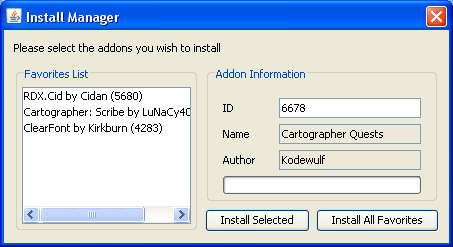
- Connection to the WoWInterface user database to retrieve your favorites list. This allows:
- Quicker matching of already-installed addons to file IDs
- Automatic install of missing favorites (after confirmation)
- Automatic backups before every install
- Before each install, the manager will create a restoration point which can later be used to revert to. It will include all configuration and saved information for the addon, as well as the Lua and XML scripts that ran it, so you can be sure you'll return to where you were.
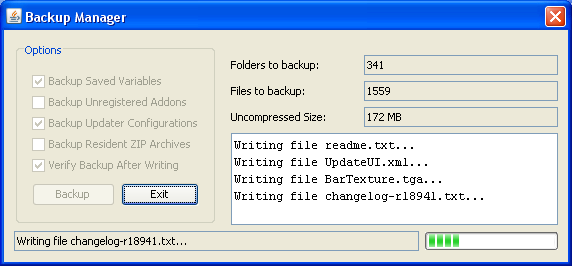
- Manual backups can be made (with or without Saved Variable data) of your entire Interface folder for easy restoration to a known-safe point.
- Backups are compressed to help minimize space taken on the hard drive
- An easy-to-use restoration manager can help you restore a backup, or restoration can be done easily without the manager by simply using the ZIP file found in the newly created "backups" folder.
- All updates are compared against MD5 hashes before being installed to ensure security.
This is a portable program. This version is for Windows and includes only a Windows MSI Setup program. For a generic version (for Linux/Macintosh users), see this page.
Requirements (for all versions)
- Microsoft Windows 2000 or later, Macintosh OS X, or Linux Kernel 2.4 or later
- Java version 1.5 or later
- 64KB of RAM
- 5MB Hard Drive Space
The JAR (Java Executable Archive) file accepts command line arguments to assist with problem cases. If you are having trouble with the program, try running the following line at a command prompt before submitting any kind of bug information:
java -jar wowiupdater.jar --verbose
Other Important Stuff
Please keep in mind the following:
- This program is released under the GNU General Public License v2. Your redistribution, modification, etc., is subject to these terms. For details, please see the file "COPYING" located inside the (a) ZIP file for the ZIP package, or (b) Installation directory for the Windows setup package.
- This program is the work of one author, and is not small by any means. I'm sure there are bugs, and unfortunately I cannot catch them all. This is a BETA RELEASE of the application and you should be aware that things may go wrong (though I have taken every precaution I can that if something DOES go wrong, you can hopefully recover from it -- but I cannot guarantee that). See the following point:
- As required by the GPL, it is important that I point out the following:
Code:This program is free software: you can redistribute it and/or modify it under the terms of the GNU General Public License as published by the Free Software Foundation, either version 2 of the License, or (at your option) any later version. This program is distributed in the hope that it will be useful, but WITHOUT ANY WARRANTY; without even the implied warranty of MERCHANTABILITY or FITNESS FOR A PARTICULAR PURPOSE. See the GNU General Public License for more details. You should have received a copy of the GNU General Public License along with this program. If not, see <http://www.gnu.org/licenses/>.
Regards,
-- Shirik
0.2.6 (r1) - Initial Public Release
0.2.7 (not tagged) - Maintenance Release
- Fixed "Internal Error" occurring when a character that has never logged in has a SavedVariables folder on the computer
- Fixed "Internal Error" occurring when an addon has files placed at the root folder (due to the updater attempting to traverse backwards past root)
- Fixed "Unspecified I/O Error" occurring when explicit files are found outside of a folder (due to the updater attempting to place a dependency identifier in the file as if it were a folder)
- Fixed UTF-8 characters in addon metadata corrupting the XML data (server-side change only)
- Fixed non-alphanumeric characters in addon metadata corrupting the XML data (server-side change only)
- Resolved bug ID 4250
- Special thanks to:
+ Tem for countless hours being a guinea pig
+ ScythXIII, Seerah, Portalius, and mrruben5 for bug reports resulting in the above fixes
0.2.8 (not tagged) - Maintenance Release
- Fixed an issue where attempting to install a new addon to a corrupt, unexpected, or already-installed folder may result in an "Unspecified I/O error"
- Special thanks to Portalius for the bug report
0.2.9 (r8) - Correction Release (Windows only)
- Updated the Swing library to 1.0.3
- Fixed the setup package so that it references the correct library
- Special thanks to Dolby for pointing out the problem in the setup package
0.2.10 (r15) - Maintenance Release
- Fixed the setup package so that the shortcut placed on the desktop now has the correct icon (Windows only)
- Fixed an issue where users with more accounts than servers played would not be able to update any addons, receiving the error "Internal Error." (Resolves bug report #4259)
- Fixed an issue where not all accounts' SavedVariables files were being backed up in cases where the user had more servers than accounts played.
- Fixed an issue where files resident in the SavedVariables folder would be incorrectly detected as an account name, resulting in an "Internal Error" while backing up prior to updating an addon.
- Adjusted the AddOns folder constant to use correct capitalization for UNIX-based systems
- Special thanks to:
+ ScythXIII for the bug report, log files, and extreme patience while the bug was resolved
+ Thunder_Child for the bug report and log files and WTF data which lead to the isolation of the issue
+ Dolby for reporting the desktop icon issue

