Category: Action Bar Mods
Addon Information
Works with 3.3
Download Latest Version.
To add favorites please register for a free account. If you already have one you need to login. How do I install this? (FAQ)
Author:
Version:
30300.5
Date:
12-23-2009 08:28 PM
Size:
16.25 Kb
Downloads:
58,141
Favorites:
112
MD5:
Pictures
Click to enlarge
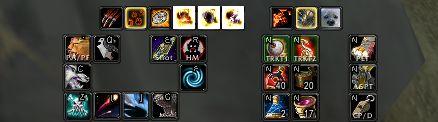
A BarKeep bar set-up for a N52 (using 3 bars)
Click to enlarge
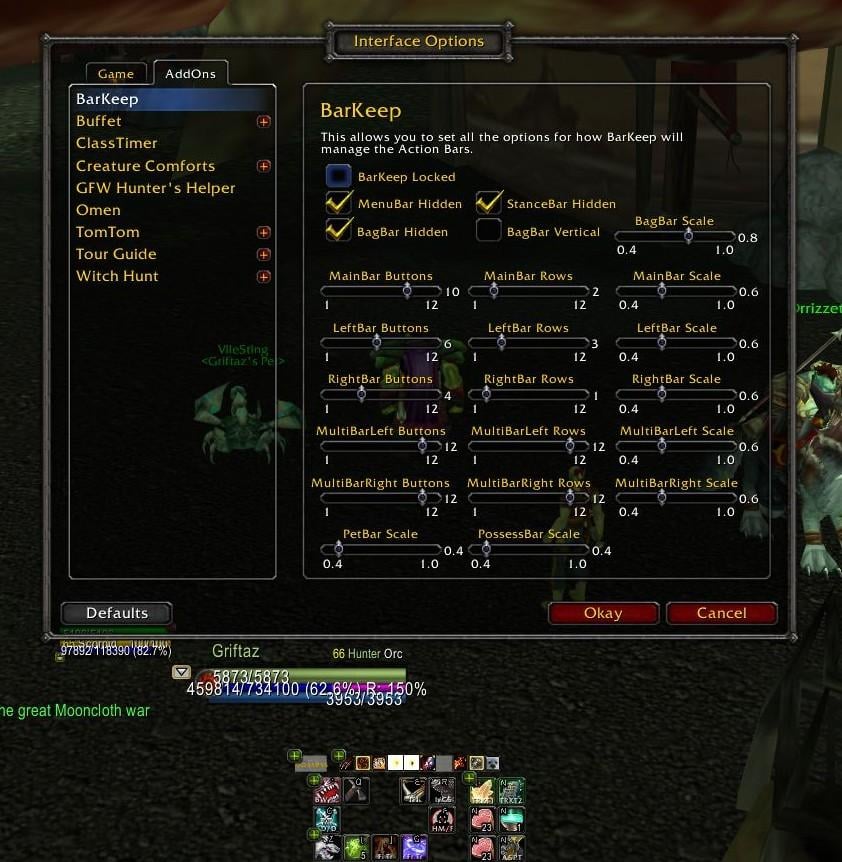
BarKeep in configuration mode - you can see the unlocked buttons that allow bar placement and the po
BarKeep   Popular! (More than 5000 hits)
BarKeep

** Now with support for the Totem Bar! The Totem Bar should be repositionable, be scaled to the same size as the Main Action Bar and stay in its new position. Please let me know if this is not the case! **

** Now with support of bars that only appear on mouseover via the optional BarKeep_BarFader add-on. Now with support for ButtonFacade via the optional BarKeep_ButtonFacade add-on. BarKeep_BarFader & BarKeep_ButtonFacade can be found in the 'Optional Files' tab. **

Here are the main features:
  • All the main action buttons can be configured to have from 1-12 buttons.
  • All the main action bars can be reconfigured to have up to 12 rows, so you can have 6 buttons x 2 rows, 3 buttons by 4 rows etc. This is done still using the Blizzard button code for compatibility.
  • All the main action bars can be scaled independently of one another.
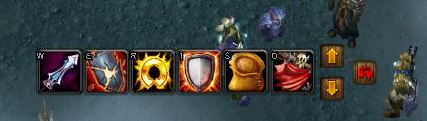
  • Stance bar, possess bar, pet bar and vehicle bar can all be relocated to where the user wants them to be.
  • All bars can be hidden if you want, some using the Blizzard options from the interface menu, others using BarKeep.
  • The options are configured by a GUI accessed from /barkeep or /bk.
  • It uses an event / hook based structure for minimal CPU usage.
I want to say thanks to the previous developers of this CleanBar & CleanBarAdvanced since BarKeep would not be possible without their initial help.

So why use BarKeep?

It enables complete rearrangement and scaling of the Blizzard bars and so has some advantages over the traditional bar mod:
  1. It uses Blizzards buttons (and button code). So pretty much it's always compatible if Blizzard make any changes.
  2. Its really light in use - doesn't use a lot of memory and CPU cycles.
  3. It seems pretty stable as a result of the above.
  4. It'll work with cooldown, ranged mods that work with Blizzard buttons and also ButtonFacade with another small mod.
Commands:

/barkeep - show the config screen.
/bk - show the config screen.

FAQ:
  • I can't see all the bars when I first use the addon. All I see are the '+'s that enable the bar placement? - Use the Blizzard 'Action Bars' tab in the interface menu to set which bars are active or not, just as you would the Blizzard bars.
  • How do I set the Key Bindings? - Use the Blizzard Key Bindings interface to set the bindings for all the bars.
  • How do I lock the actions on the bars? - Use the Blizzard 'Action Bars' tab in the interface menu to lock the Blizzard bars.
  • How do I permanently show the empty buttons? - Use the Blizzard 'Action Bars' tab in the interface menu to show the empty button grid.
Future Plans:
  • Bug fixes once identified.
  • A BarKeep_XP optional module to manage the XP bar.
  • A reconfiguration of the mod to easily allow for additional layout types for the bars. This should be fairly easy to do, it'll just require a some coding in BarKeep.lua and a change to the configuration screen, but could take some time as I'll make the changes slowly and test carefully.

Known Issues:
  • There is a request to add the seating indicator that needs to be done.
  Change Log - BarKeep
Version History
BarKeep version 30300.5
-----------------------
- Corrects a SpellbookMicroButton bug introduced by 30300.4 when switching talent specs.

BarKeep version 30300.4
-----------------------
- More elegant and better fix to correct for the Blizzard AcheivementMicroButtonUpdate bug.
- Reverted to using the Blizzard SpellBookMicroButton to enable casting from the Spellbook while in combat.


BarKeep version 30300.3
-----------------------
- Temporary fix to correct for the Blizzard AcheivementMicroButtonUpdate bug.

BarKeep version 30300.2
-----------------------
- A small change to improve the working with other add-ons that may tweak the MicroMenuBar.

BarKeep version 30300.1
-----------------------
- Updated .TOC for 30300.
- Corrected all the MicroMenuBar code to work with the new dungeon interface.

BarKeep version 30200.12
------------------------
- Reworked MicroMenuBar to remove taint and ensure the Blizzard interface cannot move the buttons.
  Optional Files - BarKeep
File Name
Version
Size
Author
Date
Type
30300.2
5kB
12-23-2009 03:52 AM
Addon
30100.2
4kB
04-23-2009 04:37 PM
Addon
  Archived Versions - BarKeep
File Name
Version
Size
Author
Date
30300.4
17kB
Platykurtic
12-23-2009 03:49 AM
30300.3
16kB
Platykurtic
12-14-2009 04:23 PM
  Comments - BarKeep
Post A Reply Comment Options
Old 02-27-2010, 12:14 PM  
Platykurtic
A Murloc Raider
Interface Author - Click to view interfaces

Forum posts: 4
File comments: 122
Uploads: 5
Re: BarKeep ButtonFacade

Quote:
Originally posted by tazdevil1970
is this going to be updated apparently it is out of date
I'll have a look into it. I'll get ButtonFacade or one of the other add-ons that work similarly working.
Platykurtic is offline Report comment to moderator   Edit/Delete Message Reply With Quote
Old 02-14-2010, 09:17 PM  
tazdevil1970
A Kobold Labourer

Forum posts: 0
File comments: 1
Uploads: 0
Red face BarKeep ButtonFacade

is this going to be updated apparently it is out of date
tazdevil1970 is offline Report comment to moderator   Edit/Delete Message Reply With Quote
Old 02-05-2010, 08:28 AM  
zohar101
A Kobold Labourer

Forum posts: 1
File comments: 51
Uploads: 0
So just to clarify, can you keybind things to an actionbar, hide it completely and have the keybindings still preserved?
zohar101 is offline Report comment to moderator   Edit/Delete Message Reply With Quote
Old 02-03-2010, 03:17 AM  
Platykurtic
A Murloc Raider
Interface Author - Click to view interfaces

Forum posts: 4
File comments: 122
Uploads: 5
Quote:
Originally posted by Polarcom
Whether it is possible to change the size of a Vehicle bar somehow?
Is the vehicle bar scale menu option not working? I'll test it tonight to check.
Platykurtic is offline Report comment to moderator   Edit/Delete Message Reply With Quote
Old 02-02-2010, 05:01 AM  
Polarcom
A Kobold Labourer

Forum posts: 0
File comments: 14
Uploads: 0
Whether it is possible to change the size of a Vehicle bar somehow?
Polarcom is offline Report comment to moderator   Edit/Delete Message Reply With Quote
Old 01-25-2010, 03:55 AM  
Platykurtic
A Murloc Raider
Interface Author - Click to view interfaces

Forum posts: 4
File comments: 122
Uploads: 5
Quote:
Originally posted by Dunwich of Drenden
I'm having trouble with the vehicle interface. It seems to acknowledge that I am pressing buttons, but not accepting the keystroke. Clicking on them is working, but awkward. Currently checking to see if other addons are causing interference.
I'd expect this is due to other add-ons, as BarKeep does nothing to the keybindings. These are simply the Blizzard settings as BarKeep uses all the Blizzard buttons.

Last edited by Platykurtic : 01-26-2010 at 07:38 AM.
Platykurtic is offline Report comment to moderator   Edit/Delete Message Reply With Quote
Old 01-19-2010, 06:20 PM  
Dunwich of Drenden
A Kobold Labourer

Forum posts: 0
File comments: 2
Uploads: 0
I'm having trouble with the vehicle interface. It seems to acknowledge that I am pressing buttons, but not accepting the keystroke. Clicking on them is working, but awkward. Currently checking to see if other addons are causing interference.
Thanks.
Dunwich of Drenden is offline Report comment to moderator   Edit/Delete Message Reply With Quote
Old 12-23-2009, 04:05 AM  
Platykurtic
A Murloc Raider
Interface Author - Click to view interfaces

Forum posts: 4
File comments: 122
Uploads: 5
30300.4 and 30300.5 - Minor update to correct an error that almost nobody had noticed around casting spells from the Spellbook itself.

BarKeep 30300.3 & 30300.5 both seem very stable in gameplay on my characters. As a result after the holiday break I'll look to add a couple of the requested features.

Last edited by Platykurtic : 12-23-2009 at 08:28 PM.
Platykurtic is offline Report comment to moderator   Edit/Delete Message Reply With Quote
Old 12-16-2009, 07:04 AM  
Platykurtic
A Murloc Raider
Interface Author - Click to view interfaces

Forum posts: 4
File comments: 122
Uploads: 5
Quote:
Originally posted by Xandria
I decided to take the time and disable all of my addons and turn them on one by one to narrow it down to see if it was something on my end; apparently it's Titan panel. :/
OK - many thanks for the work then. Its a relief to know it wasn't BarKeep.
Platykurtic is offline Report comment to moderator   Edit/Delete Message Reply With Quote
Old 12-16-2009, 05:22 AM  
Xandria
A Kobold Labourer

Forum posts: 0
File comments: 2
Uploads: 0
Quote:
Originally posted by Platykurtic
I haven't noticed this across my 3 main characters, but I'll test for this tonight. Just while I confirm this are there any other add-ons that may interact with the bar?
I decided to take the time and disable all of my addons and turn them on one by one to narrow it down to see if it was something on my end; apparently it's Titan panel. :/
Xandria is offline Report comment to moderator   Edit/Delete Message Reply With Quote
Old 12-16-2009, 04:08 AM  
Platykurtic
A Murloc Raider
Interface Author - Click to view interfaces

Forum posts: 4
File comments: 122
Uploads: 5
Quote:
Originally posted by Xandria
I'm having an issue with the Micro Menu Bar. Whenever I go to a loading screen, it doesn't let me click anything on the bar at all. Reloading fixes it, but the thought of reloading my UI every time I load to a new screen is kind of annoying..
I haven't noticed this across my 3 main characters, but I'll test for this tonight. Just while I confirm this are there any other add-ons that may interact with the bar?

Last edited by Platykurtic : 12-16-2009 at 04:08 AM.
Platykurtic is offline Report comment to moderator   Edit/Delete Message Reply With Quote
Old 12-16-2009, 02:01 AM  
Xandria
A Kobold Labourer

Forum posts: 0
File comments: 2
Uploads: 0
I'm having an issue with the Micro Menu Bar. Whenever I go to a loading screen, it doesn't let me click anything on the bar at all. Reloading fixes it, but the thought of reloading my UI every time I load to a new screen is kind of annoying..

just thought I'd let you know. I'm not sure if it's one of my other addons, or if many other people are having this issue. But I'd love for it to be fixed because I love this thing. :]
Xandria is offline Report comment to moderator   Edit/Delete Message Reply With Quote
Old 12-14-2009, 04:33 PM  
Platykurtic
A Murloc Raider
Interface Author - Click to view interfaces

Forum posts: 4
File comments: 122
Uploads: 5
Well its a Blizzard bug. I've put up a workaround that can be easily removed later and will post this in the Bugs forum. Use version 30300.3 which has the workaround.
Platykurtic is offline Report comment to moderator   Edit/Delete Message Reply With Quote
Old 12-14-2009, 01:40 AM  
Platykurtic
A Murloc Raider
Interface Author - Click to view interfaces

Forum posts: 4
File comments: 122
Uploads: 5
Yeah that achievement bug just recently popped up. I'll look into the Blizzard code and post a fix soon.
Platykurtic is offline Report comment to moderator   Edit/Delete Message Reply With Quote
Old 12-12-2009, 06:01 PM  
Kap7437
A Kobold Labourer

Forum posts: 0
File comments: 1
Uploads: 0
Barkeep causing Lua Error with Achievements

Hi, seems that Barkeep (which I love) is interfering with the avhievements.

Quote:
Message: ...ns\Blizzard_AchievementUI\Blizzard_AchievementUI.lua:671: attempt to call global 'AchievementMicroButton_Update' (a nil value)
Time: 12/12/09 18:59:03
Count: 1
Stack: ...ns\Blizzard_AchievementUI\Blizzard_AchievementUI.lua:671: in function <...ns\Blizzard_AchievementUI\Blizzard_AchievementUI.lua:633>
[C]: in function `LoadAddOn'
[string "Interface\FrameXML\BasicControls.xml:<Scrip..."]:7: in function <[string "Interface\FrameXML\BasicControls.xml:<Scrip..."]:4>
[C]: in function `AchievementMicroButton_Update'
...ns\Blizzard_AchievementUI\Blizzard_AchievementUI.lua:671: in function <...ns\Blizzard_AchievementUI\Blizzard_AchievementUI.lua:633>
[C]: in function `LoadAddOn'
Interface\FrameXML\UIParent.lua:234: in function `UIParentLoadAddOn'
Interface\FrameXML\UIParent.lua:304: in function `AchievementFrame_LoadUI'
Interface\FrameXML\UIParent.lua:354: in function `ToggleAchievementFrame'
[string "TOGGLEACHIEVEMENT"]:1: in function <[string "TOGGLEACHIEVEMENT"]:1>

Locals: self = AchievementFrameAchievements {
0 = <userdata>
buttons = <table> {
}
}
event = "ADDON_LOADED"
(*temporary) = nil
(*temporary) = "attempt to call global 'AchievementMicroButton_Update' (a nil value)"
updateTrackedAchievements = <function> defined @Interface\AddOns\Blizzard_AchievementUI\Blizzard_AchievementUI.lua:50
trackedAchievements = <table> {
}
That's the error message I get. Either when an achievement pops up or I open the tab. Disabling Barkeep stops the errors.

Also, if I disable the addon then renable it, all my settings are reset. Am I doing something wrong? Thanks!
Kap7437 is offline Report comment to moderator   Edit/Delete Message Reply With Quote
Post A Reply


Category Jump:


The Network:
EQInterface | EQ2Interface | LoTROInterface | MMOInterface | War.MMOUI | WoWInterface | VGInterface | Allakhazam | Thottbot | Wowhead | Zam


©2009 MMOUI / ZAM Network
vBulletin - Copyright ©2000 - 2010, Jelsoft Enterprises Ltd.


