Addon Information
Works with 3.3
Download Latest Version.
To add favorites please register for a free account. If you already have one you need to login. How do I install this? (FAQ)
Tuller's Portal Bug Reports Feature Requests
Author:
Version:
2.12.3
Date:
12-08-2009 06:37 AM
Size:
97.00 Kb
Downloads:
1,289,173
Favorites:
3,507
MD5:
Pictures
Click to enlarge
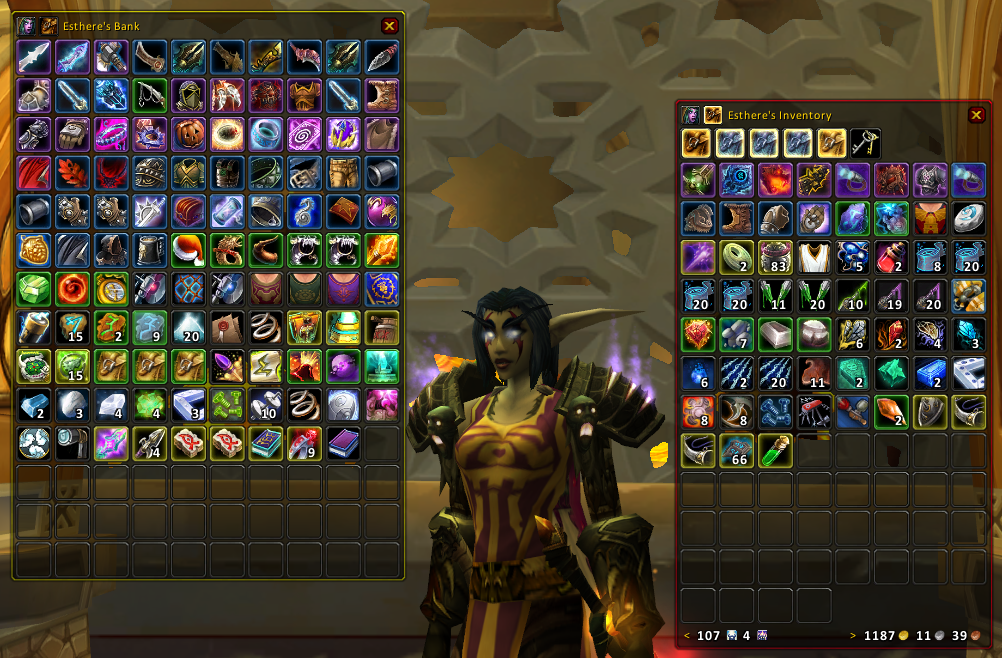
The inventory and bank frames
Click to enlarge
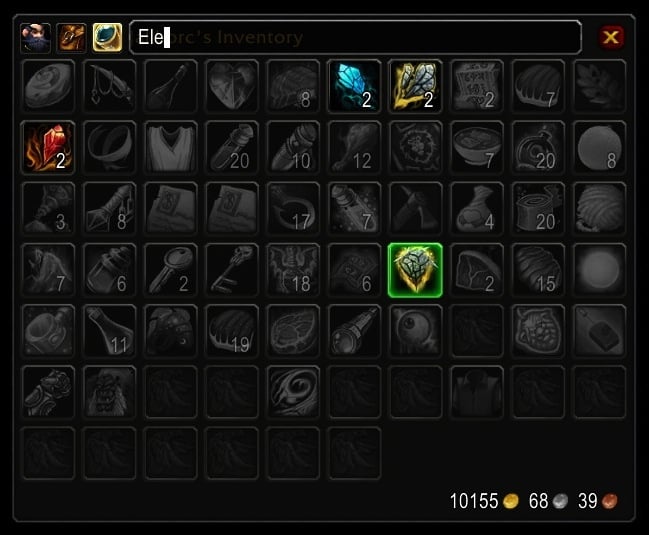
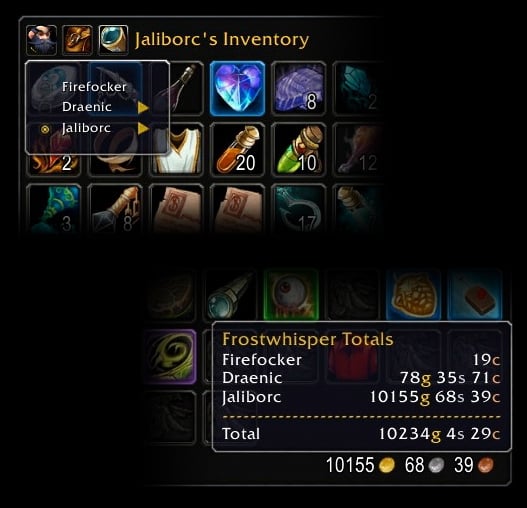
The keyring + searching and viewing info on other characters
Bagnon   Popular! (More than 5000 hits)
Have a question? Check the Bagnon wiki first!

Bagnon is an addon that merges all of your bags into three frames: One for your inventory, one for your bank, and one for your keyring. Beyond the basic all-in-one inventory functionality, Bagnon also provides the following features:
  • Items can be colored based on quality
  • Quest items can be highlighted
  • Text searching (see syntax below)
  • Offline viewing of inventory information from your other characters (via Bagnon_Forever or Bagnon_Armory)
  • Databroker plugin support. Both the inventory and bank frames allow you to display a databroker plugin in the bottom left corner. I find this works well with things like Currency Tracker

Included Addons:
  • Bagnon - Provides single window displays for your inventory, bank, and keyring
  • Bagnon_Config - Provides a means of configuring said frames :P
  • Bagnon_Forever - Enables the ability to view your character's bank, or items from any other character on the same server, from anywhere. (You need to log onto each character at least once for this to work).
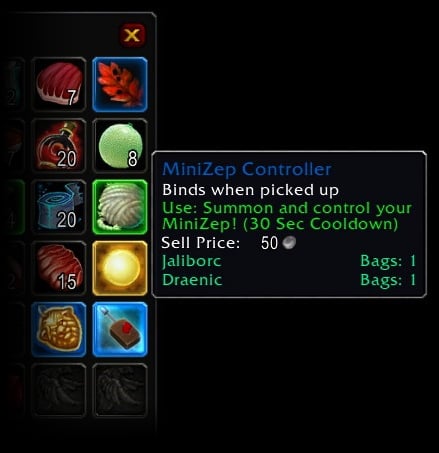
  • Bagnon_Tooltips - When hovering over an item, this tells you who has an item, and where.

Slash Commands:
  • All commands can start with either /bagnon or /bgn
  • /bagnon keys - Toggles the keyring frame
  • /bagnon bags - Toggles the inventory frame
  • /bagnon bank - Toggles the bank frame
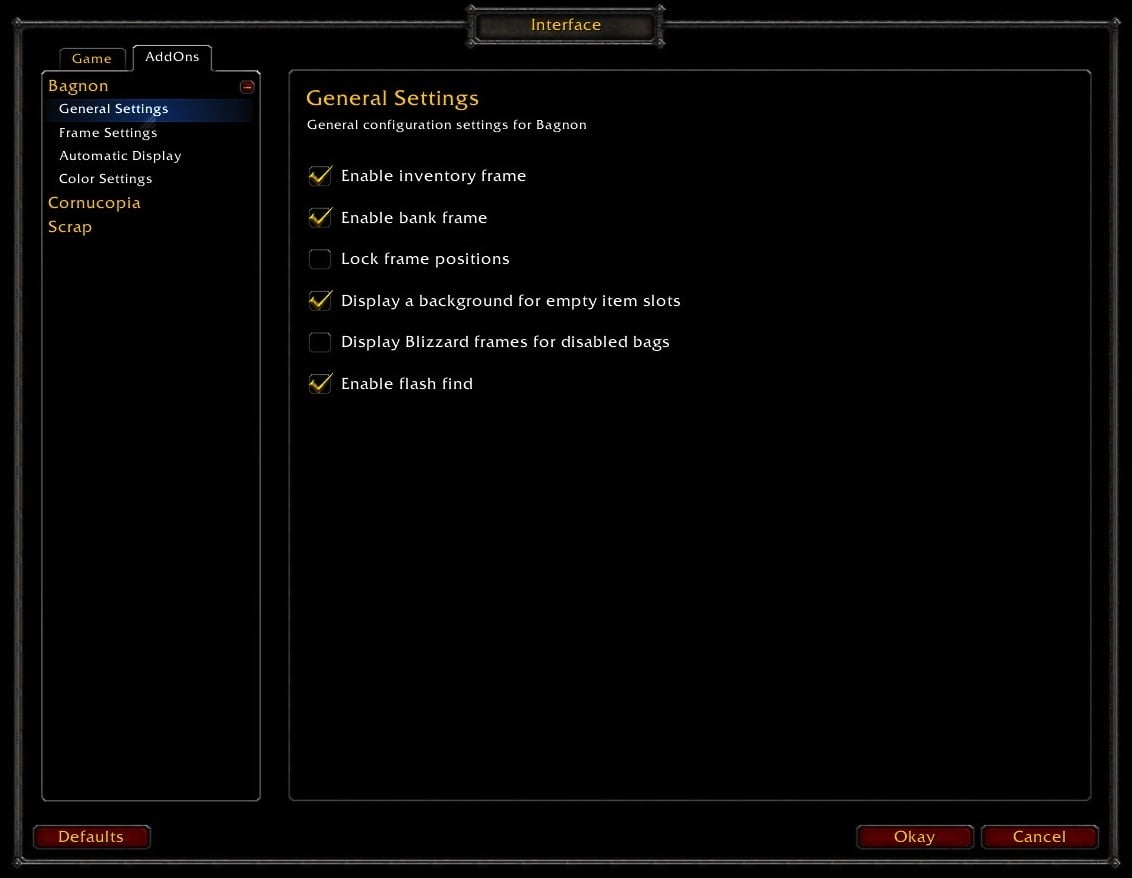
  • /bagnon config - Displays the main options menu

Search Syntax:
  • Bagnon 2.0 uses the same search syntax as Combuctor.
  • Typing a search without any modifiers will perform a "smart" search. For example, typing "armor" will find all items of type "armor" as well as any items containing the word "armor".
  • To find an item by name, simply type the items name. Typing "silk" will find all items that have "silk" in their name.
  • To find an item by type, subtype, or equip location, type t:<search>. "t:weapon" will find all weapons. "t:main" will find all main hand items.
  • To find an item by quality, type q:<quality>. "q:epic" will find all epic items. You can also use a quality number. "q:0" will find all grey items.
  • To find an item by name, type n:<name>. "n:muffins" will find all items with names containing "muffins".
  • To find items in an equipment set, type s:<equipmentSet>. "s:fire" will find all items in equipment sets you have with names that start with "fire".
  • Searches can be negated using the ! operator. "!q:epic" will find all items that are NOT epic.
  • A union of two searches can be performed using the | operator. Typing "q:epic|t:weapon" will find all items that are either epic OR weapons.
  • An intersection of two searches can be performed using the & operator. Typing "q:epic&t:weapon" will find all items that are epic AND weapons
  • The following search keywords are also supported:
    • boe - Bind on equip items.
    • quest - Items with "quest item" in their tooltips.
    • bop - Bind on pickup items.
    • boa - Bind on account items.
    • bou - Bind on use items
  Change Log - Bagnon
2.12.3
* Removed Bagnon_GuildBank. I did not intend on including it quite yet, but my build process did :P

2.12.2
* Updated TOC for 3.3

2.12.1
* Added comparison operators to item level and quality searches (you can now do things like q>=rare, q!=0, etc)
* Added itemlevel searching: ilvl<op><number> (ex, ilvl>200 or ilvl:200)

2.12.0
* Added new options for controlling item slot colors and item border brightness

2.11.0
* Added a new option to automatically display your inventory when opening the player frame
* Added a new frame specific option: Enable bag break layout
* Fixed a bug causing quest item highlighting to not work properly for non English locales

2.10.0
* Added support for equipment set searching via s:<setName>
* Made it easier for me to define new typed searches via Bagnon.ItemSearch.RegisterTypedSearch(typedSearchObj)

2.9.3
* Updated for 3.2
* Disabled search text syncing to prevent issues with Chinese clients

2.9.2
* Fixed a bug causing the options menu to show up when displaying the world map

2.9.1
* Added a new modifier to search by name: n:search. For example, typing "nants" will find all items named "pants"
* A search without modifiers, ex "gem" will now perform a smart search, like in 1.x versions of Bagnon. For example, typing "gem" will now find items of type "gem" as well as items named "gem"

2.9.0
* Added a keyring bag back to the inventory's bag frame. Its hidden by default.
* Keyring slots are now colored
* Made text searching global
* Made the text search box close when the enter key is pressed
* The searching with uppercase text bug should now be fixed.

2.8.1
* Localization bugfix

2.8.0
* Added a new option to disable the options toggle button
* Adjusted a few default settings for the automatic display of the inventory frame
* Adjusted priority of quest highlighting so that Uncommon+ items are not marked as quest items
* Updated localization

2.7.0
* Added new frame strata options: MEDIUMLOW, MEDIUMHIGH. These are equivalent to Low + Toplevel and Medium + Toplevel
* Added new option: Display Blizzard bag frames for disabled bags.
* Added the ability to right click the title frame to display the options menu.

2.6.3
* Fixed a bug causing it to not be possible to disable auto display settings
* Fixed a bug causing it to not be possible to search on other characters/your bank when not at the bank
* Fixed a bug with hiding the default bank frame
* Made the general options panel a sub panel of the main Bagnon panel. This should hopefully make it easier to spot when configuring frames.

2.6.2
* Added a bugfix to the default settings clearing code

2.6.1
* Miscellaneous bug fixes
* Updated localization

2.6.0
* Added a new options panel to configure automatic display settings for the inventory frame
* More performance optimizations to the item frame
* More bug fixes to the item frame

2.5.2
* Added an assertion to catch the nil slot issue, if it exists.
* Fixed a bug with item frame event registering causing items to appear to not move, etc
* Updated localization

2.5.1
* Added some bugfixes to item event handling
* Added some bugfixes to broker tooltip handling
* Updated localization

2.5.0
* Moved item slot event handling to the item frame.
* Fixed a display issue with the player selector for undead characters
* Added in settings to disable the inventory, bank and keyring frames
* Fixed some bugs related to saving and loading default settings
* Updated localization

2.4.1
* Fixed a redbox error from hiding a frame when viewing another character

2.4.0
* Fixed a bug with frame/border coloring
* The player filter will now reset to the current player when a frame is closed
* Made reverse bag slot ordering a per frame setting, instead of a global one
* Added per frame option: Enable bag frame (disabled for the keyring for semi obvious reasons)
* Added per frame option: Enable money frame
* Added per frame option: Enable databroker frame
* Added per frame option: Enable search frame toggle button

2.3.1
* Implemented a fix that should resolve the wacky frame position thing
* Implemented a fix that should resolve the "for limit must be a number" bug
* Updated localization
* Added per frame option: Frame Layer - Controls frames appearing above or below other frames.

2.3.0
* Rewrote saved settings back end to make it easier for me to adjust defaults. Your settings have been reset.
* Frame settings are now saved on per character basis
* Global settings (stuff on the main options panel) are saved globally.
* Adjusted a few default settings (frame border color, frame position)

2.2.1
* Updated localization
* Added option: highlight item slots by bag type
* Fixed a frame display bug when closing frames via pressing escape
* You can now double click to search once again.

2.2.0
* Added option: show empty item slot textures
* Added option: highlight items by quality
* Added option: highlight quest items
* Added option: reverse item slot ordering
* Added option: lock frame positions
* Added a databroker launcher for Bagnon
* Fixed a few bugs related to the databroker plugin

2.1.0
* Started implementation of the new options menu. Added options for color, border color, columns, spacing, opacity, and scale.
* Added new slash command, /bgn options
* Added a button to all frames as a shortcut to the options menu
* I'm calling this version a beta, since I want more feedback.

2.0.3
* Reimplemented slash commands: /bgn|/bagnon bank, /bgn bags, /bgn keys, and /bgn version

2.0.2
* Fixed bank frame tool tips
* Fixed quality display for certain items
* Removed a file that was not being called anymore.

2.0.1
* Fixed bank frame closing
* Fixed an error when hovering over a bank item when at the bank
* Fixed an error when clicking on a databroker object with no click event
* Added sounds when opening/closing frames
  Optional Files - Bagnon
File Name
Version
Size
Author
Date
Type
2.12.6
109kB
01-09-2010 01:05 PM
Addon
1.3
2kB
06-21-2009 02:12 PM
Addon
1.0
2kB
01-08-2007 05:09 PM
Patch
  Archived Versions - Bagnon
File Name
Version
Size
Author
Date
2.12.2
114kB
Tuller
12-07-2009 10:47 PM
2.12.1
97kB
Tuller
11-25-2009 07:59 PM
2.12.0
98kB
Tuller
11-04-2009 07:03 PM
2.11.0
96kB
Tuller
11-03-2009 07:15 PM
2.10.0
96kB
Tuller
09-25-2009 07:15 PM
2.9.3
95kB
Tuller
08-04-2009 06:43 PM
2.9.2
93kB
Tuller
07-20-2009 06:52 PM
2.9.1
93kB
Tuller
07-13-2009 05:28 PM
2.9.0
93kB
Tuller
07-10-2009 07:06 PM
2.8.1
93kB
Tuller
07-02-2009 09:22 PM
2.8.0
93kB
Tuller
07-02-2009 08:01 PM
2.7.0
94kB
Tuller
06-26-2009 01:44 PM
2.6.3
93kB
Tuller
06-25-2009 09:29 PM
2.6.2
93kB
Tuller
06-21-2009 05:01 PM
2.6.1
93kB
Tuller
06-21-2009 12:36 PM
1.7.3
59kB
Tuller
05-28-2009 06:35 PM
1.7.2
62kB
Tuller
04-26-2009 06:06 PM
1.7.1
59kB
Tuller
04-12-2009 08:12 PM
1.7.0
59kB
Tuller
04-12-2009 11:38 AM
1.6.10
59kB
Tuller
01-21-2009 06:25 PM
1.6.9b
59kB
Tuller
12-24-2008 01:36 PM
1.6.9
56kB
Tuller
12-19-2008 07:13 PM
  Comments - Bagnon
Post A Reply Comment Options
Old 01-28-2010, 11:58 AM  
Tuller
A Wyrmkin Dreamwalker
 
Tuller's Avatar
Interface Author - Click to view interfaces

Forum posts: 58
File comments: 1135
Uploads: 27
That's a weird one, but I think I can fix it
Tuller is offline Report comment to moderator   Edit/Delete Message Reply With Quote
Old 01-28-2010, 10:03 AM  
Beoko
A Murloc Raider
 
Beoko's Avatar
Interface Author - Click to view interfaces

Forum posts: 5
File comments: 49
Uploads: 19
My friend was telling me that he got a strange error whenever he visited the bank on a specific character. The error only occured on this character, and only at the bank. It would mess up all of his bagnon frames as well. He has the latest version, and deleting his saved variables did not affect the error.

Code:
Date: 2010-01-28 08:56:20
ID: 1
Error occured in: Global
Count: 1
Message: ..\AddOns\Bagnon\components\frameSettings.lua line 21:
table index is nil
Debug:
[C]: ?
Bagnon\components\frameSettings.lua:21:
Bagnon\components\frameSettings.lua:19
Bagnon\components\frameSettings.lua:26:
Bagnon\components\frameSettings.lua:25
(tail call): ?
Bagnon\components\item.lua:458: GetPlayer()
Bagnon\components\item.lua:487: GetItemSlotInfo()
Bagnon\components\item.lua:242: Update()
Bagnon\components\item.lua:186:
Bagnon\components\item.lua:185
[C]: SetParent()
Bagnon\components\item.lua:23:
Bagnon\components\item.lua:20
(tail call): ?
Bagnon\components\itemFrame.lua:227: AddItemSlot()
Bagnon\components\itemFrame.lua:311: ReloadAllItemSlots()
Bagnon\components\itemFrame.lua:175: UpdateEverything()
Bagnon\components\itemFrame.lua:422: SetFrameID()
Bagnon\components\itemFrame.lua:33: New()
Bagnon\components\frame.lua:716: CreateItemFrame()
Bagnon\components\frame.lua:726: PlaceItemFrame()
Bagnon\components\frame.lua:458: Layout()
Bagnon\components\frame.lua:250: UpdateLook()
Bagnon\components\frame.lua:200:
Bagnon\components\frame.lua:196
[C]: Show()
Bagnon\components\frame.lua:84: action()
Bagnon\utility\ears.lua:29: SendMessage()
Bagnon\components\frameSettings.lua:51: SendMessage()
Bagnon\components\frameSettings.lua:69: Show()
Bagnon\main.lua:111: ShowFrame()
Bagnon\main.lua:282: action()
Bagnon\utility\ears.lua:29: SendMessage()
Bagnon\utility\itemEvents.lua:257: ?()
Bagnon\utility\itemEvents.lua:70:
Bagnon\utility\itemEvents.lua:68
AddOns:
Swatter, v3.1.14 (<%codename%>)
Acheron, v
AckisRecipeList, v1.0 2769
AtlasLoot, vv5.09.05
AtlasLootFu, vv5.09.05
AucAdvanced, v5.7.4568 (KillerKoala)
AucFilterBasic, v5.7.4568 (KillerKoala)
AucFilterOutlier, v5.7.4568.2531
AucMatchUndercut, v5.7.4568.2531
AucScanData, v5.7.4568 (KillerKoala)
AucStatClassic, v5.7.4568 (KillerKoala)
AucStatHistogram, v5.7.4568 (KillerKoala)
AucStatiLevel, v5.7.4568 (KillerKoala)
AucStatPurchased, v5.7.4568 (KillerKoala)
AucStatSales, v5.7.4568.2842
AucStatSimple, v5.7.4568 (KillerKoala)
AucStatStdDev, v5.7.4568 (KillerKoala)
AucStatWOWEcon, v5.7.4568.2530
AucUtilAHWindowControl, v5.7.4568.3311
AucUtilAppraiser, v5.7.4568.2530
AucUtilAskPrice, v5.7.4568.3175
AucUtilAutoMagic, v5.7.4568.3142
AucUtilCompactUI, v5.7.4568.2530
AucUtilEasyBuyout, v5.7.4568.3583
AucUtilFixAH, v5.7.4568 (KillerKoala)
AucUtilGlypher, v5.7.4568.2545
AucUtilItemSuggest, v5.7.4568.3108
AucUtilPriceLevel, v5.7.4568.2545
AucUtilScanButton, v5.7.4568.2530
AucUtilScanFinish, v5.7.4568.2530
AucUtilScanProgress, v5.7.4568.2530
AucUtilSearchUI, v5.7.4568.3655
AucUtilSimpleAuction, v5.7.4568.4553
AucUtilVendMarkup, v5.7.4568.2530
Babylonian, v5.1.DEV.130
BadKitty, v
Bagnon, v2.12.3
BagnonForever, v1.1.2
BagnonTooltips, v
BeanCounter, v5.7.4568 (KillerKoala)
Configator, v5.1.DEV.130
CTBuffMod, v3.301 (CTMod 3.3)
CTCore, v3.303 (CTMod 3.3)
CTViewport, v3.300 (CTMod 3.3)
CurseProfiler, v
DBMCore, v
DebugLib, v5.1.DEV.130
DKIDiseases, v
DKIRunes, v
Dominos, v1.15.3
DominosCast, v
DominosRoll, v
DominosTotems, v
DominosXP, v
Enchantrix, v5.7.4568 (KillerKoala)
EnchantrixBarker, v5.7.4568 (KillerKoala)
ForteCasting, v
ForteCooldown, v
ForteCore, v1.958
ForteDeathKnight, v
ForteDruid, v
ForteTalent, v
ForteTimer, v
ForteVehicle, v
Gatherer, v3.1.14
HealBot, v3.3.0.13
Informant, v5.7.4568 (KillerKoala)
LibRareSpawns, v1.0.30100
LoggerHead, v3.1.0.93
MinimapButtonFrame, v3.0.9
MinimapButtonFrameSkinPack, v3.0
Omen, v3.0.9
OmniCC, v2.5.9
oRA2, v2.0.$Revision: 673 $
PitBull, vv3.2.15
PitBullAura, v2.0
PitBullBanzai, v1.0
PitBullBarFader, v0.1
PitBullCastBar, v2.0
PitBullCombatIcon, v2.0
PitBullCombatText, v2.0
PitBullComboPoints, v2.0
PitBullExperienceBar, v2.0
PitBullHealthBar, v2.0
PitBullHideBlizzard, v2.0
PitBullHighlight, v2.0
PitBullLeaderIcon, v2.0
PitBullMasterLooterIcon, v2.0
PitBullPowerBar, v2.0
PitBullPvPIcon, v2.0
PitBullRaidTargetIcon, v2.0
PitBullRangeCheck, v0.2
PitBullReadyCheckIcon, v2.0
PitBullReputationBar, v2.0
PitBullRestIcon, v2.0
PitBullThreatBar, v2.0
PitBullVisualHeal, v2.0
PitBullVoiceIcon, v2.0
PowerAuras, v3.0.0E
Prat30, v3.3.2
Prat30Libraries, v
Recount, v
SilverDragon, vv2.3.4
SlideBar, v5.7.4568 (KillerKoala)
Stubby, v5.7.4568 (KillerKoala)
TidyPlates, v5.9
TidyPlatesCleanPlates, v1.9g
TidyPlatesGrey, v1
TidyPlatesThreatPlates, v2.1b
BlizRuntimeLib_enUS v3.3.0.30300 <us>
(ck=bf4)
Beoko is offline Report comment to moderator   Edit/Delete Message Reply With Quote
Old 01-24-2010, 07:30 PM  
Tuller
A Wyrmkin Dreamwalker
 
Tuller's Avatar
Interface Author - Click to view interfaces

Forum posts: 58
File comments: 1135
Uploads: 27
@F1NCH
Read the wiki for info on how to do this :P

@Politig
You can also use /bagnon bank, or give a keybinding to the bank frame.
Tuller is offline Report comment to moderator   Edit/Delete Message Reply With Quote
Old 01-23-2010, 07:33 PM  
Politig
A Murloc Raider

Forum posts: 6
File comments: 267
Uploads: 0
Hello,

In order to view my bank, I bring up the Bag icon in the LDB display area and click it with a combination I can't remember right now. Is it possible to add that button to the top of the bag, around there the Config and Search bar are? I wish to view an LDB plug-in at the bottom, but don't want to have to switch when I want to look at my bank.

Thanks!
Politig is offline Report comment to moderator   Edit/Delete Message Reply With Quote
Old 01-08-2010, 12:15 PM  
F1NCH
A Kobold Labourer

Forum posts: 0
File comments: 4
Uploads: 0
hi, i love your addon^^
but pls include the option to watch my amount of, for example "Emblem of Frost" on the bagframe, just like the blizzard standard.
thx

Last edited by F1NCH : 01-08-2010 at 12:15 PM.
F1NCH is offline Report comment to moderator   Edit/Delete Message Reply With Quote
Old 01-07-2010, 05:47 AM  
Cherti
A Murloc Raider
 
Cherti's Avatar

Forum posts: 4
File comments: 23
Uploads: 1
Quote:
Originally posted by Tuller
I'm starting up the bagnon betas again, this time for guild bank support:
http://www.wowinterface.com/download...agnonBeta.html
...and weeeee!
__________________
// Cherti - www.cherti.de.vu
Cherti is offline Report comment to moderator   Edit/Delete Message Reply With Quote
Old 01-05-2010, 05:45 PM  
Tuller
A Wyrmkin Dreamwalker
 
Tuller's Avatar
Interface Author - Click to view interfaces

Forum posts: 58
File comments: 1135
Uploads: 27
I'm starting up the bagnon betas again, this time for guild bank support:
http://www.wowinterface.com/download...agnonBeta.html
Tuller is offline Report comment to moderator   Edit/Delete Message Reply With Quote
Old 01-04-2010, 11:52 AM  
Tuller
A Wyrmkin Dreamwalker
 
Tuller's Avatar
Interface Author - Click to view interfaces

Forum posts: 58
File comments: 1135
Uploads: 27
Quote:
Originally posted by vlakarados
and what about currency?
I've found that information in Bagnon_Forever, too, but I need to do a bit more research to make sure that all the proper events for it are registered, etc. I still do not really have a plan on making a currency viewer, though.
Tuller is offline Report comment to moderator   Edit/Delete Message Reply With Quote
Old 01-03-2010, 12:26 PM  
vlakarados
A Deviate Faerie Dragon

Forum posts: 19
File comments: 63
Uploads: 0
Quote:
Originally posted by Tuller
@vlakarados:
Bagnon_Forever does actually track equipped items, but there's a bug preventing the information from showing up.
and what about currency?
vlakarados is offline Report comment to moderator   Edit/Delete Message Reply With Quote
Old 12-30-2009, 05:51 PM  
Tuller
A Wyrmkin Dreamwalker
 
Tuller's Avatar
Interface Author - Click to view interfaces

Forum posts: 58
File comments: 1135
Uploads: 27
Re: Enchanting

That's because blizzard classifies the greater eternal essence as elemental for some reason :P
Tuller is offline Report comment to moderator   Edit/Delete Message Reply With Quote
Old 12-30-2009, 01:41 PM  
Axodious
A Kobold Labourer

Forum posts: 0
File comments: 8
Uploads: 0
Enchanting

When searching for Enchanting it lists Dream Shards, Abyss Crystals and Infinite Dust but not Cosmic Essence.
Axodious is offline Report comment to moderator   Edit/Delete Message Reply With Quote
Old 12-28-2009, 07:38 PM  
Sazdek
A Defias Bandit

Forum posts: 3
File comments: 19
Uploads: 0
oh heh duh....


/blond moment disengaged
Sazdek is offline Report comment to moderator   Edit/Delete Message Reply With Quote
Old 12-28-2009, 06:53 PM  
Tuller
A Wyrmkin Dreamwalker
 
Tuller's Avatar
Interface Author - Click to view interfaces

Forum posts: 58
File comments: 1135
Uploads: 27
Quote:
Originally posted by Sazdek
is there any way to purge the tooltip information? i have a couple deleted characters that still show up on my tooltips and i cant figure out for the life of me how to get rid of them. tried uninstalling/reinstalling and deleting the files in the wtf folder.
http://code.google.com/p/tullamods/w...ill_showing_up
Tuller is offline Report comment to moderator   Edit/Delete Message Reply With Quote
Old 12-28-2009, 02:23 PM  
Sazdek
A Defias Bandit

Forum posts: 3
File comments: 19
Uploads: 0
is there any way to purge the tooltip information? i have a couple deleted characters that still show up on my tooltips and i cant figure out for the life of me how to get rid of them. tried uninstalling/reinstalling and deleting the files in the wtf folder.
Sazdek is offline Report comment to moderator   Edit/Delete Message Reply With Quote
Old 12-27-2009, 11:21 AM  
Tuller
A Wyrmkin Dreamwalker
 
Tuller's Avatar
Interface Author - Click to view interfaces

Forum posts: 58
File comments: 1135
Uploads: 27
@Laine:
That was accidentally included in the first 3.3.0 version. I would disable it for now.

@vlakarados:
Bagnon_Forever does actually track equipped items, but there's a bug preventing the information from showing up.
Tuller is offline Report comment to moderator   Edit/Delete Message Reply With Quote
Post A Reply


Category Jump:


The Network:
EQInterface | EQ2Interface | LoTROInterface | MMOInterface | War.MMOUI | WoWInterface | VGInterface | Allakhazam | Thottbot | Wowhead | Zam


©2009 MMOUI / ZAM Network
vBulletin - Copyright ©2000 - 2010, Jelsoft Enterprises Ltd.


