| Go to Page... |

Pictures
File Info




| Compatibility: | Fury of Hellfire (6.2) The Adventure Continues (6.1) Warlords of Draenor (6.0.3) Warlords of Draenor Pre-Patch (6.0.2) |
| Updated: | 06-23-15 12:34 PM |
| Created: | 04-11-11 04:39 PM |
| Downloads: | 10,472 |
| Favorites: | 47 |
| MD5: | |
| Categories: | Other, Group, Guild & Friends, Mounts & Pets, ToolTip, Miscellaneous |
Glance Information Bar 

News
Glance v6.2.0.1 now available!
Updated for WoW Patch 6.2
Let me know if there are any problems related to the 6.2 patch. I performed a cursory test and everything appeared to work fine.
About Glance
Glance is a modular information bar with many modules provided by default. Glance has been built from the bottom up to allow developers to create their own data brokers. Each module can be enabled or disabled via the user interface, or the Glance Interface Options panel. So use what you like, turn off what you don't, and let me know what else you'd like to see. I encourage you to read through this somewhat lengthy description, to see just what Glance is capable of.
New In This Release
- Locations: Added option for 4 digit coordinates.
- Pets: Updated pet icon layout, added shift click to dismiss pet.
- Professions: Added bonus points display for racial traits, equipment, and lures. Minor tweak to racial bonuses.
Glance Features
- Modules can send information to themselves about other party members who are also using Glance. This behavior can be turned off.
- Modules can be repositioned by dragging them left or right one position at a time.
- Modules can be enabled or disabled in the Options panel.
- Hover over a module in the options panel to see notes, updates, and memory usage.
- Click the gear icon, or type **/glance options** to access the Options Panel.
- Shifts the Player, Target, Buff, and Minimap frames down a touch to make room for itself. This behavior can be turned off for each frame.
- Shows time played in the chat window. This behavior can be turned off.
- Use the font Glance comes with, or change to another game font.
- Glance will turn red while you are in combat.
- Glance will turn blue while you are resting.
- Click on the color swatches to change the color and transparency of the bar, bar in combat, bar resting, and bar border.
- Cursor will highlight when over a button.
- Use the slider scale in the Options panel to make the bar larger or smaller.
- Option to scale tooltips with the bar.
- Modules are all listed together on the WoW addon screen.
- Settings can be saved to and loaded from a global profile.
- Dock Glance at the top or bottom of the screen.
- Glance will communicate with other players using Glance to transmit stats (if the module uses it) between party members. Party stats will now work cross-realm.
- Option to Auto-Hide the bar until mouseover.
- Bar hides during pet battles
Glance Modules
Armor
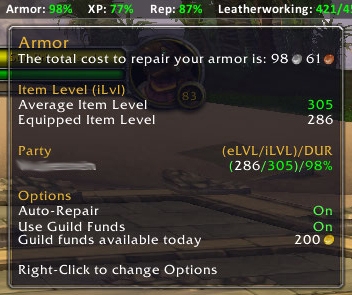
- Bar displays the durability of your armor as a percent.
- Color will change from green to yellow to red as you take damage.
- Tooltip displays the total cost to repair your armor.
- Tooltip displays your average and equipped item levels.
- Tooltip displays party stats for item level and durability.
- Module will auto-repair your armor at a merchant with guild funds if available, or your own funds if not. Right click to change this behavior.
- Module will add text overlays on the character frame and inspect frame to display the item level of each piece of gear. Right click to change this behavior.
- Module will display item level, spec, boa gear, pvp gear, and missing items in the tooltip of any player you click on. Right click to change this behavior.
Bags
- Displays Used/Total, Free/Total, Free, Used, and Total bag space.
- Option to count or not count profession bags.
- Left click to toggle bags.
Clock
- Bar displays Server time (s), Local time (l), or Date. Right click to change.
- Tooltip displays Server time, Local time, and Date.
- Time options for 12h or 24h.
- Left click to open the calendar.
DualSpec
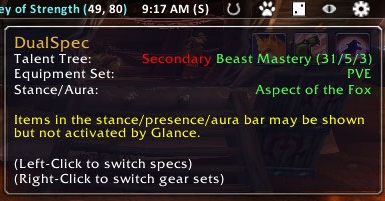
- Bar displays a dice icon. One dot if you are on your primary talent tree, two dots for secondary.
- Dice will display red if you have not chosen a stance.
- Tooltip displays current spec, equipment set, current tabard, and stance/presence/aura.
- Left click to switch between primary and secondary talents.
- Right click to display a menu and set your talents or switch equipment sets.
- **Note:** Items in the stance/presence/aura bar may be shown but not activated by Glance.
Emblems
- Bar displays selected emblems/awards/points.
- Tooltip displays all your emblems and how many of each you have.
- Tooltip displays selected emblems in a different color.
- Right click to choose which emblems to display.
- Left click to open the Currency tab
- Emblems are now sorted by category and displays the emblem/token icon.
- Weekly Valor and Conquest caps displayed.
Framerate
- Bar displays current frames per second (FPS)
- Tooltip displays current framerate, as well as minimum, maximum, and average for the current session.
- Tooltip displays party stats for average framerate per party member.
Friends
- Bar displays Friends/RealID Friends that are currently online.
- Tooltip displays friends. Name, color coded by class, and location.
- Left click to open the Friends tab.
- Module will display Battle.net friends even if they are playing another game.
Gold
- Bar displays either total gold, character's gold, or gold per hour. Right click to change.
- Tooltip displays gold per account, per faction, per character with totals on a given realm.
- Tooltip displays gold per sesion, and gold per hour.
- Right click to delete an old character or faction.
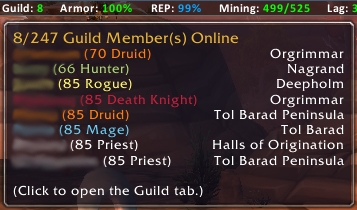
Guild
- Bar displays guild members that are currently online.
- Tooltip displays guild members. Name, class, level, color coded by class, and location.
- Left click to open the Guild tab.
Latency
- Bar displays current latency (Lag) home/world in milliseconds.
- Tooltip displays current home and world latency and bandwidth used.
- Tooltip displays party stats for home/world latency per party member.
Location (Updated)
- Bar displays current zone and subzone and current map coordinates.
- Bar will now display a player's current speed.
- Any of the display elements can be toggled off.
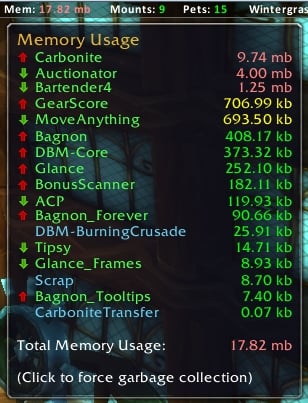
Memory
- Bar displays current addon memory usage in megabytes or percentages.
- Bar displays current addon CPU usage in seconds used or percentages.
- Tooltip displays each addon and how much memory/cpu it is using in real-time.
- Tooltip displays arrows to show current activity (increase or decrease).
- Left click to recycle memory. This is data left in memory that is no longer used.
- Module can force memory recycling on login. Right click to change this behavior.
- Shift left click to launch ACP if it is installed. (Optional Dependency)
- All modules of an addon are shown as one line item of combined memory. Right click to change this behavior and display the memory usage of each module.
- Track addons loaded on demand
Mounts
- Bar displays a horseshoe icon.
- Tooltip shows the total mounts you have obtained.
- Left click to summon a (favorite) random mount suitable to your location.
- Right click to display a list of individual mounts.
- Mount list can be filtered by Flying, Riding, and Swimming.
- Mount list can be filtered by quirks such as water walking and zone locked mounts..
- Mount list can be filtered by favorites.
- Mount list can be searched.
- Module has an Options Panel with a list of macros.
- Unuseable mounts colored in red.
- Mounts that are summoned are colored gold.
- Favorite mounts have a star icon
- When hovering over a mount, a tooltip will pop up with a rotating mount model, name and description of the mount, and where or how the mount was obtained.
- Left click a mount in the mount list to summon.
- Right click a mount in the mount list to set or unset favorites.
Pets (Updated)
- Bar displays a paw print icon.
- Tooltip shows the total companion pets you have obtained.
- Tooltip shows the number of companion pets left after being filtered.
- Tooltip shows how many companion pets are injured.
- Left click to summon a random pet.
- Right click to display a list of individual pets.
- Pets that can not battle are colored red.
- Pets that are summoned are colored gold.
- Pet list can be filtered by source (drop, vendor, etc.)
- Pet list can be filtered by family (humanoid, aquatic, critter, etc.)
- Pet list can be sorted by name, level, rarity, and type.
- Pet list displays the pet name, level, icon, favorite status, and breed (requires BattlePetBreedID)
- When hovering over a pet, a tooltip will pop up displaying a rotating pet model, name and description of the pet, and where or how the pet was obtained.
- Hover display also indicates the pet type, health, level, XP, stats, favorite status, and breed (requires BattlePetBreedID)
- Left click a pet in the pet list to summon.
- Right click a pet in the pet list to set or unset favorites.
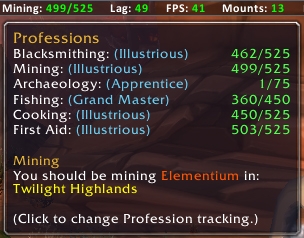
Professions (Updated)
- Bar displays currently tracked profession (current/total points).
- Bar displays orange warnings when new skill levels are available at the trainer.
- Bar and Tooltip display bonus points for racial traits, equipment, lures, etc.
- Tooltip displays professions, level, and current skill points.
- Tooltip displays best gathering locations and types based on your skill level.
- Left click to open the Professions tab.
- Right click to select which profession to display on the bar.
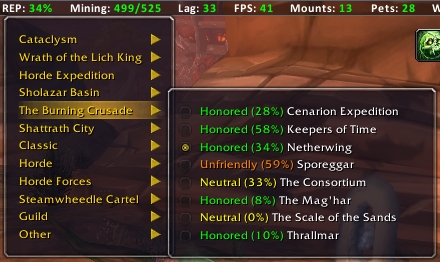
Reputation
- Bar displays either a percentage earned or points remaining for the currently tracked reputation. Right click to change the display.
- Tooltip displays the currently tracked repution.
- Tooltip displays percent earned and points remaining on the currently tracked reputation.
- Left click to open the Reputation tab.
- Right click to select a reputation to track.
- Displays friends for reputations that have friends.
- Track multiple professions.
Titles
- Bar displays a person icon.
- Tooltip displays the currently selected character title and how many titles have been obtained.
- Right click to select a character title.
XP
- Bar displays your current experience (XP) as a percent and your level.
- Text color matches resting state. Blue for using rested xp, purple when not rested.
- Tooltip displays the total xp for your current level, how much xp you have gained, how much you need, and your rested xp.
- Tooltip displays the time played on this character, this level, and this session.
- Tooltip displays your leveling speed in xp per hour and how long it will take you to level.
- Tooltip displays an average number of kills, quests, and gathers you need to level.
- Tooltip displays a hunters pet level and xp.
- Tooltip displays party stats for level, xp, and xp per hour per party member.
Glance Macros
- /glance random
Summons a random mount best suited for the area you are in.
Glance Slash Commands
- /glance hide
Hides the Glance bar. - /glance show
Shows the glance bar. - /glance options
Shows the Glance Interface Options panel.
Glance Notes
- Please submit any bugs or glitches on CurseForge, and not in the comments.
Glance Reviews
- A heart felt thanks for those who have taken time to write amazing reviews about this addon. Thank you!
- WoW Insider
- The Gold Queen
Developers
- Feel free to develop modules of your own for Glance.
6.2.0.1
6.1.2.1
6.0.3.2
6.0.3.1
6.0.2.1
5.4.8.1r
[*] Bug fix for the previous release.
5.4.8.1
Options: Moved options into new panels, added font and font size, added ability to turn off frame repositioning on vehicle enter/exit. Added option to auto-hide the bar during pet battles and on vehicles.
5.4.7.6
Core: Added a slight shadow to button text to be more visible in resting and combat states. Fixed a bug when moving Minimap.
Armor: Included bag items in estimated repair cost.
Location: Small mod to allow display when the world map is up.
Memory: Added CPU tracking. Added ability to merge addons that have modules. Added percentages.
Mounts: Fixed bug where some unuseable mounts were being summoned.
Options: Added ability to load options on demand when going straight to the game interface addon options. Added option for shadow text.
XP: Changed display color to match resting state. Blue for using rested xp, purple when not rested.
5.4.7.5
Core: Fixed a bug that popped up when in a party with a member of the same realm. Set the bar to hide during pet battles.
Friends: Formatting changes and code redesign to shorten the tooltip and eliminate lua errors.
Pets: Fixed Dismiss Pet
5.4.7.4
Friends: Formatting changes to shorten the tooltip and eliminate lua errors.
Professions: Added racial bonuses, Fixed a bug in the tooltip.
5.4.7.3
Core: Added Titles module. Fixed a bug that was preventing new modules from displaying.
Armor: Added item upgrade data.
Friends: Fixed a bug where the class color was causing a concatenation error.
Memory: Added ability to detect and track addons loaded on demand.
Professions: Added warnings when new skill levels are available at the trainer.
Titles: New Module
5.4.7.2
Core: Option for Tooltips to scale with the bar. Fixed a bug with auto-hide when moving the bar to the bottom of the UI. Added Notes and Options listings for each module. Fixed a bug with cross-realm party stats. Re-coded addons to use less memory. Added bags module.
Armor: Updated iLevel colors per expansion.
Bags: New Module
DualSpec: Disabled until level 30 when dual weilding can be learned.
Emblems: Added weekly cap tracking on Valor and Conquest Points. Adjusted the total cap on Valor Points.
Memory: Renamed collect garbage to Recycle Memory
Mounts: Fixed bug with Ahn'Qiraj Battle tanks. Disabled until level 20 when apprentice riding can be learned.
Pets: Moved enable pet from options panel to shift-right-click menu.
Professions: Fixed a bug in which the display was not updated when learning new skill levels.
5.4.7.1
Core: Added Auto-Hide capability. Tooltips now scale with the bar.
Emblems: Added weekly cap tracking on Valor and Conquest Points. Adjusted the total cap on Valor Points.
Mounts: Updated to better distinguish mount types. Unuseable mounts colored in red, mounts that can't swim colored purple, favorite mounts colored blue. Sea mounts should now be called properly. Removed the options interface favorite selection and moved it to shift-right click on the module.
Professions: Fixed a bug in which the display was not updated when learning new skill levels.
Reputation: Fixed tooltip display for multiple tracking and friends to show percent or points remaining.
5.4.2.1
Core: Fixed a bug in the button swap functions between the left side of the bar to the right side.
Armor: Fixed a bug when the toon is a guild master. Fixed a bug in the party stats where data was not being sent or received between party members of different realms.
Dungeons: Set to disabled by default
Emblems: Fixed bug displaying categories, replaced text with emblem icon in the display.
Framerate: Fixed a bug in the party stats where data was not being sent or received between party members of different realms.
Friends: Minor changes to colors, bug fix for Real-ID friends.
Gold: Added realm to the tooltip as gold counts will not travel cross realm.
Guild: Minor changes to colors.
Latency: Fixed a bug in the party stats where data was not being sent or received between party members of different realms.
Location: Added the ability to toggle Zone, SubZone, and Coordinates independently. Added speed.
Options: Added module information in the module pane.
Professions: Replaced the profession name with the profession icon in the display.
Reputation: Updated the tooltip to display Friends (Tillers & Anglers). Added the capability to track multiple reputations at once. (In the tooltip)
Tol Barad: Set to disabled by default
WinterGrasp: Set to disabled by default
XP: Fixed a bug in the party stats where data was not being sent or received between party members of different realms.
5.4.1.1
Fixed RealFriends zone bug in Friends module, fixed WoW permission error in Friends and Professions module.
5.4.0.2
Updated dungeons module data. Added Scenarios to Dungeons module. Modified XP module to display level Fixed incorrect description in Pets module Added option to dock Glance at the bottom of the screen.
5.4.0.1
Bug fix for button width issues caused by patch 5.4 Updated dungeons module data.
5.3.0.1
Maintenance release to keep the addon up to date.
5.1.0.1
Fixed errors when disabling or moving modules. Fixed pets module error caused by patch 5.1.0.
5.0.5.2
Bug fix for Friends when RealID Friends are online but not in-game. Bug fix for Armor tooltip crashing and not displaying item level correctly. Added new color option for the bar for when you enter a rest area.
5.0.5.1
Bug fixes for patch 5.0.5 Mists of Pandaria. Bug fix for Friends and Guild caused by the new class. Bug fix for Armor if your are a guildmaster. Updated data on Professions and Dungeons. Updated max level for XP, Updated Pets to include pet level, if it can battle, sorted pets by category and fixed a bug on summon. Updated mounts to include alphabetical listing for those who have a million mounts. Turned off Garbage Collection by default in the Memory module. Added Tabard to DualSpec.
5.0.4.2
Fixed a bug in the button system that affected moving, enabling/disabling modules. This should no longer be an issue. Added the ability to delete old characters or factions from the Gold module. Added the ability to change the color and transparency of the bar, bar-in-combat, and bar border. Combined the modules in the WoW addon screen for ease of use.
5.0.4.1
Fixed bugs in Armor, DualSpec, FrameRate, Latency, Pets, and XP modules due to overwhelming API changes made in patch 5.0.4.
4.3.4.1
Completely rewritten. New buttons, updated features. Check the description for a full list. Bar is now modular. Module options available on right-click. Gold now displays gph/character/account. Multiple Emblems can be tracked. Added guild repair to Armor. Added points remaining option to Reputation. Option to shorten names on Wintergrasp/Tol Barad. Mounts/Pets are now icons. Added DualSpec (switch specs/track stance/equipment set). Added Dungeon eligibility (what dungeons/raids you can do at what level).
4.0.6.8
Another bug fix for gold tooltip (gold per session/gold per hour). Fixed player and target frame positions when entering/exiting instances.
4.0.6.8
Bug fix for gold tooltip (gold per session/gold per hour).
4.0.6.7
Bug fix and update for patch 4.2. Friends tooltip for RealID friends was generating errors.
4.0.6.6
Fixed an issue with the battleground timers resetting world map coordinates when the map is displayed. Added an option to turn off garbage collection at login. Fixed time played message display to properly hide the server response when Glance requests the data.
4.0.6.5
Bug fix for an addon conflict which was preventing the options panel from showing.
4.0.6.4
Added clock tooltip for local/server time and date with a right click to switch the display, added memory as a button, memory tooltip updates realtime (5 sec) with up/down arrows, added latency tooltip with local/server and ul/dl speed, increased dropdown menu font size, added option to scale the size of bar and font, added memory click to force garbage collection, added fps tooltip to show min/max/avg, upgraded xp tooltip. xp now shows xp per hour, time to level, kills/quests/gathering to level based on an average. xp/armor/lag/fps now shows data from your party if they have Glance.
4.0.6.3
Fixed random mount (water) bug, separated gold tally between factions.
4.0.6.2
Updated professions, mounts, emblems for Cataclysm. Added random mount macros, Tol Barad timer, companion pets, account gold tally. Mount Fix.
4.0.6.1
Added professions tracking and display. Added a preferred mount list in the options panel.
- Locations: Added option for 4 digit coordinates.
- Pets: Updated pet icon layout, added shift click to dismiss pet.
- Professions: Added bonus points display for racial traits, equipment, and lures. Minor tweak to racial bonuses.
6.1.2.1
- Armor: Added item level overlays on character frame, inspect frame, and tooltip when a target is selected. Updated item level colors.
- Clock: Added 24 hour time option, 4 digit year
- Mounts: Recreated the module. Added filters, search, models, data, favorites.
- Pets: Recreated the module. Added filters, search, models, data, favorites, breed, rarity, level, battle stats
- Professions: Added bonus points display for racial traits, equipment, and lures
6.0.3.2
- Armor: Fixed armor auto-repair, updated item level coloring.
- Updated profession levels, titles, and gathering data for WoD
6.0.3.1
- Fixed the auto-hide and UI options not saving.
- Fixed issues with module preferences not saving.
- Fixed an issue with enabling/disabling modules.
- Fixed an issue with Glance not displaying after exiting a vehicle.
- Fixed an issue with Glance not displaying after cutscenes.
6.0.2.1
- Too much to list here. I'm calling an audible and saying it works with the new patch. Blizzard made some huge code changes, and I expect you will find a few bugs, especially once the expansion is fully released. This update will fix most things and get Glance running again. I've closed all existing tickets, so open a new ticket for any problems you find.
- I have noticed that toons with special characters in their name have had issues with saving addon data, my characters included. I can't do anything about that, it's a game glitch.
5.4.8.1r
[*] Bug fix for the previous release.
5.4.8.1
Options: Moved options into new panels, added font and font size, added ability to turn off frame repositioning on vehicle enter/exit. Added option to auto-hide the bar during pet battles and on vehicles.
5.4.7.6
Core: Added a slight shadow to button text to be more visible in resting and combat states. Fixed a bug when moving Minimap.
Armor: Included bag items in estimated repair cost.
Location: Small mod to allow display when the world map is up.
Memory: Added CPU tracking. Added ability to merge addons that have modules. Added percentages.
Mounts: Fixed bug where some unuseable mounts were being summoned.
Options: Added ability to load options on demand when going straight to the game interface addon options. Added option for shadow text.
XP: Changed display color to match resting state. Blue for using rested xp, purple when not rested.
5.4.7.5
Core: Fixed a bug that popped up when in a party with a member of the same realm. Set the bar to hide during pet battles.
Friends: Formatting changes and code redesign to shorten the tooltip and eliminate lua errors.
Pets: Fixed Dismiss Pet
5.4.7.4
Friends: Formatting changes to shorten the tooltip and eliminate lua errors.
Professions: Added racial bonuses, Fixed a bug in the tooltip.
5.4.7.3
Core: Added Titles module. Fixed a bug that was preventing new modules from displaying.
Armor: Added item upgrade data.
Friends: Fixed a bug where the class color was causing a concatenation error.
Memory: Added ability to detect and track addons loaded on demand.
Professions: Added warnings when new skill levels are available at the trainer.
Titles: New Module
5.4.7.2
Core: Option for Tooltips to scale with the bar. Fixed a bug with auto-hide when moving the bar to the bottom of the UI. Added Notes and Options listings for each module. Fixed a bug with cross-realm party stats. Re-coded addons to use less memory. Added bags module.
Armor: Updated iLevel colors per expansion.
Bags: New Module
DualSpec: Disabled until level 30 when dual weilding can be learned.
Emblems: Added weekly cap tracking on Valor and Conquest Points. Adjusted the total cap on Valor Points.
Memory: Renamed collect garbage to Recycle Memory
Mounts: Fixed bug with Ahn'Qiraj Battle tanks. Disabled until level 20 when apprentice riding can be learned.
Pets: Moved enable pet from options panel to shift-right-click menu.
Professions: Fixed a bug in which the display was not updated when learning new skill levels.
5.4.7.1
Core: Added Auto-Hide capability. Tooltips now scale with the bar.
Emblems: Added weekly cap tracking on Valor and Conquest Points. Adjusted the total cap on Valor Points.
Mounts: Updated to better distinguish mount types. Unuseable mounts colored in red, mounts that can't swim colored purple, favorite mounts colored blue. Sea mounts should now be called properly. Removed the options interface favorite selection and moved it to shift-right click on the module.
Professions: Fixed a bug in which the display was not updated when learning new skill levels.
Reputation: Fixed tooltip display for multiple tracking and friends to show percent or points remaining.
5.4.2.1
Core: Fixed a bug in the button swap functions between the left side of the bar to the right side.
Armor: Fixed a bug when the toon is a guild master. Fixed a bug in the party stats where data was not being sent or received between party members of different realms.
Dungeons: Set to disabled by default
Emblems: Fixed bug displaying categories, replaced text with emblem icon in the display.
Framerate: Fixed a bug in the party stats where data was not being sent or received between party members of different realms.
Friends: Minor changes to colors, bug fix for Real-ID friends.
Gold: Added realm to the tooltip as gold counts will not travel cross realm.
Guild: Minor changes to colors.
Latency: Fixed a bug in the party stats where data was not being sent or received between party members of different realms.
Location: Added the ability to toggle Zone, SubZone, and Coordinates independently. Added speed.
Options: Added module information in the module pane.
Professions: Replaced the profession name with the profession icon in the display.
Reputation: Updated the tooltip to display Friends (Tillers & Anglers). Added the capability to track multiple reputations at once. (In the tooltip)
Tol Barad: Set to disabled by default
WinterGrasp: Set to disabled by default
XP: Fixed a bug in the party stats where data was not being sent or received between party members of different realms.
5.4.1.1
Fixed RealFriends zone bug in Friends module, fixed WoW permission error in Friends and Professions module.
5.4.0.2
Updated dungeons module data. Added Scenarios to Dungeons module. Modified XP module to display level Fixed incorrect description in Pets module Added option to dock Glance at the bottom of the screen.
5.4.0.1
Bug fix for button width issues caused by patch 5.4 Updated dungeons module data.
5.3.0.1
Maintenance release to keep the addon up to date.
5.1.0.1
Fixed errors when disabling or moving modules. Fixed pets module error caused by patch 5.1.0.
5.0.5.2
Bug fix for Friends when RealID Friends are online but not in-game. Bug fix for Armor tooltip crashing and not displaying item level correctly. Added new color option for the bar for when you enter a rest area.
5.0.5.1
Bug fixes for patch 5.0.5 Mists of Pandaria. Bug fix for Friends and Guild caused by the new class. Bug fix for Armor if your are a guildmaster. Updated data on Professions and Dungeons. Updated max level for XP, Updated Pets to include pet level, if it can battle, sorted pets by category and fixed a bug on summon. Updated mounts to include alphabetical listing for those who have a million mounts. Turned off Garbage Collection by default in the Memory module. Added Tabard to DualSpec.
5.0.4.2
Fixed a bug in the button system that affected moving, enabling/disabling modules. This should no longer be an issue. Added the ability to delete old characters or factions from the Gold module. Added the ability to change the color and transparency of the bar, bar-in-combat, and bar border. Combined the modules in the WoW addon screen for ease of use.
5.0.4.1
Fixed bugs in Armor, DualSpec, FrameRate, Latency, Pets, and XP modules due to overwhelming API changes made in patch 5.0.4.
4.3.4.1
Completely rewritten. New buttons, updated features. Check the description for a full list. Bar is now modular. Module options available on right-click. Gold now displays gph/character/account. Multiple Emblems can be tracked. Added guild repair to Armor. Added points remaining option to Reputation. Option to shorten names on Wintergrasp/Tol Barad. Mounts/Pets are now icons. Added DualSpec (switch specs/track stance/equipment set). Added Dungeon eligibility (what dungeons/raids you can do at what level).
4.0.6.8
Another bug fix for gold tooltip (gold per session/gold per hour). Fixed player and target frame positions when entering/exiting instances.
4.0.6.8
Bug fix for gold tooltip (gold per session/gold per hour).
4.0.6.7
Bug fix and update for patch 4.2. Friends tooltip for RealID friends was generating errors.
4.0.6.6
Fixed an issue with the battleground timers resetting world map coordinates when the map is displayed. Added an option to turn off garbage collection at login. Fixed time played message display to properly hide the server response when Glance requests the data.
4.0.6.5
Bug fix for an addon conflict which was preventing the options panel from showing.
4.0.6.4
Added clock tooltip for local/server time and date with a right click to switch the display, added memory as a button, memory tooltip updates realtime (5 sec) with up/down arrows, added latency tooltip with local/server and ul/dl speed, increased dropdown menu font size, added option to scale the size of bar and font, added memory click to force garbage collection, added fps tooltip to show min/max/avg, upgraded xp tooltip. xp now shows xp per hour, time to level, kills/quests/gathering to level based on an average. xp/armor/lag/fps now shows data from your party if they have Glance.
4.0.6.3
Fixed random mount (water) bug, separated gold tally between factions.
4.0.6.2
Updated professions, mounts, emblems for Cataclysm. Added random mount macros, Tol Barad timer, companion pets, account gold tally. Mount Fix.
4.0.6.1
Added professions tracking and display. Added a preferred mount list in the options panel.
Optional Files (0)
 |
Comment Options |
 08-09-15, 09:57 PM
|
|
|
A Kobold Labourer
 Forum posts: 1
File comments: 44
Uploads: 2
|
Re: Changing width
@rocnroll The screen width is defined in variables.lua, but in initialize.lua in the function gf.loadFrame() I'm setting points for topleft and topright which essentially stretches the bar from left to right. I imagine that if you comment out tf:SetPoint("TOPRIGHT", 0, 0) then the screen width would be set based on the variable, anchored to the left side of the screen. Your best bet would be to research SetPoint, and modify my definitions to match what you really want.
|

|

|
| kegluneq |
| View Public Profile |
| Send a private message to kegluneq |
| Find More Posts by kegluneq |
| Add kegluneq to Your Buddy List |
|
08-03-15, 02:05 PM
|
|
|
A Firelord

Forum posts: 463
File comments: 82
Uploads: 2
|
Changing width
I found where you set the variable for screen width and tried changing the value with no luck. Is it set in more than one place? I'd like the bar to be a little smaller.
|
|
|
|
| JDoubleU00 |
| View Public Profile |
| Send a private message to JDoubleU00 |
| Find More Posts by JDoubleU00 |
| Add JDoubleU00 to Your Buddy List |
|
01-30-15, 12:58 PM
|
|
|
A Murloc Raider
Forum posts: 6
File comments: 36
Uploads: 0
|
Left / Center / Right Alignment
Is it possible to have add a Center alignment to Glance? I have been using Glance to replace my other info bars but I do miss being able to have some of the info centered.
|
|
|
|
| Dameek |
| View Public Profile |
| Send a private message to Dameek |
| Find More Posts by Dameek |
| Add Dameek to Your Buddy List |
|
11-24-14, 10:51 AM
|
||
|
A Kobold Labourer
Forum posts: 1
File comments: 3
Uploads: 0
|
 And thx for the update and now all work fine And thx for the update and now all work fine ) ) |
|
|
|
|
| Warcliffe |
| View Public Profile |
| Send a private message to Warcliffe |
| Find More Posts by Warcliffe |
| Add Warcliffe to Your Buddy List |
|
11-23-14, 04:25 PM
|
|
|
A Kobold Labourer
Forum posts: 1
File comments: 44
Uploads: 2
|
@Warcliffe Thanks for the error report. I just posted a patch that fixes all those problems.
|
|
|
|
| kegluneq |
| View Public Profile |
| Send a private message to kegluneq |
| Find More Posts by kegluneq |
| Add kegluneq to Your Buddy List |
|
11-23-14, 10:36 AM
|
|
|
A Kobold Labourer
Forum posts: 1
File comments: 3
Uploads: 0
|
Hi all
I download this addon because it have all features what i ned but i have one litle problem. I canot save it on the TOP off the screen. on all reloads the bar is on the bottom... |
|
|
|
| Warcliffe |
| View Public Profile |
| Send a private message to Warcliffe |
| Find More Posts by Warcliffe |
| Add Warcliffe to Your Buddy List |
|
06-21-14, 07:03 AM
|
|
|
A Kobold Labourer
Forum posts: 1
File comments: 44
Uploads: 2
|
Re: Bug and suggestion/request
@Widersinnes Thanks for the suggestion and letting me know about the bug. I should have it fixed in the next release.
|
|
|
|
| kegluneq |
| View Public Profile |
| Send a private message to kegluneq |
| Find More Posts by kegluneq |
| Add kegluneq to Your Buddy List |
|
06-20-14, 10:49 AM
|
|
|
A Kobold Labourer
Forum posts: 0
File comments: 51
Uploads: 0
|
Bug and suggestion/request
Suggestion/Request: On the friends and guild modules. Being able to mouse over then:
Click name to send a whisper right click a name to invite to a party/raid would be very helpful on both those moduls Bug: If you have no title selected it will throw an error if you mouse over the icon in the bar. The right click works and you can still select a title though. After you select a title it doesn't throw an error anymore on mouse over but if you de-select it in the character pane the mouse over error comes back. 4x Glance_Titles-5.4.8.1r\Titles.lua:97: attempt to index local "titlename" (a nil value) Glance_Titles-5.4.8.1r\Titles.lua:97: in function "formatTitle" Glance_Titles-5.4.8.1r\Titles.lua:59: in function "tooltip" Glance-5.4.8.1r\core\Functions.lua:169: in function "showTooltip" Glance-5.4.8.1r\core\Initialize.lua:67: in function <Glance\core\Initialize.lua:67>
Last edited by Widersinnes : 06-20-14 at 10:50 AM.
|
|
|
|
| Widersinnes |
| View Public Profile |
| Send a private message to Widersinnes |
| Find More Posts by Widersinnes |
| Add Widersinnes to Your Buddy List |
|
03-18-14, 01:41 PM
|
||
|
A Kobold Labourer
Forum posts: 0
File comments: 51
Uploads: 0
|
|
|
|
|
|
| Widersinnes |
| View Public Profile |
| Send a private message to Widersinnes |
| Find More Posts by Widersinnes |
| Add Widersinnes to Your Buddy List |
|
03-12-14, 11:29 AM
|
|
|
A Kobold Labourer
Forum posts: 1
File comments: 44
Uploads: 2
|
@Widersinnes I have it built, I'm just fixing a few bugs in the bar before the next release.
|
|
|
|
| kegluneq |
| View Public Profile |
| Send a private message to kegluneq |
| Find More Posts by kegluneq |
| Add kegluneq to Your Buddy List |
|
03-10-14, 01:36 PM
|
||
|
A Kobold Labourer
Forum posts: 0
File comments: 51
Uploads: 0
|
I'd definitely be swapping out my current LDB set up if you did :P
|
|
|
|
|
| Widersinnes |
| View Public Profile |
| Send a private message to Widersinnes |
| Find More Posts by Widersinnes |
| Add Widersinnes to Your Buddy List |
|
03-08-14, 08:44 AM
|
|
|
A Kobold Labourer
Forum posts: 1
File comments: 44
Uploads: 2
|
@Widersinnes It wouldn't be a difficult module to create and I've thought of it a few times. I'll keep it in mind for the next release.
|
|
|
|
| kegluneq |
| View Public Profile |
| Send a private message to kegluneq |
| Find More Posts by kegluneq |
| Add kegluneq to Your Buddy List |
|
03-08-14, 06:37 AM
|
|
|
A Kobold Labourer
Forum posts: 0
File comments: 51
Uploads: 0
|
Like the look and feel of this one a lot but it is missing an important module; Bags (unless I'm missing it somewhere). Would be nice to have this show total/free or just free space.
|
|
|
|
| Widersinnes |
| View Public Profile |
| Send a private message to Widersinnes |
| Find More Posts by Widersinnes |
| Add Widersinnes to Your Buddy List |
|
02-13-14, 10:01 PM
|
|
|
A Kobold Labourer
Forum posts: 1
File comments: 44
Uploads: 2
|
@airwg The good news is unlike most every other problem people have had, I can actually recreate this one. I'll dig into it tomorrow and see if I can fix this. I have a big update just about ready to come out so the timing is really good. I'll let you know here.
[EDIT] I've found and fixed the bug. Look for a new release this weekend.
Last edited by kegluneq : 02-14-14 at 01:30 PM.
|
|
|
|
| kegluneq |
| View Public Profile |
| Send a private message to kegluneq |
| Find More Posts by kegluneq |
| Add kegluneq to Your Buddy List |
|
02-12-14, 06:12 PM
|
||
|
A Kobold Labourer
Forum posts: 0
File comments: 4
Uploads: 0
|
I found this interesting... this snippet is from my character's folder: ["button"] = { ["order"] = { ["RIGHT"] = { "Options", -- [1] "Dungeons", -- [2] "DualSpec", -- [3] "Pets", -- [4] "Mounts", -- [5] "Clock", -- [6] "Location", -- [7] }, ["LEFT"] = { "Emblems", -- [1] "Armor", -- [2] "Friends", -- [3] "Guild", -- [4] "Reputation", -- [5] "XP", -- [6] "WinterGrasp", -- [7] "TolBarad", -- [8] "Gold", -- [9] "Memory", -- [10] "Framerate", -- [11] "Latency", -- [12] And this one is from WTF/Account/ACCOUNTNAME/SavedVariables: ["button"] = { ["order"] = { ["RIGHT"] = { "Options", -- [1] "Dungeons", -- [2] "DualSpec", -- [3] "Pets", -- [4] "Mounts", -- [5] "Clock", -- [6] "Location", -- [7] "Memory", -- [8] "Framerate", -- [9] "Latency", -- [10] }, ["LEFT"] = { "Emblems", -- [1] "Armor", -- [2] "Friends", -- [3] "Guild", -- [4] "Reputation", -- [5] "XP", -- [6] "WinterGrasp", -- [7] "TolBarad", -- [8] "Gold", -- [9] This order is how I set the modules in game (with a few turned off - not sure if this impacts anything but I don't see why it would). The listing in the character folder is the default and it keeps reverting to it. Tried manually editing the .lua within my character's folder, logged back in, and it defaulted back to the order listed above as if I changed nothing (and it gave the usual duplicate entry found for right side button error). All of this was done with no other addons on. Hope this helps you help me! Thanks again kegluneq! I'm VERY appreciative of you taking a look at this!
Last edited by airwg : 02-12-14 at 06:14 PM.
|
|
|
|
|
| airwg |
| View Public Profile |
| Send a private message to airwg |
| Find More Posts by airwg |
| Add airwg to Your Buddy List |
|
