Download
(258 Kb)
Download
Updated: 06-08-13 11:56 AM
Pictures
File Info
Compatibility:
Escalation (5.3)
Updated:06-08-13 11:56 AM
Created:02-03-11 10:34 AM
Downloads:27,642
Favorites:156
MD5:
Categories:Unit Mods, Combat Mods
5.3
KuiNameplates  Popular! (More than 5000 hits)
Version: 211
by: Kesava [More]
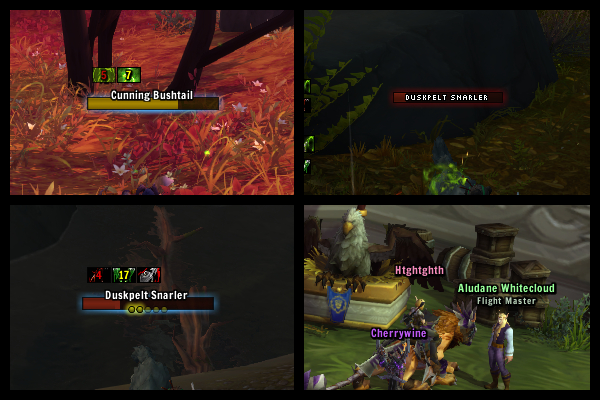
Prettier, pixel-perfect nameplates with auras. Configurable through interface options (open with /knp or /kuinameplates).

Class colours on hostile players can be enabled in the default interface options, under "Names" - check "Class Colors in Nameplates" at the bottom right.

If you're having issues with nameplates being in incorrect locations or being unclickable, first try unchecking the "Fix aliasing" option in configuration.

Current features:
  • All of the default nameplate features
  • Pixel perfect!
  • Auras!
  • Combo points
  • Tank mode - recolour health bars when you have threat (enable by checking "Enable tank mode" in options)
  • Customisable display of health for friendly or enemy units
  • Pretty fading in/out of frames (disable by unchecking "Smoothly fade" in options)
  • Automatic toggling of nameplates when you enter or exit combat (enable by checking "Auto toggle in combat" in options)
  • Cast & incoming healing warnings, useful for PVP (disabled by default, check "Show cast warnings" in options)
  • Configuration profiles
Health display patterns:
The text to display for health on different frames is determined by two simple patterns: one for friendly frames and one for neutral and hostile frames. These patterns can be changed in the options dialog (/knp). They must make use of specific conditions and results, in the following format:
condition1:result1;condition2:result2;condition3:result3;
There must be at least one condition (and one result). Any other conditions are optional.

Possible conditions are:
"=" When the unit is at maximum health...
"<" When the unit's health is less than maximum...
"=<" When the unit's health is either less than maximum or at maximum...
Possible results are:
"m" ... Display their maximum health (i.e. 123.4k).
"d" ... Display their health deficit (i.e. -46.5k).
"p" ... Display their health percentage.
"c" ... Display their current health (i.e. 76.9k).
"b" ... Display nothing.
The patterns used by default are:
Friendly units: =:m;<:d;
Which means:
When the unit is at maximum health:Display their maximum health;
When they're below maximum health:Display their health deficit;
Hostile units: <:p;
Which means:
When the unit is below maximum health:Display their health percentage;
Planned features:
  • Frame blacklisting
  • Stuff I can't remember
**211**
* changing my version numbering again. Now just incrementing by one for each
stable release.
* fix enemy priests use tapped unit colour when class colour is enabled

**208**
* add option to change height of health bar
* add option to change height of trivial unit health bar
* add option to change height of cast bar
* add option to change scale of combo point icons
* add option to use alpha of 1 for all font strings, disabled by default
* move auras slightly
* fix changing tapped colour in addon.r has no effect
* fix friendly player colour isn't in addon.r
* fix health bar frame level is sometimes too high
* fix health text is incorrect the first time it is shown
* move targetglow creation to create.lua
* remove redundant sizing/positioning code from layout.lua
* moved addon's configChangedFuncs to core.lua
* fix frame glow is incorrect after displaying a trivial unit
* fix external fonts aren't saved between sessions
* bump auras toc to 50300 (whoopsie)
* fix jittery fontstrings on the health bar when using fixaa
* move name, level and health text slightly
* progress on continuing rewrite - layout.lua partial cleanup
* fix SetFontSize using profile instead of addon.db.profile
* remove comments from create.lua CreateBackground
* move texSizes, fontSizes into addon.sizes table
* move frame sizes to addon.sizes.frame
* move addon vars into core.lua, out of layout.lua
* move GUID/name functions to core.lua
* move scaling functions to core.lua
* move addon.OnEnable to core.lua
* move addon.GetNameplate to core.lua
* only schedule the core timer once the addon has been initialised and enabled
* remove revision 150 files check
* make bg (glow) position use BOTTOMLEFT and TOPLEFT points
* update kui_media t readme
* fix name text is incorrectly positioned when level text is hidden
* fix cast warnings positioned incorrectly when level is disabled

**Known issues:**
* changing profiles/most options requires a UI reload
Archived Files (1)
File Name
Version
Size
Author
Date
208
263kB
Kesava
06-07-13 10:11 AM


Post A Reply Comment Options
Old 06-15-13, 07:50 PM  
Kesava
A Defias Bandit
 
Kesava's Avatar
AddOn Author - Click to view AddOns

Forum posts: 2
File comments: 133
Uploads: 3
Re: Raid marke based coloring

Originally Posted by Calebzor
Could we have an option to color the nameplates health bar part based on the raid marker the unit has?
I'll look into it. Probably won't end up being built in but I can always post a module for it as an optional file.

Originally Posted by rcdyer1984
...
I'm guessing it wouldn't be too difficult but I keep putting it off. I'll try to get to it.

Thanks!
Kesava is offline Report comment to moderator  
Reply With Quote
Old 06-14-13, 12:54 PM  
rcdyer1984
A Murloc Raider
 
rcdyer1984's Avatar
AddOn Compiler - Click to view compilations

Forum posts: 7
File comments: 82
Uploads: 5
Ishtara would LOVE it if there was an in-game option to change the bar texture
I was hoping it wouldn't be too terribly difficult since the add-on already supports in-game font changes.

<3
Ish

ps, this is my fav nameplate addon
__________________
<3
rcdyer1984 is offline Report comment to moderator  
Reply With Quote
Old 06-13-13, 04:26 PM  
Calebzor
A Kobold Labourer
 
Calebzor's Avatar
AddOn Author - Click to view AddOns

Forum posts: 1
File comments: 3
Uploads: 3
Raid marke based coloring

Could we have an option to color the nameplates health bar part based on the raid marker the unit has?
Calebzor is offline Report comment to moderator  
Reply With Quote
Old 06-12-13, 11:34 AM  
Kesava
A Defias Bandit
 
Kesava's Avatar
AddOn Author - Click to view AddOns

Forum posts: 2
File comments: 133
Uploads: 3
Put it under PostShow, not PostCreate.
Originally Posted by Rusken
...
Kesava is offline Report comment to moderator  
Reply With Quote
Old 06-12-13, 08:50 AM  
Rusken
A Wyrmkin Dreamwalker
AddOn Compiler - Click to view compilations

Forum posts: 59
File comments: 66
Uploads: 2
Originally Posted by Kesava
The text is always supposed to have been half-over and half-off the health bar, like in the default screenshot, but it depends what font you use, so I'll probably add an option for text offset at some point.
For now, the code you needed is in create.lua. However I'd suggest you use custom.lua so that you don't have to change it every time there's an update. Rename "custom-rename-me.lua" to "custom.lua" and under this line:
Code:
function mod:PostShow(msg, frame)
Paste this code, replacing the first instance of -2.5 with whatever Y offset you want:
Code:
local offset = -2.5
frame.health.p:SetPoint('BOTTOMRIGHT', frame.health, 'TOPRIGHT', -2.5, offset)

if trivial then
    frame.name:SetPoint('BOTTOM', frame.health, 'TOP', 0, offset)
elseif frame.level then
    frame.level:SetPoint('BOTTOMLEFT', frame.health, 'TOPLEFT', 2.5, offset)
else
    frame.name:SetPoint('BOTTOMLEFT', frame.health, 'TOPLEFT', 2.5, offset)
end
Originally Posted by Rusken
With the latest release the unitnames got placed inside of the bar instead of outside on the top as in the earlier version.
Is there any way to change this? I have looked in bot core, config and layout without success.
Thanks! But i must have done something wrong, i pasted the code under the "function mod:PostCreate(msg, frame)" but when i change the local offset the only text that changes position is the hp percent.
The name is still in the same position, i played around with the other offsets aswell but that didn't change anything.
This is how it looks ->

Code:
function mod:PostCreate(msg, frame)
local offset = -5
frame.health.p:SetPoint('BOTTOMRIGHT', frame.health, 'TOPRIGHT', -2.5, offset)

if trivial then
    frame.name:SetPoint('BOTTOM', frame.health, 'TOP', 0, offset)
elseif frame.level then
    frame.level:SetPoint('BOTTOMLEFT', frame.health, 'TOPLEFT', 2.5, offset)
else
    frame.name:SetPoint('BOTTOMLEFT', frame.health, 'TOPLEFT', 2.5, offset)
end	-- Place code to be performed after a frame is created here.
end
Last edited by Rusken : 06-12-13 at 08:50 AM.
Rusken is offline Report comment to moderator  
Reply With Quote
Old 06-12-13, 08:31 AM  
Kesava
A Defias Bandit
 
Kesava's Avatar
AddOn Author - Click to view AddOns

Forum posts: 2
File comments: 133
Uploads: 3
The text is always supposed to have been half-over and half-off the health bar, like in the default screenshot, but it depends what font you use, so I'll probably add an option for text offset at some point.
For now, the code you needed is in create.lua. However I'd suggest you use custom.lua so that you don't have to change it every time there's an update. Rename "custom-rename-me.lua" to "custom.lua" and under this line:
Code:
function mod:PostShow(msg, frame)
Paste this code, replacing the first instance of -2.5 with whatever Y offset you want:
Code:
local offset = -2.5
frame.health.p:SetPoint('BOTTOMRIGHT', frame.health, 'TOPRIGHT', -2.5, offset)

if trivial then
    frame.name:SetPoint('BOTTOM', frame.health, 'TOP', 0, offset)
elseif frame.level then
    frame.level:SetPoint('BOTTOMLEFT', frame.health, 'TOPLEFT', 2.5, offset)
else
    frame.name:SetPoint('BOTTOMLEFT', frame.health, 'TOPLEFT', 2.5, offset)
end
Originally Posted by Rusken
With the latest release the unitnames got placed inside of the bar instead of outside on the top as in the earlier version.
Is there any way to change this? I have looked in bot core, config and layout without success.
Kesava is offline Report comment to moderator  
Reply With Quote
Old 06-11-13, 03:42 AM  
Rusken
A Wyrmkin Dreamwalker
AddOn Compiler - Click to view compilations

Forum posts: 59
File comments: 66
Uploads: 2
With the latest release the unitnames got placed inside of the bar instead of outside on the top as in the earlier version.
Is there any way to change this? I have looked in bot core, config and layout without success.
Last edited by Rusken : 06-11-13 at 03:43 AM.
Rusken is offline Report comment to moderator  
Reply With Quote
Old 06-08-13, 10:52 AM  
Kesava
A Defias Bandit
 
Kesava's Avatar
AddOn Author - Click to view AddOns

Forum posts: 2
File comments: 133
Uploads: 3
Originally Posted by Tonyleila
Why do we need bigger nameplates? I think adding an option to make some nameplates like the DK Bloodworms to Trival nameplates woud be enough. Blacklist woud be better for that so that we don't have to whitelist every mob
the "etc etc" included that.
Kesava is offline Report comment to moderator  
Reply With Quote
Old 06-08-13, 10:03 AM  
Tonyleila
A Chromatic Dragonspawn
 
Tonyleila's Avatar
AddOn Author - Click to view AddOns

Forum posts: 185
File comments: 976
Uploads: 26
Why do we need bigger nameplates? I think adding an option to make some nameplates like the DK Bloodworms to Trival nameplates woud be enough. Blacklist woud be better for that so that we don't have to whitelist every mob
__________________
Author of: LeilaUI and Aurora: Missing Textures
__________________
Last edited by Tonyleila : 06-08-13 at 10:06 AM.
Tonyleila is offline Report comment to moderator  
Reply With Quote
Old 06-08-13, 09:09 AM  
Kesava
A Defias Bandit
 
Kesava's Avatar
AddOn Author - Click to view AddOns

Forum posts: 2
File comments: 133
Uploads: 3
Originally Posted by devilArt
hi kesava, is there any progress about change nameplate for specific mob, like disable nameplate or make it bigger
Not in terms of making a whitelist, but now that I've got the option to change height (and i'll be testing one for width), I know that works without any apparent problems. Once I've got width in I just have to make a whitelist and that can be for a bunch of things. Like don't display for, display larger for, don't show auras on, etc etc.
Kesava is offline Report comment to moderator  
Reply With Quote
Old 06-07-13, 05:08 PM  
devilArt
A Fallenroot Satyr
 
devilArt's Avatar

Forum posts: 22
File comments: 91
Uploads: 0
hi kesava, is there any progress about change nameplate for specific mob, like disable nameplate or make it bigger
devilArt is offline Report comment to moderator  
Reply With Quote
Old 06-07-13, 12:00 PM  
Kesava
A Defias Bandit
 
Kesava's Avatar
AddOn Author - Click to view AddOns

Forum posts: 2
File comments: 133
Uploads: 3
I uploaded 208 here and on Curse at the same time because I'm pretty sure it's stable now. It's still pending verification here, but Curse have verfied it, so you can see the differences between 201 and 208 here.

Kui_Media is for generic things that I use in other (unreleased) addons, so bar textures or fonts. The media file in Kui_Nameplates is -just- for Kui_Nameplates.
Originally Posted by Tonyleila
Kesava I'm realy confuse about your version names
Now is there any difference between 208 and 201 @ curse? Sorry

And I have one question, why are there 2 media folders? one outside the addon folder and one inside?
Edit: actually there's a bug with 208 where enemy priests with class colour enabled will use the new tapped unit colour. Won't take much to fix though.
Last edited by Kesava : 06-07-13 at 12:39 PM.
Kesava is offline Report comment to moderator  
Reply With Quote
Old 06-07-13, 10:21 AM  
Tonyleila
A Chromatic Dragonspawn
 
Tonyleila's Avatar
AddOn Author - Click to view AddOns

Forum posts: 185
File comments: 976
Uploads: 26
Kesava I'm realy confuse about your version names
Now is there any difference between 208 and 201 @ curse? Sorry

And I have one question, why are there 2 media folders? one outside the addon folder and one inside?
__________________
Author of: LeilaUI and Aurora: Missing Textures
__________________
Last edited by Tonyleila : 06-07-13 at 10:24 AM.
Tonyleila is offline Report comment to moderator  
Reply With Quote
Old 06-07-13, 10:08 AM  
Kesava
A Defias Bandit
 
Kesava's Avatar
AddOn Author - Click to view AddOns

Forum posts: 2
File comments: 133
Uploads: 3
Might be fixed in 208 which I just uploaded here and on Curse?
I'm not sure what would cause that besides another addon, and I've never seen it so it's difficult to diagnose.

Originally Posted by Ross
I am having the same issue as the person on curse who was using vialcooldowns, But I am not using that addon. Seems to happen when I zone from a scenario to old world or could just be random. The only addon I am using that is like Vialcooldown is the one that comes with ur kuinameplates that puts my aura's above the name plate.
Last edited by Kesava : 06-07-13 at 10:13 AM.
Kesava is offline Report comment to moderator  
Reply With Quote
Old 06-05-13, 03:02 PM  
Ross
A Theradrim Guardian
AddOn Author - Click to view AddOns

Forum posts: 67
File comments: 137
Uploads: 1
I am having the same issue as the person on curse who was using vialcooldowns, But I am not using that addon. Seems to happen when I zone from a scenario to old world or could just be random. The only addon I am using that is like Vialcooldown is the one that comes with ur kuinameplates that puts my aura's above the name plate.
Ross is offline Report comment to moderator  
Reply With Quote
Post A Reply


Category Jump:



