Download
(192 Kb)
Download
Updated: 05-22-13 09:41 AM
Pictures
File Info
Compatibility:
Escalation (5.3)
Thunder Isle (5.2)
Updated:05-22-13 09:41 AM
Created:unknown
Downloads:259,441
Favorites:1,663
MD5:
5.3
Mapster  Updated Today!  Popular! (More than 5000 hits)
Version: 1.5.3
by: Nevcairiel [More]
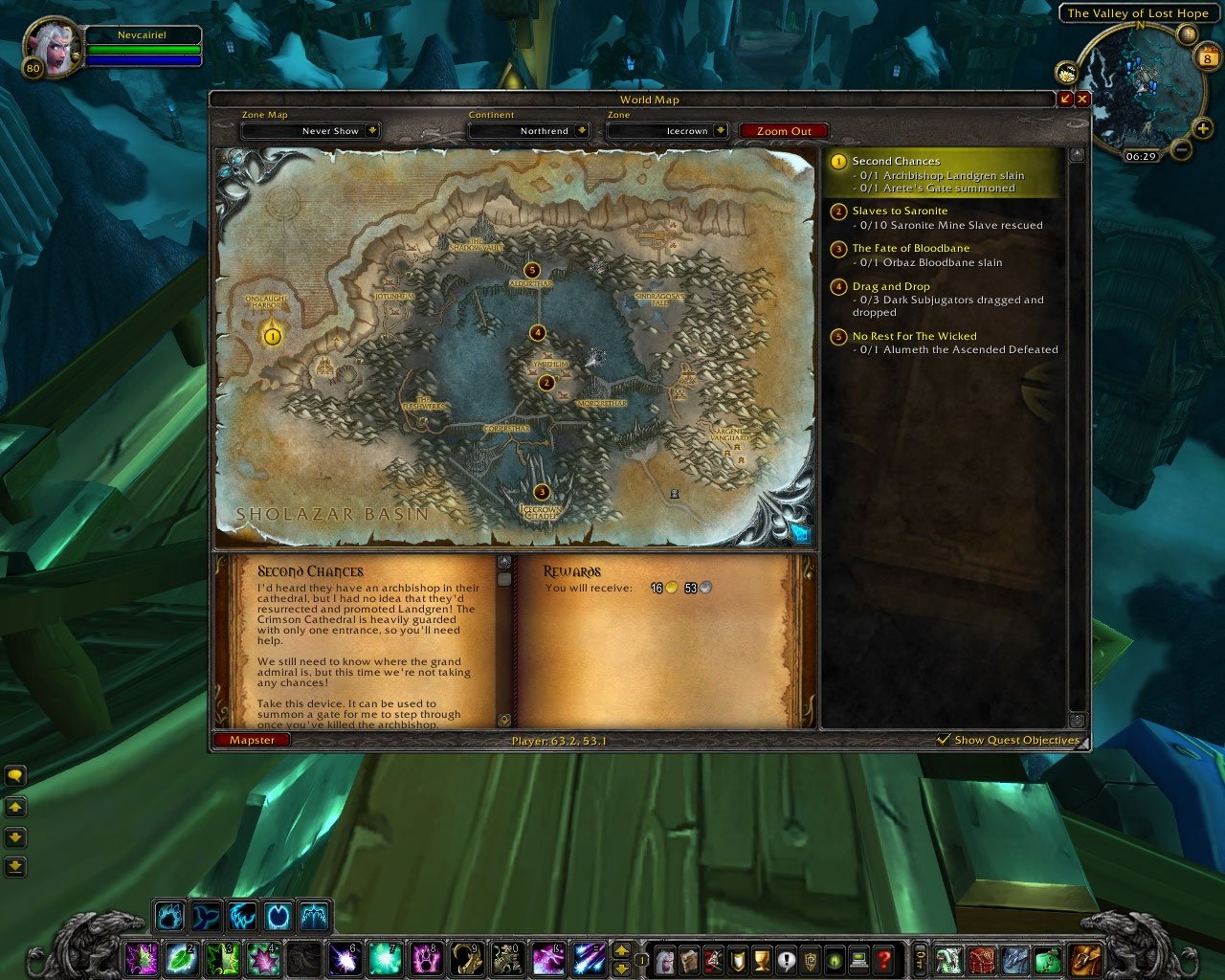
Mapster is a very simple world map enhacement addon, which was designed to work in conjunction with all other map addons out there. The idea to create Mapster originated from pure lack of a simplistic addon that only modifies the world map, without adding a full scale feature set.

Features
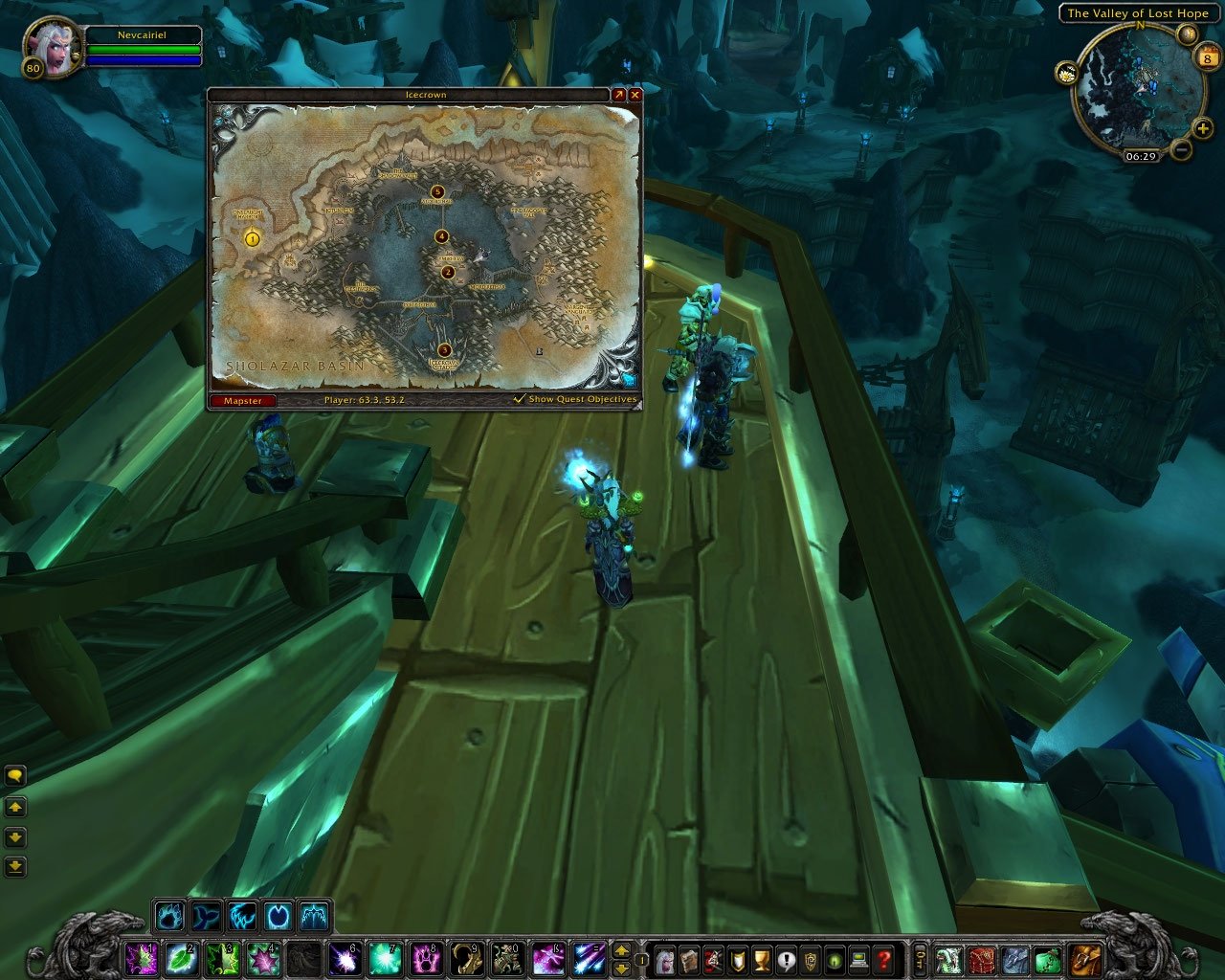
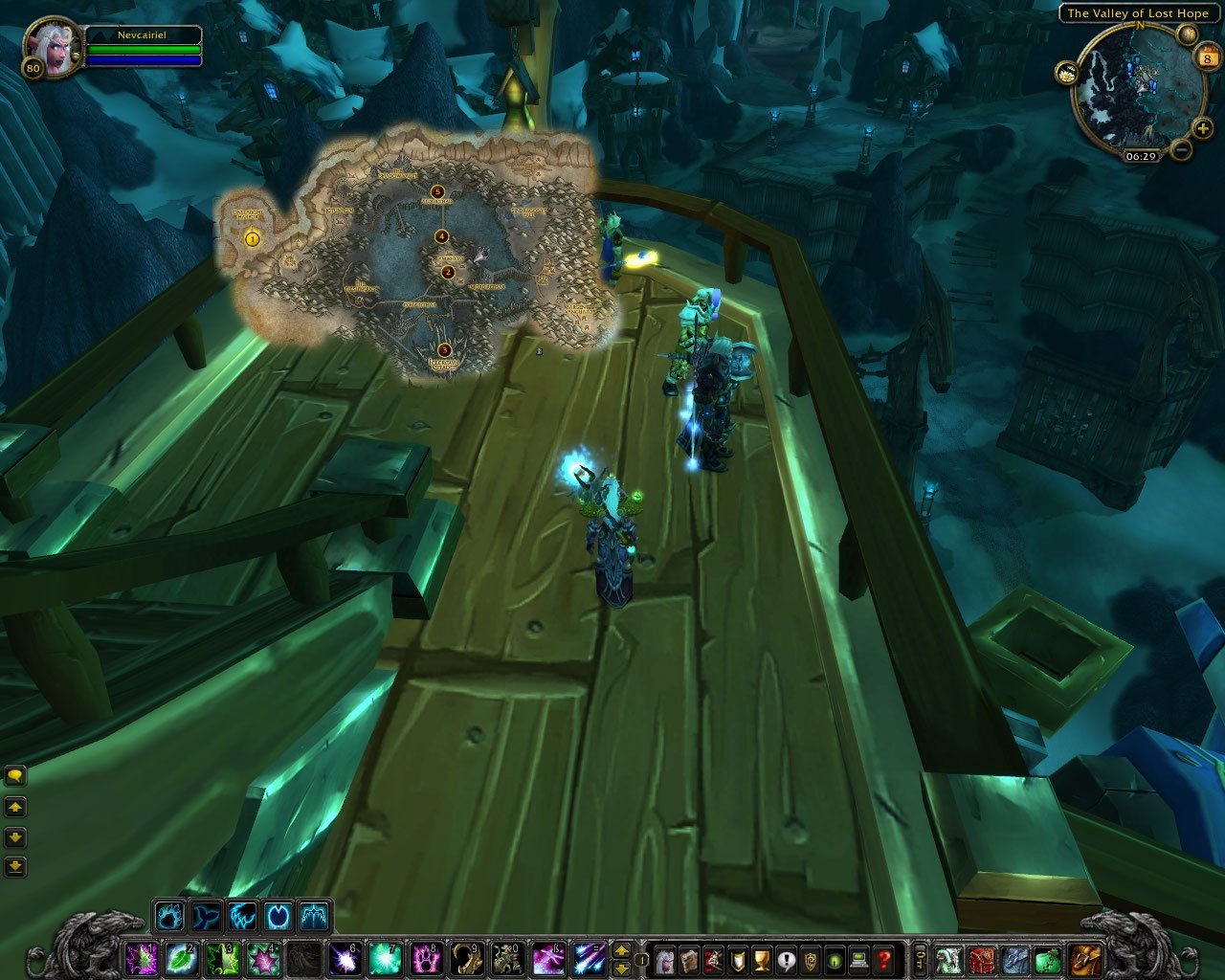
  • Map Style (Scale & Alpha)
  • Coordinates
  • Fog of War removal
  • Enhancement of the raid/party group icons
  • Access to the WotLK Instance Maps from anywhere!

You can access the Mapster configuration menu through the new button on the world map, as shown in the screenshot.
All features (except the style) can be turned off individually if you do not need/want them.

If you're looking for a replacement to Cartographer, i also recommend the following addons:
ChangeLog

1.5.3
- Support for WoW 5.3
- Fixed the scale drag handle
- Fixed a bunch of strata issues causing certain map elements to not show up properly (player ping, for example)

1.5.2
- Support for WoW 5.2
- Fixed display of micro dungeons

1.5.1
- Fixed map overlay in Dun Morogh
- Fixed errant raid member icons on the world map

1.5.0
- Support for WoW 5.0 and Mists of Pandaria
- FogClear data for all Mists of Pandaria zones
- Instance Maps for all new Instances/Raids
- Added an option to change the scale of the Encounter Journal Map Icons
- Fixed behaviour of the Battlefield Map
- Added support for ptBR and itIT locales

1.4.3
- Updated for WoW 4.3
- Added instances/raids added in WoW Patch 4.3 and 4.2

1.4.2
- Fixed a bug that caused the whole UI to hide when the map is shown

1.4.1
- Fixes for 4.1
- Fixes for Digsite Overlays on the Map

1.4.0
- Updated FogClear Data for the new and revised zones of Cataclysm
- Added all Classic and Cataclysm Instances to the Instance Maps module
- Hide the "Track Quest" checkbox in "Minimized" map mode
- Fix the Floor Dropdown in "Minimized" map mode
- Fix an error that occured when using the "Toggle Map Size" keybinding

1.3.11
- Fixed GroupIcon module

1.3.10
- Fixes for the 4.0.1 Patch

1.3.9
- Add the instance map for the Ruby Sanctum

1.3.8
- Fixes for the 3.3.3 Patch

1.3.7
- Properly adjust the position of the map POIs when changing the scale of the map.
- When disabling the BattleMap module, properly restore the previously hidden textures.

1.3.6
- Moved the Quest Objectives drop down to the bottom status bar, so it doesn't collide with the floor drop down anymore.
- Properly apply the saved Quest Objectives state on login.

1.3.5
- Extended the "Show Quest Objectives" Feature to allow showing only the Map Blobs without showing the Panels on the World Map Frame.
- The Map is no longer clamped to the screen, and can be moved (partially) off-screen!
- Adjusted the maximal scale of the map to 200% for even bigger Maps on small UI Scales.
- Fixed an error in the positioning logic that was causing excess errors in some situations.
- Fixed an error that was causing the drag handle to be still click-able even when the map was closed.

1.3.4
- Fixed a nil error in the POI Scaling logic.
- Other random fixes to the frame layouting.

1.3.3
- Added an option to scale the POI Icons on the map.
- InstanceMaps fixes and additions.
- More fixes to the Quest Blobs and combat issue.

1.3.2
- Worked around a Blizzard Limitation that broke opening the map in combat in previous versions.
- Minor fixes

1.3.1
- Fixed a rare nil error related to the Hide Borders code on login.

1.3.0
- Updated for the 3.3.0 Content Patch
- Added support for the "minimized" map, that you can switch to for alternate positioning and size.
- Added a mouse-drag scaler to scale the map without opening the options.
- Added an option to hide the Borders and Artwork in minimized-map-mode.
- Redesigned Instance Maps code to be more versatile in the future.

1.2.3
- Updated for the 3.2.0 Content Patch
- Fixed a glitch that caused the Group Icons on the World Map to be displayed in white sometimes.

1.2.2
- Fixed an glitch with the map overlays in Alterac Valley

1.2.1
- Fix an error with Babble-Zone

1.2.0
- Full support for the 3.1.0 Content Patch!
- Added an InstanceMaps module for the builtin instance maps in the game.
- Add support for !ClassColors
- Fixes and enhancements

1.1.3
- Added an option to change the scale of the PlayerArrow on the map
- Internal changes

1.1.2
- Fixed embeded libraries
- Updated zhTW locale

1.1.1
- Adjusted Draw Layer of the textures in the FogClear module to not block other addons from displaying overlays on the map

1.1.0
- Added a new BattleMap module that applys a skin to the Battlefield MiniMap
- Improved behaviour of the FogClear module
- Alot of small fixes

1.0.5
- Added a workaround for the bug that would reset your map-zoom to the current zone when the Battlefield Minimap was shown
- Moved the Mapster MiniMap button a bit to the left to not overlap with QuestHelper
- Updated FogClear Data
- Small fix to the initialization code that fixes the return values of GetWidth/GetHeight before the map was shown

1.0.4
- Support for WoW 3.0
- FogClear Data for all zones in Wrath of the Lich King included
- Fixes and tweaks for WoW 3.0

1.0.3
- Updated Libraries and Bugfix Release

1.0.2
- Added missing Library to package

1.0.1
- Updated for Patch 2.4
- Now using the 2.4 Interface Options Panel for configuration
- Small fixes and tweaks

1.0.0
- Initial Release
Archived Files (25)
File Name
Version
Size
Author
Date
1.5.2
192kB
Nevcairiel
03-06-13 09:02 AM
1.5.1
191kB
Nevcairiel
09-22-12 02:00 AM
1.5.0
191kB
Nevcairiel
08-28-12 01:33 AM
1.4.3
215kB
Nevcairiel
12-01-11 12:41 PM
1.4.1
213kB
Nevcairiel
05-01-11 04:34 AM
1.4.0
209kB
Nevcairiel
11-27-10 09:25 AM
1.3.11
204kB
Nevcairiel
10-16-10 06:58 AM
1.3.10
206kB
Nevcairiel
10-14-10 09:05 AM
1.3.9
205kB
Nevcairiel
07-02-10 10:07 AM
1.3.8
206kB
Nevcairiel
03-23-10 10:45 AM
1.3.7
205kB
Nevcairiel
02-04-10 02:09 AM
1.3.6
205kB
Nevcairiel
01-26-10 01:07 PM
1.3.4
204kB
Nevcairiel
12-20-09 09:44 AM
1.3.3
203kB
Nevcairiel
12-17-09 03:17 AM
1.3.2
202kB
Nevcairiel
12-12-09 04:08 AM
1.3.1
202kB
Nevcairiel
12-09-09 04:23 AM
1.3.0
203kB
Nevcairiel
12-08-09 07:40 AM
1.2.3
186kB
Nevcairiel
09-01-09 03:30 AM
1.2.2
185kB
Nevcairiel
05-16-09 04:48 AM
1.2.1
185kB
Nevcairiel
04-14-09 10:54 AM
1.2.0
185kB
Nevcairiel
04-14-09 08:44 AM
1.1.3
146kB
Nevcairiel
02-19-09 03:05 AM
1.1.2
138kB
Nevcairiel
12-28-08 10:42 AM
1.1.1
134kB
Nevcairiel
12-04-08 03:06 PM
1.1.0
135kB
Nevcairiel
12-04-08 01:13 AM


Post A Reply Comment Options
Old 12-12-09, 02:56 PM  
Rellikcro
A Kobold Labourer

Forum posts: 0
File comments: 51
Uploads: 0
Originally posted by Bornabe
I use Lightheaded for the Quests I have a hard time with. I too came from Cartographer + Cartographer QuestInfo. I am now using:

Mapster, HandyNotes, HandyNotes Guild, TomTom, Cromulent & Lightheaded as my replacement and am enjoying it quite a bit more than I thought I would be.
I second this, I used Cart for a long time till I found Mapster and now I use all the above addons plus QuestHelper which I still find much better then the built-in one.
Rellikcro is offline Report comment to moderator  
Reply With Quote
Old 12-12-09, 01:31 PM  
Bornabe
A Flamescale Wyrmkin
 
Bornabe's Avatar
AddOn Author - Click to view AddOns

Forum posts: 133
File comments: 288
Uploads: 6
I use Lightheaded for the Quests I have a hard time with. I too came from Cartographer + Cartographer QuestInfo. I am now using:

Mapster, HandyNotes, HandyNotes Guild, TomTom, Cromulent & Lightheaded as my replacement and am enjoying it quite a bit more than I thought I would be.
Bornabe is offline Report comment to moderator  
Reply With Quote
Old 12-12-09, 08:42 AM  
kaimox
A Murloc Raider

Forum posts: 7
File comments: 88
Uploads: 0
Does anybody have an idea what to repalce Cartographer_Questinfo with? The new default questinfo is shurely lacking ...
Cartographer_Questinfo was my only reason for clinging to Cartographer but now both seem dead.
kaimox is offline Report comment to moderator  
Reply With Quote
Old 12-11-09, 09:15 AM  
Bornabe
A Flamescale Wyrmkin
 
Bornabe's Avatar
AddOn Author - Click to view AddOns

Forum posts: 133
File comments: 288
Uploads: 6
Re: Re: Re: wont open in combat

Originally posted by Nevcairiel
I was thinking about that, will see if its easily possible
-- Awesome, you're the best!

I don't get what you really mean by the first. The Blobs can only be drawn for one Quest, sadly. For Minimap, well thats not Mapsters terrain!
-- And I thought about the whole Mapster isn't the MiniMap thing right after I posted that, lol. I'll go bug the author of Chinchilla.

No. HandyNotes + HandyNotes_Guild are the way to go there.
-- Grabbing HandyNotes now, thanks!
Last edited by Bornabe : 12-11-09 at 09:16 AM.
Bornabe is offline Report comment to moderator  
Reply With Quote
Old 12-11-09, 08:02 AM  
Nevcairiel
A Deviate Faerie Dragon
AddOn Author - Click to view AddOns

Forum posts: 11
File comments: 99
Uploads: 7
Re: Hide Border greyed out?

Originally posted by Corbeau
Just wondering why the Hide Border option is greyed out. I really like this addon, Cart was just getting to be too buggy, and I was looking for something with the Fog of War feature. I like that you can hide the border and artwork in the mini mode, but I was wondering why you can't do it in scale mode?
Because it wasn't finished yet, and i wanted to get the 3.3 version out, will be added!
Nevcairiel is offline Report comment to moderator  
Reply With Quote
Old 12-11-09, 08:02 AM  
Nevcairiel
A Deviate Faerie Dragon
AddOn Author - Click to view AddOns

Forum posts: 11
File comments: 99
Uploads: 7
Re: Re: wont open in combat

Originally posted by Bornabe

1) Ability to scale Blizzard's New Quest #s on the Main Map, those things are quite the huge.
I was thinking about that, will see if its easily possible


2) Ability to Enable / Disable Blizzard's New Quest #s / -All- Quest 'Areas'. Currently you can only see the quest blue area for the quest you've got highlighted, and nothing shows on the minimap.
I don't get what you really mean by the first. The Blobs can only be drawn for one Quest, sadly. For Minimap, well thats not Mapsters terrain!


Is there a way to see Guildmates on it built-in?
No. HandyNotes + HandyNotes_Guild are the way to go there.
Last edited by Nevcairiel : 12-11-09 at 08:16 AM.
Nevcairiel is offline Report comment to moderator  
Reply With Quote
Old 12-11-09, 07:59 AM  
Nevcairiel
A Deviate Faerie Dragon
AddOn Author - Click to view AddOns

Forum posts: 11
File comments: 99
Uploads: 7
Re: wont open in combat

Originally posted by speak
mapster wont open if im in combat. a message in my chat window says "interface action failed because of an addon" and tahts it - nothing in bugsack or elsewhere.

once i exit combat, map wroks fine again.
I'm working on a fix for that, should be here soon!
Last edited by Nevcairiel : 12-11-09 at 08:00 AM.
Nevcairiel is offline Report comment to moderator  
Reply With Quote
Old 12-11-09, 07:30 AM  
Bornabe
A Flamescale Wyrmkin
 
Bornabe's Avatar
AddOn Author - Click to view AddOns

Forum posts: 133
File comments: 288
Uploads: 6
Re: wont open in combat

Mook, FlightMap works fine, you need to go into it's options to have it show Unknown Flight Paths, etc... pretty much check all it's options and it'll show you all the Flight Masters, including ones you've not visited. I didn't have to visit any with Mapster + FlightMap + TomTom myself.
-----

Add one more to the Cartographer Convert Crew, I LOVE your latest release of Mapster, it's vedy vedy nice. If I may put in a request:

1) Ability to scale Blizzard's New Quest #s on the Main Map, those things are quite the huge.

2) Ability to Enable / Disable Blizzard's New Quest #s / -All- Quest 'Areas'. Currently you can only see the quest blue area for the quest you've got highlighted, and nothing shows on the minimap.

3) I know you've noted no support for older Dungeon Maps... but is there a possibility to incorporate perhaps if a user has Atlas Installed, maybe the Atlas Maps so when we're in a Dungeon, it shows that Map instead? Smacking M is a lot easier than opening Atlas.

I'm using Mapster in the BornabeUI Compilation now and am VERY pleased with everything you've done. The simplicity of Mapster couldn't be beat. Is there a way to see Guildmates on it built-in?
Last edited by Bornabe : 12-11-09 at 07:32 AM.
Bornabe is offline Report comment to moderator  
Reply With Quote
Old 12-11-09, 12:14 AM  
speak
A Wyrmkin Dreamwalker
 
speak's Avatar

Forum posts: 57
File comments: 185
Uploads: 0
wont open in combat

mapster wont open if im in combat. a message in my chat window says "interface action failed because of an addon" and tahts it - nothing in bugsack or elsewhere.

once i exit combat, map wroks fine again.
plsfix!ty
ps im another cartographer convert! soon this addon will be #2 most downloaded mod! maybe even #1!
speak is offline Report comment to moderator  
Reply With Quote
Old 12-09-09, 09:43 PM  
Corbeau
A Kobold Labourer

Forum posts: 0
File comments: 36
Uploads: 0
Hide Border greyed out?

Just wondering why the Hide Border option is greyed out. I really like this addon, Cart was just getting to be too buggy, and I was looking for something with the Fog of War feature. I like that you can hide the border and artwork in the mini mode, but I was wondering why you can't do it in scale mode?
Corbeau is offline Report comment to moderator  
Reply With Quote
Old 12-09-09, 09:41 PM  
Mook
A Murloc Raider
AddOn Compiler - Click to view compilations

Forum posts: 6
File comments: 120
Uploads: 1
Flight Master Icons

Howdy!

Another user who's jumped ship from Cartographer to Mapster + TomTom, and lovin it!

Question - does anyone know of an AddOn that can successfully put the FlightMaster icons on the Mapster map? I really, really miss this, but FlightMap apparently won't work on the Mapster WorldMap.

Oh, one other thing (damn users right? - I used SuperDuperMacro and the keybindings for Bartender4 to setup a keypress to be able to toggle the WorldMap size from big, to small, to big, etc. Adding a keybinding directly into Mapster to allow for toggling between the big and small maps would be awesome.

Excellent AddOn! I appreciate all the work you've put into it!

EDIT: Doh, please forgive my noobishness, I apparently just need to (re)talk to each of the FlightMasters before they show up on Mapster. Nvm!
Last edited by Mook : 12-10-09 at 04:18 PM.
Mook is offline Report comment to moderator  
Reply With Quote
Old 12-09-09, 02:35 PM  
Limb0
A Cobalt Mageweaver
 
Limb0's Avatar
AddOn Author - Click to view AddOns

Forum posts: 220
File comments: 298
Uploads: 10
I've been enjoying this addon, but would like a zoom in feature (previous Cartographer3 user). Is this something that you might consider?
__________________
Limb0 is offline Report comment to moderator  
Reply With Quote
Old 12-09-09, 01:26 PM  
Banur
A Murloc Raider
AddOn Author - Click to view AddOns

Forum posts: 7
File comments: 126
Uploads: 2
Hmm I can't move the map to the bottom. It seems to be blocked somehow.

#edit: Well I can move it, but just above over the edge of the screen.
Last edited by Banur : 12-09-09 at 03:46 PM.
Banur is offline Report comment to moderator  
Reply With Quote
Old 12-09-09, 07:59 AM  
Ugmar
A Defias Bandit
AddOn Author - Click to view AddOns

Forum posts: 2
File comments: 6
Uploads: 1
Cartographer replacement

I'm currently in the process of replacing my long time friend cartographer with something a bit better, trying out Mapster now and like what I see.

Using tom tom and gatherer there is (for now) just one feature im kindof missing from using cartographer, and thats when you open the map there is a brief indication to where your player arrow is, some flashing thingie to help you notice your current location. Do you have any plans to add a similar feature?

Edit: Oh, I found the Player Arrow Scale, @200% that helps alot =) Still, its nicer to have a small arrow and let it flash or minimap-ping like animation when you open your map, just to let your eyes naturally draw to it, but much less important to me now =)

AWESOME addon, you made my addon-break day a lot more cheerful
Last edited by Ugmar : 12-09-09 at 08:04 AM.
Ugmar is offline Report comment to moderator  
Reply With Quote
Old 12-09-09, 02:41 AM  
romac
A Kobold Labourer

Forum posts: 0
File comments: 1
Uploads: 0
cursor coords

***EDIT***
the cursor coords that were showing up on my main map were from titan panel's "titan coords" addon - mapster somehow makes these coords wrong - disabled the titan mod and am now using the mapster coords with no problems
------------------------------------------------------
mapster is messing up cursor coords on the main map

i have tom tom and mapster - both with "don't show" coords selected - i presume there are coords now included with the mainmap becasue i still have coords shown on the main map (even with both tom tom and mapster coords turned off)

when i disable the mapster addon the cursor coords are correct
when i enable mapster the cursor coords are wrong

i'd use mapster coords if i could turn off the coords on the main map, but they overlap making them basically unreadable
Last edited by romac : 12-09-09 at 02:57 AM.
romac is offline Report comment to moderator  
Reply With Quote
Post A Reply


Category Jump:

Support AddOn Development!

You have just downloaded by the author . If you like this AddOn why not consider supporting the author? This author has set up a donation account. Donations ensure that authors can continue to develop useful tools for everyone.



