| Go to Page... |

Pictures
File Info
| Updated: | 07-29-18 04:26 AM |
| Created: | unknown |
| Downloads: | 155,523 |
| Favorites: | 751 |
| MD5: |
PhanxChat 

| I am no longer developing or maintaining World of Warcraft addons. I haven't played in years, and don't have the time or interest to continue working on addons for a game I don't play anymore. If you are an addon author interested in continuing one of my addons, please see https://phanx.net/addons/. If you are an addon user, sorry, but there won't be any more fixes or updates from me. |
[DE] Entfernt das Durcheinander des Chat-Fensters und fügt einige Funktionen hinzu.
[ES] Eliminar desorden de la ventana de chat y añadir algunas funciones.
[FR] Retire les restrictions du chat et ajoute quelques fonctionnalités.
[PT] Remover a desordem da janela de bate-papo e adicionar algumas funcionalidades.
[RU] Удаляет беспорядок в окне чата и добавляет новые возможности.
[CN] 移除聊天框的杂物并加入一些功能。
[TW] 移除聊天框架的雜亂並新增一些功能。
Features
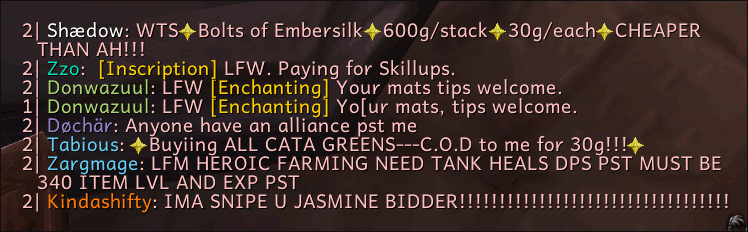
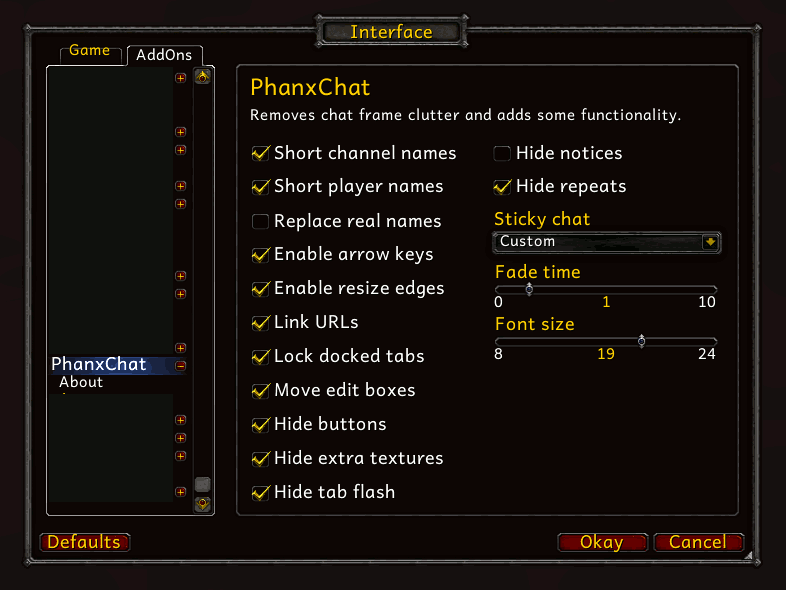
- Shortens chat channel names
- Shortens cross-realm character names and Real ID player names
- Replaces Real ID player names and BattleTags with WoW character names
- Enables arrow keys without the Alt key (*)
- Enables resizing chat frames by their edges
- Makes all channels sticky (**)
- Makes URLs clickable for easy copying
- Moves the input box above the chat frame
- Sets the delay time for chat text fading
- Stops docked chat tabs from being dragged
- Hides the scroll, menu, and social buttons
- Hides extra textures on chat frames
- Hides the flashing effect on chat tabs
- Hides channel notification messages
- Hides repeated messages in public channels
- Enables class colored names in all channels with a single click
- Changes the text size in all chat frames from a single control
(*) As of Patch 5.4 using Up/Down to access previously entered chat lines without the Alt key is limited to non-secure commands only. If you need to access previously entered secure commands (like /cast or /use) you will still need to hold the Alt key.Options & Commands
(**) If a channel is sticky, then after talking in that channel, the chat input box will open to the same chat type again, rather than making you type “/g” or “/ra” again.
- Type “/pchat” for options, or find them in the Interface Options.
- Type “/clear” or “/clearchat” to clear all visible chat windows.
- Type “/clear all” or “/clearchat all” to clear all chat windows.
- Type “/tt" or “/wt” to send a whisper to your current target.
Some additional options, such as customizing which channels are made sticky and what abbreviations are used for channel names, are available by editing the Core.lua file in a plain-text editor such as Notepad. If you break something, download a fresh copy and try again.Language Support
Please DO NOT send me PMs asking for help, reporting bugs, or requesting features. To report a bug or suggest a feature, see the instructions below. To get help, post a comment. I read and respond to every ticket and comment!
Works in all languages. Translated into English, Deutsch, Español, Français, Português, Русский, 한국어, 简体中文, and 繁體中文 (partial). Add or update translations for any locale on CurseForge!Feedback
Post a ticket or comment. If you are reporting a bug, please include directions I can follow to reproduce the bug, whether it still happens when all other addons are disabled, and the exact text of the related error message (if any) from Bugger.
The following features will never be added to PhanxChat, and requests for them will be deleted, so please just don't bother posting such requests:
- Reskinned or recolored edit box, chat tabs, or anything else
- Custom fonts, outlines, shadows, or text alignments
- Freely movable/draggable edit box
- Extra entries in the player name right-click menu
- Extra click actions on player names (eg. alt-click to invite)
- Alerts for specific words or message types seen in chat
- Mouseover tooltips on item or other links
- Keybindings to open specific chat channels
- Nicknames, main/alt aliases, group numbers, levels, or any other extra text
- Anything related to timestamps
Version 8.0.0.1
Version 8.0.0.0
Version 7.3.5.1
Version 7.3.5.0
Version 7.3.0.0
Version 7.1.0.1
Version 7.1.0.0
Version 7.0.3.0
Version 6.0.3.88
Version 6.0.3.87
Version 6.0.2.253
Version 6.0.2.250
Version 5.4.8.244
Version 5.4.8.241
Version 5.4.7.240
Version 5.4.7.239
Version 5.4.7.237
Version 5.4.7.236
Version 5.4.2.231
Version 5.4.2.221
Version 5.4.1.219
Version 5.4.1.216
Version 5.4.1.212
Version 5.3.0.210
Version 5.3.0.209
Version 5.2.0.208
Version 5.2.0.203
Version 5.2.0.201
Version 5.2.0.198
Version 5.1.0.187
Version 5.1.0.186
Version 5.1.0.177
Version 5.1.0.174
Version 5.0.5.167
Version 5.0.4.163
Version 4.3.4.159
Version 4.3.4.155
Version 4.3.3.147
Version 4.3.0.139
Version 4.2.2.136
Version 4.2.0.135
Version 4.2.0.134
Version 4.1.0.133
Version 4.0.3.120
Version 4.0.3.118
Version 4.0.1.112
Version 4.0.1.111
Version 3.3.5.108
Version 3.3.5.101
Version 3.3.5.94
Due to file changes, you should completely uninstall your existing copy of the addon before installing this version. Removing your old saved variables is recommended, but not required.
Version 3.3.5.73
Version 3.3.5.72
Version 3.3.3.68
Version 3.3.3.67-beta
Version 3.3.3.66-beta
Version 3.3.3.64-beta
Version 3.3.0.60
Version 3.3.0.57
Version 3.2.0.53
Version 3.2.0.51
Version 3.1.1.49-beta
Version 3.1.1.48-beta
Version 3.1.0.39-beta
Version 3.1.0.37-beta
Version 3.1.0.35-beta
Version 3.1.0.33-beta
Version 3.0.2.26
Version 3.0.2.22
Version 3.0.2.21
Version 3.0.2.20
Version 2.4.3.19
Version 2.4.3.18
Version 2.4.3.17
Version 2.4.3.14
Version 2.4.3.10
Version 2.4.3.9
Version 20100-r08
Version 20100-r07
Version 20100-r06
Version 20100-r05
Version 20100-r04
Version 20100-r03
Version 20100-r02
Version 20100-r01
TEMPORARY fix for visible line ID. Note that this fix discards the line ID completely, preventing use of the new spam reporting functions. If you would prefer to report spam, disable the player name class coloring and bracket removal features.
Version 2.1.1
Version 2.1.0
Version 2.0.5
Version 2.0.4
Version 2.0.3
Version 2.0.2
Version 2.0.1
Version 2.0
Version 1.4
Version 1.3
Version 1.2
Version 1.0
- Fixed moving chat frames near the edges of the screen
- Removed special handling for the "scroll to bottom" button as it behaves nicely by default now
Version 8.0.0.0
- Updated for WoW 8.0 (thanks Sefriol!)
Version 7.3.5.1
- Fixed localization
Version 7.3.5.0
- Added an option to adjust the chat frame line spacing
- Rearranged the options panel
Version 7.3.0.0
- Updated for WoW 7.3
Version 7.1.0.1
- Fixed removing brackets from Battle.net player names
- Fixed an error when shift-clicking Battle.net player names in chat (ticket #13)
- Added intelligent downgrading of group channels (/i is automatically converted to /ra or /p if you're not in an instance group, and /ra and /rw are converted to /i or /p if you're not in a raid group) (ticket #9)
Version 7.1.0.0
- Updated for WoW 7.1
- Fixed an error caused by Blizzard renaming the chat frame friends button
Version 7.0.3.0
- Updated for WoW 7.0.3
- Added toggles for the game's "Enable Mouse Wheel Scrolling" and "Remove Chat Hover Delay" settings, which are no longer exposed in the default Chat options panel.
Version 6.0.3.88
- Fixed the term "battle.net" being turned into a clickable link.
- Shift-clicking links into chat and cycling through previously entered chat lines will no longer insert an extra space.
- The /pchat clear command is now just /clear and clears only visible chat frames by default. Use /clear all to clear all chat frames instead.
- The /pchat command remains for opening the options window.
Version 6.0.3.87
- Fixed option to disable chat fading
Version 6.0.2.253
- Added an option to prevent the chat frame from opening a pet battle combat log window
- Updated French and Portuguese translations
Version 6.0.2.250
- Updated for WoW 6.0
- Fixed an error that could occur if a Battle.net whisper was received while logging in
Version 5.4.8.244
- Updated Ð*уÑ�Ñ�кий translations from Yafis
- Updated 简体ä¸*æ–‡ translations from tss1398383123
Version 5.4.8.241
- Fix for missing labels on dropdowns in options panel
Version 5.4.7.240
- Fixed an error when opening the chat edit box to a numbered channel
Version 5.4.7.239
- Fixed an error when setting the fade time to 0
- Improved channel name shortening to avoid matching other link types with channelname-like text
Version 5.4.7.237
- Updated the "Hide extra textures" option to look better on temporary chat frames whose tabs have icons
Version 5.4.7.236
- Updated Battle.net player name shift-click reports to support Hearthstone and the Battle.net Desktop App
Version 5.4.2.231
- Battle.net names will now be colored by class all the time, not just when replacing them with character names
- Battle.net "Player (Character) has come online" messages will now be shortened to just "Name has come online" using your Battle.net name settings
- Battle.net name shortening and coloring will no longer occasionally not work right away after logging in
- The /tt and /wt commands will now recognize the player as a valid whisper target
- Updated Traditional Chinese localization from tss1398383123 on Curse
Version 5.4.2.221
- Fixed an issue with removing realm names
Version 5.4.1.219
- Improved the behavior of history cycling after reusing an existing history line.
- Fixed an error that would occur when trying to cycle through chat history before any lines were added to it.
Version 5.4.1.216
- Added a limited workaround for Blizzard's stupid auto-complete changes in 5.4 that broke the ability to cycle through your chat input history using the Up/Down arrows without holding the Alt key. However, this is limited to non-secure commands only. If you need to access previously entered secure commands (like /cast or /use) you will still need to hold the Alt key.
Version 5.4.1.212
- Updated for WoW 5.4
- Fixed the "Shorten RealID names" option not saving properly
Version 5.3.0.210
- Updated German localization from staratnight
- Updated Simplified Chinese localization from tss1398383123
Version 5.3.0.209
- Updated for WoW 5.3
- Battle.net names are no longer class colored when Show Class Colors is disabled
Version 5.2.0.208
- Channel names are now shortened in the editbox too
- Chat fade time can now be specified in 15-second increments
Version 5.2.0.203
- Updated Traditional Chinese localization from BNSSNB on CurseForge
- Updated German localization from bigx2 on CurseForge
Version 5.2.0.201
- Fixed shortening real names at first login
- Fixed using short names for numbered channels instead of numbers only (Lua config only)
Version 5.2.0.198
- Updated for WoW 5.2
- The "Shorten player names" option has been renamed to "Remove server names" and now only removes server names from cross-realm character names.
- A new "Shorten real names" option has been added, with the choice of keeping full names, showing first names only, or replacing Real ID names with BattleTags.
- The "Replace real names" option will continue to replace both Real ID names and BattleTags with character names.
- The "Show class colors" option now always overrides the individual channel options in the Blizzard chat options window. To avoid confusion, the Blizzard check boxes are disabled.
Version 5.1.0.187
- Added LibChatAnims to work around public chat API functions tainting the talent frame due to Blizzard's stupidity
Version 5.1.0.186
- Fixed channel name shortening in locales that include spaces, city names, etc.
- Updated abbreviations for "Instance Chat" for all locales
Version 5.1.0.177
- Fixed an error that could occur when receiving certain types of messages
- Updated frFR translations from L0relei on Curse
- Removed 5.0.5 compatibility
Version 5.1.0.174
- Updated for WoW 5.1
- Fixed shift-clicking on Real ID and BattleTag names
- Updated ptBR translations from mgaedke on Curse
Version 5.0.5.167
- Fixed Real ID name shortening and character name replacement
- Added BattleTag name shortening (removes the #1234 nonsense) and character name replacement
- Updated deDE translations from staratnight
- Updated zhCN translations from tss1398383123
Version 5.0.4.163
- Updated for WoW 5.0.4
- Removed all references to GuildRecruitment channel since it hasn't existed for a while
- Added itIT channel names and abbreviations
- Updated channel names for all locales from ChannelNames.dbc
Version 4.3.4.159
- Compatible with both 4.3 live realms and Mists of Pandaria beta realms. Use the “Load out of date addons� checkbox on beta realms — the TOC won’t be updated until Patch 5.0 goes live.
- The game’s “Enable Mouse Wheel Scrolling� option will now be enabled and locked while PhanxChat’s “Hide buttons� option is enabled.
- The game’s “Show Class Color� option for each individual chat type will be enabled and locked while PhanxChat’s “Show class colors� option is enabled.
- Fixed some options not updating properly.
- Removed a debugging print.
- Updated system channel names for deDE and frFR.
- Added more zhTW translations from yunrong on CurseForge.
Version 4.3.4.155
- Compatible with both 4.3 live realms and Mists of Pandaria beta realms. Use the “Load out of date addons� checkbox on beta realms — the TOC won’t be updated until Patch 5.0 goes live.
- The default UI’s “Chat Style� option will now be set and locked to “Classic� if the edit box is moved to the top.
- Added a “Show class colors� checkbox in the options panel as a shortcut for enabling class colors in all chat channels.
- Improved tell-target functionality.
- Added partial zhTW localization from yunrong on CurseForge.
Version 4.3.3.147
- Fixed an issue preventing the "Short player names" option from working with Real ID names.
- Fixed an issue with Blizzard URL links.
- Added a workaround to help prevent taint errors from the Blizzard Glyph UI.
- Updated esMX translations for server chat channel names.
Version 4.3.0.139
- Updated for WoW 4.3
- Added Português (ptBR) translations
- Fixed shift-clicking on RealID names
Version 4.2.2.136
- Fixed beginner tooltips sticking on chat tabs
Version 4.2.0.135
- Fixed short chat channel names
- Fixed class-colored character names for Real ID friends
Version 4.2.0.134
- Updated for WoW 4.2
Version 4.1.0.133
- Fixed the weird tab resizing behavior in Patch 4.1
- Added default sticky settings for Battle.net conversations and whispers
- Added Spanish translations (still need channel names)
- Added Simplified Chinese translations by tss1398383123 on CurseForge
- Improved the appearance of highlighted and selected tabs
Version 4.0.3.120
- Added Korean localization from Talkswind on Curse
Version 4.0.3.118
- Updated Real ID name replacement for WoW 4.0
- Fixed the cursor when resizing the chat frame
Version 4.0.1.112
- Fixed the URL copy module for changes in WoW 4.0.1
Version 4.0.1.111
- Fixed errors with temporary chat windows
- Added frFR localization from Strigx on curse.com
Version 3.3.5.108
- Fixed chat buttons not switching sides when the chat frame is dragged
- Added deDE localization from ac3r on wowinterface.com
- Added ruRU localization from hungry2 on curse.com
Version 3.3.5.101
- Fixed shortening of Real ID player names
- Added replacement of Real ID player names with WoW character names
- Added /who print when shift-clicking Real ID player names to keep them consistent with normal player names
- Improved efficiency of bottom button display check
- Improved visibility of resize edges on unlocked chat frames
- Fixed URL linking to not cause taint
Version 3.3.5.94
Due to file changes, you should completely uninstall your existing copy of the addon before installing this version. Removing your old saved variables is recommended, but not required.
- Added a Shorten Player Names feature, which shortens player names by removing realm names from cross-realm players and last names from Real ID players.
- Removed the Auto Start Chat Log feature, because I never used it.
- Removed the Color Player Names feature, because it was just too much code and performance overhead to color the very few types of messages that the default UI doesn't already color, and also confused all the people who never read patch notes or change logs.
- Translations are needed for all locales.
- All existing translations for the configuration UI have been discarded, since none of them had been updated since the transition from slash commands to a GUI over a year ago. If you can provide translations for any locale, please send me a PM.
- Additionally, several chat channels are currently only shortened in English locales, because nobody has provided translations for them. If you see a channel name that isn't shortened, please post a bug report ticket with your locale (eg. "German" or "deDE"), the English name of the channel (eg. "General"), the localized name of the channel (eg. "Allgemein"), and an appropriate short form for your locale (eg. "A").
Version 3.3.5.73
- Fixed a bug preveing the new Battle.net "toast" window from being shown
- Fixed a bug relating to sticky channel selection
Version 3.3.5.72
- Updated for patch 3.3.5. NOT BACKWARDS COMPATIBLE.
- Added an “Enable resize edges� option to add resize controls along all edges of chat frames, and remove the bottom-left-corner resize arrow. This basically just restores pre-3.3.5 chat frame resizing functionality.
- Added a “Hide extra textures� option to hide the extra textures on chat tabs and chat edit boxes added in patch 3.3.5.
- Removed the “Enable mousewheel scrolling� option, since this functionality is now provided by the default UI.
- Modified the default UI's mousewheel scrolling to scroll more lines at a time, page up/down on ctrl, and top/bottom on shift.
- Fixed a bug preventing custom short channel name formats from using the channel name in addition to the channel number.
- Translations are needed for the new options in all locales. Also, major revisions are needed for several locales. If you can assist with translations for any locale, please send me a PM.
Version 3.3.3.68
- Fixed an bug that caused the player's own repeated messages to be hidden
Version 3.3.3.67-beta
- Fixed an error that caused tab flashing to not always be disabled
Version 3.3.3.66-beta
- Fixed an error caused by a misnamed variable
- Added missing config library
Version 3.3.3.64-beta
- The "Dungeon Guide" title is now abbreviated
- Repeat-message suppression is now case-insensitive and ignores spaces
- The configuration panel has been rearranged, and the wording of several options improved
- Translations for all locales need to be reviewed
Version 3.3.0.60
- Repeat message suppression now looks at the last 15 lines (up from 10)
- Fixed repeat message suppression option
Version 3.3.0.57
- Update for WoW 3.3
Version 3.2.0.53
- Added checks to prevent errors caused by other addons that haven't been updated for 3.2, because I'm tired of hearing about them
- Fixed suppression options again
- Changed from hardcoded class name translations to new FillLocalizedClassList API
Version 3.2.0.51
- Updated class coloring for WoW 3.2
Version 3.1.1.49-beta
- Fixed error preventing ChatFrame3 and ChatFrame7 from being formatted
Version 3.1.1.48-beta
- Fixed achievement messages for Korean (and possibly other non-English) clients
- Improved URL linking to reduce the occurrence of false positives
- Updated koKR translations by kornshock @ WoWInterface
Version 3.1.0.39-beta
- Rearranged configuration GUI
- Re-added "/pchat clear" command for easy keybinding
Version 3.1.0.37-beta
- Fixed suppressing repeated messages in 3.1
- Fixed error in option for shortening channel names
Version 3.1.0.35-beta
- Add LibStub for GUI configuration
Version 3.1.0.33-beta
- Update for WoW 3.1 (NOT backwards compatible)
- Fix German translation for "Death Knight"
- Add GUI configuration in the Interface Options panel
- Remove command-line configuration
Version 3.0.2.26
- Fix channel notice suppression option
Version 3.0.2.22
- Fix chat tab dragging
Version 3.0.2.21
- Fix font size command
Version 3.0.2.20
- Remove 2.4.3 compatibility
Version 2.4.3.19
- Fix scroll-to-bottom button for 2.4.3
Version 2.4.3.18
- Fix channel notice suppression option
Version 2.4.3.17
- Add complete deDE translations from Melikae
- Add complete ruRU translations from Valle
Version 2.4.3.14
- Fix suppression options
- Add complete koKR translations from TalksWind
Version 2.4.3.10
- Add complete frFR translations from Nicolas
Version 2.4.3.9
- Fix frame blacklisting
Version 20100-r08
- Fix erratic chat logging
- Added option to include number with short channel names
- Added partial Traditional Chinese translations (thanks ??)
- Use RAID_CLASS_COLORS for class coloring (I recommend ReTeal for restoring the teal class color for shamans)
Version 20100-r07
- Changed method for getting class information from short who queries. This means you will not get class coloring from shift-clicking blood elves and night elves.
Version 20100-r06
- Changed detection pattern for short who results to be less specific (should always pick up names and classes now)
- Added a compatibility check to stop the errors from AtlasLoot when validating items
Version 20100-r05
- Fixed FuBar plugin / minimap icon error
- changed FuBar plugin / minimap icon menu
Version 20100-r04
- Fixed duplicate FuBar plugin / minimap icon
Version 20100-r03
- Fixed sticky channels toggle
- Fixed channel color memory toggle
- Maybe fixed Auctioneer conflict (I couldn't reproduce it)
Version 20100-r02
- Added option to save class colors between sessions
- Added option to suppress certain spammy messages
- Added optional GUI configuration
Version 20100-r01
TEMPORARY fix for visible line ID. Note that this fix discards the line ID completely, preventing use of the new spam reporting functions. If you would prefer to report spam, disable the player name class coloring and bracket removal features.
Version 2.1.1
- Removed workaround code for Blizzard's "reappearing channels" bug (fixed in WoW 2.0.7)
Version 2.1.0
- Added chat fading controls
- Fixed tell-target keybinding
Version 2.0.5
- Updated embedded libraries for WoW 2.0.3
Version 2.0.4
- Fixed chat string setup on login
- Fixed chat logging start on login
Version 2.0.3
- Fixed chat string shortening
Version 2.0.2
- Fixed menu button toggle (again)
Version 2.0.1
- Fixed menu button toggle
- Fixed chat tab lock toggle
Version 2.0
- Partial rewrite
- Fixed guild MotD being suppressed on login
- Added keybinding and slash command (/tt) to whisper your current target
- Added class name coloring
- Added toggle for arrow keys in the edit box
Version 1.4
- Update for WoW 2.0
Version 1.3
- Added URL copy feature with several options
Version 1.2
- Added tab flash suppression
- Added tab locking
- Added toggles for some options
Version 1.0
- Initial release
 |
Comment Options |
 07-29-18, 01:14 AM
|
|
|
A Murloc Raider
Forum posts: 6
File comments: 15
Uploads: 0
|
new update is still broken, you cannot move the 2nd chat window without it having some gap between the sides of the screen
|

|

|
| C A I N |
| View Public Profile |
| Send a private message to C A I N |
| Find More Posts by C A I N |
| Add C A I N to Your Buddy List |
|
07-27-18, 09:39 PM
|
||
|
A Murloc Raider
Forum posts: 6
File comments: 15
Uploads: 0
|
|
|
|
|
|
| C A I N |
| View Public Profile |
| Send a private message to C A I N |
| Find More Posts by C A I N |
| Add C A I N to Your Buddy List |
|
07-27-18, 05:32 PM
|
|
|
A Kobold Labourer
Forum posts: 0
File comments: 51
Uploads: 0
|
if you go to the github a gentleman named Sefriol made the changes to the files. you just have to go and view the full page of the Core.lua, Modules/HideButtons.lua, and Modules/ReplaceRealNames.lua and copy paste. took 30 seconds. works great now. I think phanx is afk. its awaiting his approval and hes obviously not playing wow at the moment.
|
|
|
|
| lcarnegie |
| View Public Profile |
| Send a private message to lcarnegie |
| Find More Posts by lcarnegie |
| Add lcarnegie to Your Buddy List |
|
07-25-18, 03:33 PM
|
|
|
A Kobold Labourer
Forum posts: 0
File comments: 51
Uploads: 0
|
hopefully its being worked on Ive used this addon for years. love it
|
|
|
|
| lcarnegie |
| View Public Profile |
| Send a private message to lcarnegie |
| Find More Posts by lcarnegie |
| Add lcarnegie to Your Buddy List |
|
07-22-18, 05:56 PM
|
|
|
A Murloc Raider
Forum posts: 6
File comments: 15
Uploads: 0
|
update?
Are there plans to update this addon?
 |
|
|
|
| C A I N |
| View Public Profile |
| Send a private message to C A I N |
| Find More Posts by C A I N |
| Add C A I N to Your Buddy List |
|
05-12-18, 06:43 AM
|
|
|
A Fallenroot Satyr
Forum posts: 25
File comments: 100
Uploads: 0
|
I knew I was just blind - thank you for looking. That way the problem I reported is solved.
|
|
|
|
| kaimox |
| View Public Profile |
| Send a private message to kaimox |
| Find More Posts by kaimox |
| Add kaimox to Your Buddy List |
|
05-12-18, 06:17 AM
|
|||
|
Cat.
 Forum posts: 5617
File comments: 2321
Uploads: 54
|
3 seconds of looking shows me it's in the same place it's been for the last decade or so. Esc > Interface > Social > Chat Timestamps dropdown near the bottom.
__________________
Retired author of too many addons. Message me if you're interested in taking over one of my addons. Don’t message me about addon bugs or programming questions. |
||
|
|
|
| Phanx |
| View Public Profile |
| Send a private message to Phanx |
| Find More Posts by Phanx |
| Add Phanx to Your Buddy List |
|
05-11-18, 10:40 AM
|
|
|
A Fallenroot Satyr
Forum posts: 25
File comments: 100
Uploads: 0
|
I'm sorry for the off-topic but where are the WoW intern chat timestamps? I know the setting was there in the past, but I can't find them any more. I'm probably just blind - please, somebody help me out?
|
|
|
|
| kaimox |
| View Public Profile |
| Send a private message to kaimox |
| Find More Posts by kaimox |
| Add kaimox to Your Buddy List |
|
05-06-18, 07:36 PM
|
|||
|
A Chromatic Dragonspawn
Forum posts: 163
File comments: 643
Uploads: 42
|
Russian message: "Смена канала: [1. Общий - Оргриммар]." (mind the dot) You can test pattern on this string or just add dot to enUS string. I was assuming messages ending with channel link (incl. dot) as system messages and subbing them to "General Orgrimmar", you can just not do that.
Last edited by d87 : 05-06-18 at 07:42 PM.
|
||
|
|
|
| d87 |
| View Public Profile |
| Send a private message to d87 |
| Find More Posts by d87 |
| Add d87 to Your Buddy List |
|
05-06-18, 04:57 PM
|
||
|
Cat.
Forum posts: 5617
File comments: 2321
Uploads: 54
|
__________________
Retired author of too many addons. Message me if you're interested in taking over one of my addons. Don’t message me about addon bugs or programming questions.
Last edited by Phanx : 05-06-18 at 05:04 PM.
|
|
|
|
|
| Phanx |
| View Public Profile |
| Send a private message to Phanx |
| Find More Posts by Phanx |
| Add Phanx to Your Buddy List |
|
05-06-18, 04:56 PM
|
|||
|
Cat.
Forum posts: 5617
File comments: 2321
Uploads: 54
|
__________________
Retired author of too many addons. Message me if you're interested in taking over one of my addons. Don’t message me about addon bugs or programming questions. |
||
|
|
|
| Phanx |
| View Public Profile |
| Send a private message to Phanx |
| Find More Posts by Phanx |
| Add Phanx to Your Buddy List |
|
05-01-18, 07:30 PM
|
|
|
A Kobold Labourer
Forum posts: 0
File comments: 89
Uploads: 0
|
Is there an outline font feature?
|
|
|
|
| Zasz |
| View Public Profile |
| Send a private message to Zasz |
| Find More Posts by Zasz |
| Add Zasz to Your Buddy List |
|
04-21-18, 07:54 AM
|
|
|
A Chromatic Dragonspawn
Forum posts: 163
File comments: 643
Uploads: 42
|
I found a bug with short names or maybe it was intentional.
Messages like "Changed channel: [1. General - Orgrimmar]" are ignored in enUS, they don't match because of CHANNEL_PATTERN_PLUS, the plus part. But in Russian client there's a dot after, like "Смена канала: [1. Общий - Оргриммар]." and it was matching and replacing them with "Смена канала: 1| " Anyway i made a patch https://paste2.org/Kn5eyOVJ Also in Russian localization it should be C.LocalDefense = "Оборона" C.LookingForGroup = "Поиск спутников" |
|
|
|
| d87 |
| View Public Profile |
| Send a private message to d87 |
| Find More Posts by d87 |
| Add d87 to Your Buddy List |
|
04-19-18, 11:26 PM
|
||
|
A Chromatic Dragonspawn
Forum posts: 163
File comments: 643
Uploads: 42
|
EDIT: never mind, even if you fix it on your end, all other messages in the game are still without separator
Last edited by d87 : 04-19-18 at 11:52 PM.
|
|
|
|
|
| d87 |
| View Public Profile |
| Send a private message to d87 |
| Find More Posts by d87 |
| Add d87 to Your Buddy List |
|
03-15-18, 02:48 PM
|
|
|
Cat.
Forum posts: 5617
File comments: 2321
Uploads: 54
|
I don't have any recommendation, for the same reason there aren't any timestamp features in PhanxChat: I don't like timestamps. That said, can't you just use the built-in (to WoW) timestamps option?
__________________
Retired author of too many addons. Message me if you're interested in taking over one of my addons. Don’t message me about addon bugs or programming questions. |
|
|
|
| Phanx |
| View Public Profile |
| Send a private message to Phanx |
| Find More Posts by Phanx |
| Add Phanx to Your Buddy List |
|
