| Go to Page... |

Pictures
File Info
| Compatibility: | Warlords of Draenor Pre-Patch (6.0.2) |
| Updated: | 10-17-14 08:24 PM |
| Created: | unknown |
| Downloads: | 1,333,213 |
| Favorites: | 3,749 |
| MD5: |
MikScrollingBattleText 

Announcements:
- Version 5.7.134 is updated to work with Warlord of Draenor Patch 6.0.2 and fixes the font preview issues.
- If you are having issues with the fonts "resetting" on initial game load, update to Version 5.7.137.
- Version 5.7.138 corrects issues with several triggers like Kill Shot and Hammer of Wrath.
Description:
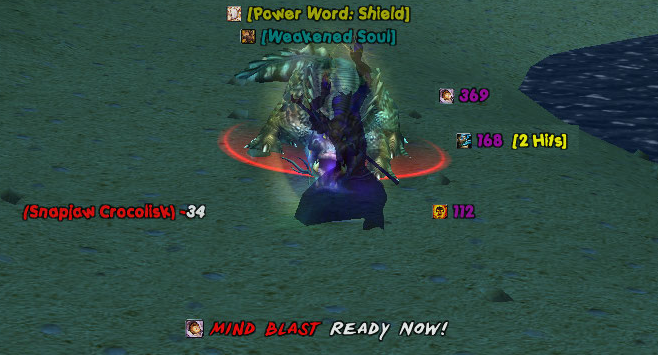
MSBT is designed to be an extremely lightweight, efficient, and highly configurable mod that makes it easier to see combat information by scrolling the information on the screen in separate, dynamically creatable scroll areas. It is a replacement for Blizzard's Floating Combat Text and Damage output.
Features:
- Lightweight and efficient design.
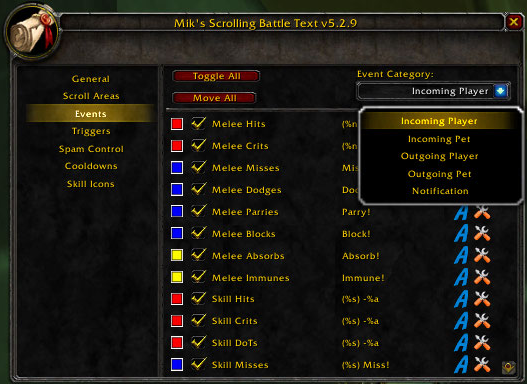
- Scroll incoming damage/heals, outgoing damage/heals, and notifications in separate configurable scroll areas on the playing field.
- Display player and pet cooldown completion alerts.
- Display loot alerts with a total of how many are now in inventory.
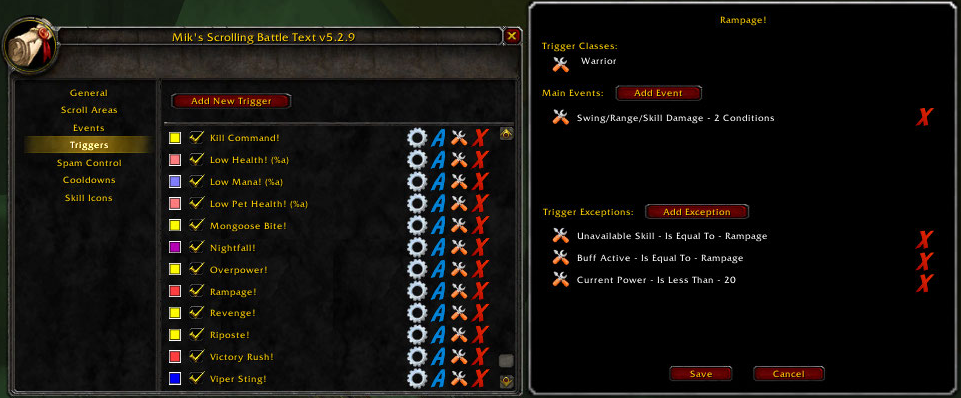
- Add triggers that will allow you to show notifications based on a variety of conditions.
- Assign a sound file to play for events/triggers.
- Dynamically create new scroll areas and assign any event/trigger to them.
- Customize the position, size, animation style, enabled state, font style, font size, font outline, and opacity for each of the scroll areas.
- Customize each individual event's color, font style, font size, font outline, opacity, output message, enabled state, and scroll area.
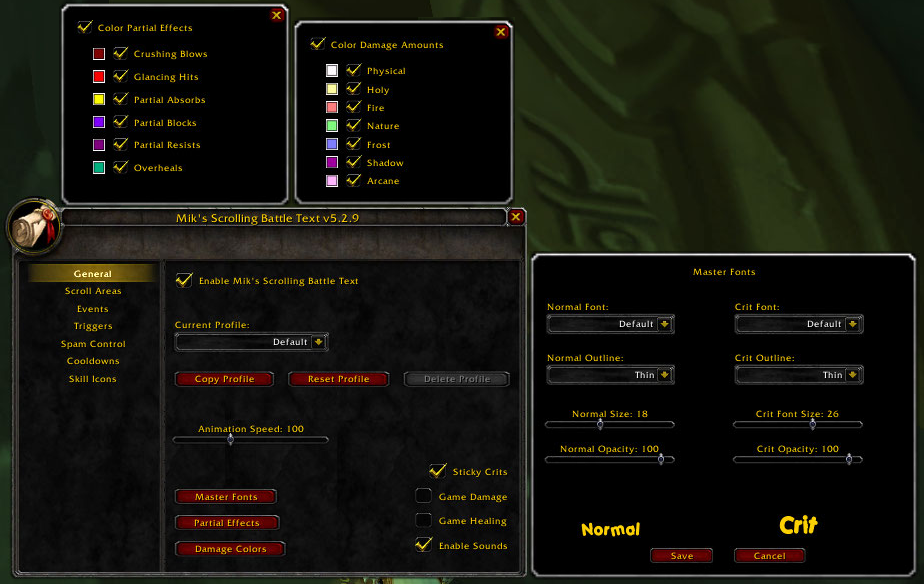
- Set "Master Font" settings that will be inherited by all of the scroll areas and the events in them unless they are overridden at the scroll area or event level.
- Merge AoE data into one event with cumulative damage/healing done with number of normal and crits specified.
- Show overhealing amounts against yourself or party/raid members.
- Color unit names according to their class (including CUSTOM_CLASS_COLORS support).
- Color damage amounts according to damage type.
- Show partial effects (resists, absorbs, vulnerabilities, etc) colored according to type.
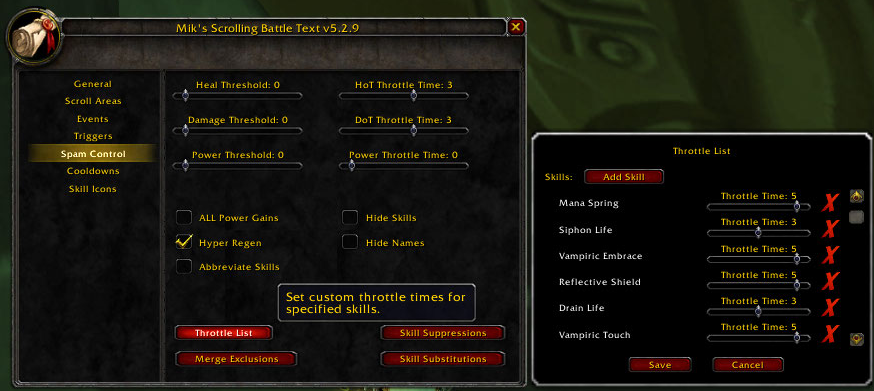
- Filter output information with a full suite of spam controls.
- Load on demand options.
- For mod developers:
- Output your own scrolling messages with the MikSBT.DisplayMessage function instead of having to create your own frame and animation code. You can also use your own font by first registering it with MSBT via the MikSBT.RegisterFont function.
- Create custom animation styles.
- See the included API.html file for reference information.
Supported Events:
- Incoming:
- Melee Damage, Misses, Dodges, Parries, Blocks, Deflects, Absorbs, and Immunes
- Skill Damage, Damage Over Time (DoTs), Misses, Dodges, Parries, Blocks, Deflects, Absorbs, Immunes, Reflects, and Interrupts
- Spell Resists
- Heals and Heals Over Time (HoTs)
- Pet Melee Damage, Misses, Dodges, Parries, Blocks, Deflects, Absorbs, and Immunes
- Pet Skill Damage, Damage Over Time (DoTs), Misses, Dodges, Parries, Blocks, Deflects, Absorbs, and Immunes
- Pet Spell Resists
- Pet Heals and Heals Over Time (HoTs)
- Environmental Damage
- Outgoing:
- Melee Damage, Misses, Dodges, Parries, Blocks, Deflects, Absorbs, Immunes, and Evades
- Skill Damage, Damage Over Time (DoTs), Misses, Dodges, Parries, Blocks, Deflects, Absorbs, Immunes, Reflects, Interrupts, and Evades
- Spell Resists and Buff Dispels
- Heals and Heals Over Time (HoTs)
- Pet Melee Damage, Misses, Dodges, Parries, Blocks, Deflects, Absorbs, Immunes, and Evades
- Pet Skill Damage, Damage Over Time (DoTs), Misses, Dodges, Parries, Blocks, Deflects, Absorbs, Immunes, and Evades
- Pet Spell Resists and Buff Dispels
- Pet Heals and Heals Over Time (HoTs)
- Notification:
- Buffs / Buff Stacks / Buff Fades
- Debuffs / Debuff Stacks / Debuff Fades
- Item Buffs / Item Buff Fades
- Enter/Leave Combat
- Power Gains and Losses
- Alternate Power Gains and Losses
- Chi Gains and Chi Full
- Combo Point Gains and Combo Points Full
- Holy Power Changes and Holy Power Full
- Honor Gains
- Reputation Gains and Losses
- Skill Gains
- Experience Gains
- Killing Blows (Player and NPC)
- Extra Attacks
- Soul Shard Creation
- Enemy Buff Gains
- Monster Emotes
- Player, Pet and Item Cooldown Completions
- Loot:
- Looted Items
- Money Gains
- Default Triggers:
- All Relevant Classes - Low Health, Low Mana, Low Pet Health
- Death Knight - Killing Machine, Rime, Shadow Infusion x5
- Druid - Berserk, Clearcasting, Predator's Swiftness, Shooting Stars
- Hunter - Kill Shot, Lock and Load
- Mage - Brain Freeze, Clearcasting, Fingers of Frost, Missile Barrage
- Monk- Elusive Brew x5, x10, x15, Mana Tea x20, Vital Mists x5
- Paladin - Hammer of Wrath, The Art of War
- Priest - Clearcasting, Shadow Orb x3
- Rogue - Blindside
- Shaman - Clearcasting, Lava Surge, Maelstrom Weapon x5, Tidal Waves
- Warlock - Decimation, Molten Core, Nightfall
- Warrior - Bloodsurge, Execute, Revenge, Sudden Death, Taste for Blood, Victory Rush
Commands:
Code:
/msbt                  Shows the options interface.
/msbt reset            Resets the current profile to the default settings.
/msbt disable          Disables the mod.
/msbt enable           Enables the mod.
/msbt version          Shows the current version.
/msbt help             Shows the command usage.
Frequently Asked Questions:
See the FAQ list at MSBT's portal site. http://mikord.wowinterface.com/portal.php?id=156&a=faq
Localization Maintainers:
See the list at MSBT's portal site.
http://www.wowinterface.com/portal.p...156&pageid=159
If you are capable and interested in being a maintainer for the localization files for a specific language, please send me a PM. The SVN capabilities here at WoWInterface allow me to provide direct access to the localization files in the repository to make the process easier.
5.7.138
5.7.137
5.7.136
5.7.135
5.7.134
5.7.132
5.7.131
5.7.130
5.7.129
5.7.128
5.7.127
5.7.126
5.7.125
5.7.124
5.7.123
5.7.122
5.7.119
5.7.118
5.6.117
5.6.113
5.6.112
5.6.111
5.6.108
5.6.107
5.5.106
5.5.105
5.5.100
5.5.99
5.5.98
5.5.97
5.5.91
5.5.89
See the included readme.html for further version history.
- Moved the new font loader logic into its own frame to prevent issues with UIs such as RealUI that play with opacity on objects they don't own.
- Fixed unit reaction condition that was preventing many triggers like Kill Shot and Hammer of Wrath from working.
- Fixed taint issues cause by the _ global variable.
- Updated options dialogs to remove reference to support for mp3s which the game no longer supports.
5.7.137
- Corrected an error that occurs on startup with deleted default triggers.
5.7.136
- Reworked the font handling to preload fonts during initial load to resolve the issue where the fonts would reset to the default on initial game load.
5.7.135
- Fixed the ability to add custom fonts via the custom media tab.
5.7.134
- Fixed an issue where the font previews were not updating properly.
- Updated parser to support the new parameters introduced by patch 6.0.2.
5.7.132
- Updated for Patch 6.0.2 / Warlords of Draenor
- Modified global constants for item quality to their new values.
- Removed Berserker Stance from available trigger conditions.
- Removed Backlash default trigger.
- Removed Owlkin Frenzy default trigger.
- Removed Overpower default trigger.
- Removed Power Guard default trigger.
- Removed Rune Strike default trigger.
- Removed Solar and Lunar Eclipse default triggers.
- Modified several skill IDs to reflect their new values.
- Updated TOC for Patch 6.0.2.
5.7.131
- Fixed issue introduced with Patch 5.4 where the fonts could not be changed
5.7.130
- Updated TOC for Patch 5.4.
5.7.129
- Fixed issue introduced with Patch 5.3 where dispels were showing the skill performing the dispel rather than the one being dispelled.
- Increased damage and healing maximum spam thresholds to 100,000.
- Added default trigger for Ultimatum.
- Updated TOC for Patch 5.3.
5.7.128
- Updated parser to support the new amount parameter on applied and removed auras. Thanks to pelf for the patch.
5.7.127
- Fix issue introduced with Patch 5.2 where dispels were showing the skill performing the dispel rather than the one being dispelled.
5.7.126
- Modified skill ID for Taste For Blood to reflect the new value.
- Updated TOC for Patch 5.2.
5.7.125
- Updated TOC for Patch 5.1.
5.7.124
- Fixed issue introduced with Monk Chi changes in Patch 5.1.
5.7.123
- Fixed an issue where certain power types such as Sha Power and Alternate Power were causing errors.
5.7.122
- Added new Shadow Orbs Change and Shadow Orbs Full events that act similar to combo points.
- Removed shadow orbs from standard power gains (e.g. +1 Shadow Orbs) since it is now treated similar to combo points.
- Removed Shadow Orbs x3 default trigger due to the new Shadow Orbs Full event.
- Fixed issue where the shorten numbers and group by thousands options were not being applied to overkill amounts.
- Added default trigger for Blindside.
- Removed extra exclamation point from druid berserking default trigger.
- Added missing Italian localization files.
5.7.119
- Fixed issue where combo point gains and full combo points were not being displayed (reported by dondasch).
5.7.118
- Updated for Patch 5.0.1 / Mists of Pandaria Beta
- Monk is now an available class for triggers and class coloring.
- Added new Chi Change and Chi Full events that act similar to combo points.
- Added support for dynamic max chi and holy power.
- Removed chi from standard power gains (e.g. +1 Chi) since it is now treated similar to combo points.
- Removed the following triggers since they no longer apply: Counterattack, Eradication, Hot Streak, Impact, Riposte, Viper Sting
- Removed the following skills from default suppressions and throttling since they no longer apply: Arcane Empowerment, Desecration, Ferocious Inspiration, Mana Spring
- Updated supported power types to include Alternate, Dark Force, Chi (Light Force), Shadow Orbs, Burning Embers, and Demonic Fury.
- Rewrote code that deals with party and raid members to use the new Blizzard APIs.
- Updated "Active Talents" trigger condition to use the new Blizzard API.
- Modified remaining existing triggers to work with their new values.
- Modified several skill IDs to reflect their new values.
- Added default trigger for Vital Mists x5.
- Added default trigger for Mana Tea x20.
- Added default trigger for Elusive Brew at 5, 10, and 15 stacks.
- Added default trigger for Power Guard x3.
- Added new events for Alternate Power Gains and Losses so they may be customized.
- Added temporary workaround for UnitGUID bug when in a group. Triggers that involve party/raid members will not work currently due to this.
- Updated environmental damage handler for environmental type changes.
- Updated TOC for Patch 5.0.4.
- Added new option to shorten large numbers using si suffixes (32765 displays as 33k).
- Added new option to separate large numbers into digit groups (32765 dispays as 32,765).
- Fixed taint issues cause by the _ global variable.
- Converted class names to use Blizzard provided localizations.
- Removed old temporary workaround for raid flags added in Patch 4.2.
- Added Italian localization from Kelhar@Runetotem-EU.
5.6.117
- Money strings will now show properly on all supported languages.
- Updated Simplified and Traditional Chinese translations from yleaf.
5.6.113
- Converted all sounds to .ogg from .mp3.
5.6.112
- Modified combat event log parser to work with the absorb changes in Patch 4.3.
5.6.111
- Updated German translations from mojosdojo.
- Updated Simplified and Traditional Chinese translations from yleaf.
- Updated TOC for Patch 4.3.
5.6.108
- Removed item cooldoown tracking debug print
5.6.107
- Added support for item cooldowns:
- Created new event for customizable item cooldown notifications.
- Added Item Cooldown Complete to the available trigger events.
- Added Item ID and Item Name condition handling for the main trigger events that support them.
- Cooldown exclusions now accept skill IDs, item names, and item IDs in addition to skill names.
- Added monochrome, monochrome + thin, and monochrome + thick to available outline font settings for pixel font lovers.
- Modified the custom font and sound validation routines to work with arbitrary case extensions.
- Changed custom font validation error message to a more descriptive message when the font can't be set versus the more generic ttf message.
5.5.106
- Added option to customize color of shadowflame damage.
- Added option to customize color of frostfire damage.
5.5.105
- Modified combat event log parsers to work with the changes in Patch 4.2 without extra indirection.
- Changed Traditional Chinese default font by yleaf.
- Updated Simplified and Traditional Chinese translations from yleaf.
- Updated TOC for Patch 4.2.
5.5.100
- Added logic to detect and merge off-hand strikes with main hand strikes.
5.5.99
- Removed Happiness as an available power type since it no longer exists as of Patch 4.1.
- Added logic to handle the changed combat log event format in Patch 4.2 on the PTR without breaking the current version (Blizzard is changing it again).
- Updated LibStub to the latest version (14 Jan 2011, 1.0.1).
- Updated CallbackHandler to the latest version (14 Jan 2011, 1.0.7).
- Updated LibSharedMedia to the latest version (05 Nov 2010, 3.0-4).
5.5.98
- Fixed handling for the always show quest items option that was broken by Patch 4.0.6 (reported by Judgespear).
- Modified to play sounds even when game sound effects are disabled as allowed by API changes in Patch 4.0.6 (reported by Retlaw).
5.5.97
- Modified combat event log parsers to work with the changes in Patch 4.1 (committed by mojosdojo, reported by several others).
- Updated Russian translations from StingerSoft.
- Updated German translations from mojosdojo.
- Updated TOC for Patch 4.1.
5.5.91
- Added the new pet heal events to the options interface so they may be customized and disabled as intended.
- Updated Korean translations from chkid.
5.5.89
- Made several updates to the cooldown tracking system:
- Implemented a work around for Blizzard's cooldown bug with dismissed pets. Pet cooldowns should no longer be shown before they are actually finished.
- Created new event for customizable pet cooldown notifications.
- Added an option to customize the color of the skill name in cooldown events.
- Changed Skill Cooldown Complete trigger event to Player Cooldown Complete (only detects player cooldowns).
- Added Pet Cooldown Complete to the available trigger events.
- Added Skill ID as an available condition for player and pet cooldown triggers.
- Created new events for outgoing pet heals, pet heal crits, pet periodic heals (HoTs), and pet periodic heal (HoT) crits.
- Efflorescense is now detected and displayed as a pet heal.
- Added default triggers for Blood Swarm and Shadow Infusion x5.
See the included readme.html for further version history.
Optional Files (4)
File Name |
Version |
Size |
Author |
Date |
Type |
8.2.0.1 |
18kB |
07-31-19 11:36 AM |
|||
1.0.1 |
590kB |
08-20-16 02:58 PM |
Patch |
||
5.5.91d |
560kB |
05-06-11 05:53 PM |
Patch |
||
423kB |
04-28-11 03:12 PM |
Patch |
 |
Comment Options |
 07-02-09, 01:38 AM
|
||
|
A Kobold Labourer
Forum posts: 1
File comments: 30
Uploads: 0
|
The combat log does show when I gain Hot Streak, and when it fades. But I'm happy with the Power Auras texture (big glowing red fireball symbol) that I set to show on my screen for the duration of HS. But since it does have some great functionality that Power Auras doesn't, I was just hoping to use your mod to give me even more info in this case. I want to see when HS is still up IN SPITE OF me definitely casting Pyroblast (i.e. T8 proc), and not still up because I was silenced, or had a lag spike, or fat-fingered my hotkey, or whatever. But I can just watch the cast itself leave my toon, which is fine unless my camera is zoomed all of the way out and a ton of stuff is happening on my screen. Or I can just enable the GCD function of Quartz, to see that *some* spell was cast, although I really don't want to see that 95% of the time. I still don't get why using a Cast Start trigger works fine for Pyroblast, whether casting it normally or instantly when I have Hot Streak, unless the T8 bonus procs on the cast. If so the trigger doesn't work - it doesn't show that I cast the Pyro at all, although the combat log shows it. Is that definitely game mechanics too do you think? |
|

|

|
| Raging_Sage |
| View Public Profile |
| Send a private message to Raging_Sage |
| Find More Posts by Raging_Sage |
| Add Raging_Sage to Your Buddy List |
|
07-01-09, 09:50 AM
|
|
|
A Theradrim Guardian
 Forum posts: 61
File comments: 503
Uploads: 2
|
Houseplant:
The %e is the old code from a few version back. It changed to %n, so you have the correct one. The only way to disable the class coloring is through the global option available via the Class Colors button on the General tab. |
|
|
|
| Mikord |
| View Public Profile |
| Send a private message to Mikord |
| Find More Posts by Mikord |
| Add Mikord to Your Buddy List |
|
06-30-09, 05:44 PM
|
|
|
A Murloc Raider
Forum posts: 9
File comments: 5
Uploads: 0
|
Whenever I get a killing blow on an NPC it pops up as %e and doesn't say the name. When I change it to %n it shows the name of the NPC I killed but it does it so in the manor of coloring their name based on their class. Is there anyway to have it so that is shows the name of the NPC without it being colored based on their classification?
|
|
|
|
| Houseplant |
| View Public Profile |
| Send a private message to Houseplant |
| Find More Posts by Houseplant |
| Add Houseplant to Your Buddy List |
|
06-29-09, 04:45 PM
|
|
|
A Theradrim Guardian
Forum posts: 61
File comments: 503
Uploads: 2
|
Raging_Sage:
You're correct that's how the game mechanics work. Instant cast spells are typically categorized as "Cast Success" and spells with a cast time show up as "Cast Start". There isn't really an end marker for cast spells except for the event generated as a result of the spell being cast (i.e heal with a cast time shows up as a "Cast Start" event followed by a "Heal" event if it completes). Naturally these have a slight lag associated with the round trip to the server. On to your specific request, does the proc report anything to the combat log? If so, you can probably look specifically for that to let you know when it happens. Alternatively, you could look specifically for the removal of Hot Streak and notify when that happens because it won't get removed when the proc happens. That way you get a notification when HS is down regardless of how many times the proc kept it instant. Eilensar: Thanks for the report. There are a couple of mods that mess with frames that aren't their own that can cause that behavior. I plan to look into it, I just haven't had the time yet. Duhwhat: I'll assume you're talking about for the default triggers, and in that case not directly. The closest way is to create a new scroll area, move all triggers to the new area, and change each of the triggers to "Inherit" the font size. Now you can change the font size of that new scroll area and all triggers set to inherit will display using that inherited size.
Last edited by Mikord : 06-29-09 at 04:46 PM.
|
|
|
|
| Mikord |
| View Public Profile |
| Send a private message to Mikord |
| Find More Posts by Mikord |
| Add Mikord to Your Buddy List |
|
06-29-09, 12:24 PM
|
|
|
A Wyrmkin Dreamwalker
Forum posts: 51
File comments: 236
Uploads: 0
|
Is there a global font setting for the notification text size, or do you have to change each one individually?
|
|
|
|
| duhwhat |
| View Public Profile |
| Send a private message to duhwhat |
| Find More Posts by duhwhat |
| Add duhwhat to Your Buddy List |
|
06-29-09, 07:55 AM
|
|
|
A Kobold Labourer
Forum posts: 0
File comments: 7
Uploads: 0
|
Conflicting Addon
Not sure if this has been brought up before, but the addon FLOATINGFRAMES will disable the ability to use the option window for MSBT. It does not give any errors. It just makes the window non-interactive and hides any buttons.
Now that I've removed that addon, MSBT works great. Thank you for your work. |
|
|
|
| eilensar |
| View Public Profile |
| Send a private message to eilensar |
| Find More Posts by eilensar |
| Add eilensar to Your Buddy List |
|
06-27-09, 05:38 PM
|
||
|
A Kobold Labourer
Forum posts: 1
File comments: 30
Uploads: 0
|
Sorry in advance for the long post, but maybe you can help with this: I'm having trouble getting Cast Success triggers to fire. I don't know if the problem is with Blizzard's game mechanics (which I suspect), the mod or my use of it, or a combination of factors. FYI, I tried disabling all of my other mods, reloading my UI, and restarting WoW, and none of those helped the issue. What I'm trying to do is simple - have a trigger fire whenever I successfully cast Pyroblast. But I can't get it to fire. I played around with various combinations of Source/Recipient Unit conditions, and tried the spell ID instead of the name, etc. The combat log shows the events/casts going off fine as well, but this trigger won't fire no matter what I try. Cast Success Skill Name - Is Equal To - Pyroblast Source Unit Affiliation - Is Equal To - You In fact, I can't get this trigger to fire with any spell that has a cast time. BUT, it works fine with every instant-cast or channeled spell that I've tried. What's more, when I change the Main Event to Cast Start or Cast Failure, it seems to work as expected for all spells - regardless of the spell having a cast time or not, or being channeled. But I think I remember having issues with other mods in the past that had cast-success triggers, which is why I suspect this might be game mechanics, but I'm not sure. I even tried a work-around I thought would fit my circumstances. -- I use this mod together with Power Auras. (For some things I want to see text, and others a graphic, and each mod has things it does better than the other.) When Hot Streak procs for me, I can cast an instant Pyroblast. I have Power Auras set to show an aura with timer as long as the HS buff is on me. Great. (This is one case where Power Auras showing a constant graphic is better than scrolling text, so I have the built-in Hot Streak trigger disabled, and the Hot Streak skill suppressed.) But now, on top of HS itself, we also have the Mage 4-pc T8 set bonus to allow for. When the bonus procs, it makes the HS buff not be consumed when you cast the instant Pyro. (It can chain proc sometimes, allowing multiple instant Pyroblasts in a row.) If it's a fight where I've got the camera scrolled all of the way out, and there's tons of stuff flying around (including other mages next to me casting instant pyros), then sometimes I can't tell the difference between when the 4-pc bonus procs, and when I just didn't get off even the initial instant pyro due to lag, being silenced, or whatever. That's why I wanted to use a trigger in this mod, so right when I hit my pyro key, I can tell instantly if the spell went off, and if the buff doesn't drop off immediately, I can shoot off another pyro right then. There are some other weird things about this too. Hot Streak makes your pyros instant. So you'd think maybe the Cast Success trigger would work for these buffed pyros, since it does fire for other instant-cast spells. But it still doesn't work. Then I realized that since the pyros I want to track are instant, I could use a Cast Start trigger just as well, which I know works with the Pyroblast spell. And Cast Start works fine that way, as long as the instant pyro DOES consume the HS buff (i.e. the 4-pc bonus didn't proc.) HOWEVER, when the instant pyro goes off and the bonus procs (keeping the HS buff up), the Cast Start trigger doesn't fire. Then on whichever subsequent pyro cast that does result in HS dropping off, it fires. Is that not bizarre? If it doesn't fire every time, it defeats the purpose of what I'm trying to show. That has to be something weird with how Blizzard handles that T8 proc, doesn't it? Or am I just missing something? Any thoughts on this, or ideas for a different solution or work-around, without adding yet another mod? I tried basing the trigger off of the Recipient Unit taking damage from my Pyroblast, but that's not really what I want, as there is a delay there while the spell flies towards the target, and I assume it also wouldn't fire if the target got killed before my spell hit, or got banished or something like that. Thanks, |
|
|
|
|
| Raging_Sage |
| View Public Profile |
| Send a private message to Raging_Sage |
| Find More Posts by Raging_Sage |
| Add Raging_Sage to Your Buddy List |
|
06-22-09, 04:12 PM
|
|
|
A Theradrim Guardian
Forum posts: 61
File comments: 503
Uploads: 2
|
Sovereignty:
There is not a way to do that. Archiv: These should do what you're after. Health Change Unit ID - Is Equal To - Target Threshold - Is Less Than - 20 Aura Removal Recipient Unit Affiliation - Is Eqaul To - Target Skill Name - Is Equal To - Frost Fever Raging_Sage As you've noticed there isn't a way to manipulate them independently, but you could create 2 generic triggers for skill hits and crits to achieve it though without having to do it for every single skill as you suggest. The following two should do it. Output Message: %a Skill Damage Source Unit Affiliation - Is Equal To - You (Change event settings on this one this one so it's not "Always Stickied") Output Message: %a Skill Damage Source Unit Affiliation - Is Equal To - You Crit - Is Equal To - True However, as you suggested I think you'll find the coloring is quite useful once you get used to it. This is especially true on classes that have several schools they do damage with.
Last edited by Mikord : 06-22-09 at 04:14 PM.
|
|
|
|
| Mikord |
| View Public Profile |
| Send a private message to Mikord |
| Find More Posts by Mikord |
| Add Mikord to Your Buddy List |
|
06-22-09, 04:49 AM
|
|
|
A Kobold Labourer
Forum posts: 1
File comments: 30
Uploads: 0
|
Okay, I finally decided to replace the built-in scrolling combat text, and found my way here to MSBT. I've only had your mod installed for a few hours, and I'm still experimenting with it. But so far, I love it. It seems to be very logically-constructed and well-documented. (I wish all mods were like this!)
But of course, I already have a minor question/request. Could you modify the Damage Colors feature so it can be applied separately for incoming and outgoing damage amounts? I love the ability to see incoming damage types by color. I raid primarily on my Mage, and this could help in lots of situations. If I see I'm taking tons of shadow damage, I could ask the raid leader why we don't have Prayer of Shadow Protection up, etc. Or it could help me identify situations where popping fire/frost ward would be useful to power up Incanter's Absorption if I'm specced Arcane, or whatever. However, I'd prefer to see my own hits as yellow, with my crits red, or something like that. (I know what spells I'm casting.) I did figure out that I could do what I wanted manually, by leaving Damage Colors ON, turning OFF Outgoing Player Skill Hits and Crits, and then creating custom Triggers for my spells colored the way I want. However, unless I'm missing something, I'd have to create 2 triggers apiece, for every single spell I can do damage with. One for the spell hit, and one for the crit. Because the color is for the end result of the trigger, it doesn't seem like the flexibility of multiple main events and substitution features would help in this case. So, am I looking at this the right way, or is there an easier way to do what I was trying to do? If not, could you consider that for a future release?  Or perhaps add a color override option for crits under Master Fonts? I'll play with all of the damage colored for now (creating that many triggers would be tedious/crazy), and I might even come to prefer it that way. But you never know, some other crazy S.O.B. out there might want to see their outgoing damage colored, but not their incoming amounts (damage is damage after all). Or perhaps add a color override option for crits under Master Fonts? I'll play with all of the damage colored for now (creating that many triggers would be tedious/crazy), and I might even come to prefer it that way. But you never know, some other crazy S.O.B. out there might want to see their outgoing damage colored, but not their incoming amounts (damage is damage after all).Thanks, |
|
|
|
| Raging_Sage |
| View Public Profile |
| Send a private message to Raging_Sage |
| Find More Posts by Raging_Sage |
| Add Raging_Sage to Your Buddy List |
|
06-20-09, 01:33 PM
|
|
|
A Kobold Labourer
Forum posts: 0
File comments: 2
Uploads: 1
|
I might be totally blind, but is there a way to truncate player names in the options?
|
|
|
|
| Sovereignty |
| View Public Profile |
| Send a private message to Sovereignty |
| Find More Posts by Sovereignty |
| Add Sovereignty to Your Buddy List |
|
06-16-09, 04:01 PM
|
|
|
A Theradrim Guardian
Forum posts: 61
File comments: 503
Uploads: 2
|
Funk:
No, there isn't a way to change the icons. The ones shown are the icons specified by Blizzard for each skill as a part of the combat log events. I am aware that they do have a slight few of them incorrect. Richerich: 1) The output message can be changed by editing the output message under the event settings for the trigger. 2) I'll assume you're talking about having a separate event for every melee swing. I'll probably ultimately add an option for it since it's been requested a few times, but honestly it's not high on my priority list so it would at least be a few more revs. 3) Not a bad idea. |
|
|
|
| Mikord |
| View Public Profile |
| Send a private message to Mikord |
| Find More Posts by Mikord |
| Add Mikord to Your Buddy List |
|
06-15-09, 04:45 AM
|
|
|
A Wyrmkin Dreamwalker
Forum posts: 58
File comments: 787
Uploads: 5
|
May i suggest a few things?
1. Change "Maelstrom Weapon x5" to "Maelstrom!" as default. I think it's better formulated to see that than to see how many stacks it has... 2. Add a option to seperate damagecounters, kinda like how SCTD have (instead of "2800 [2 hits, 1 crit]", show "2000 + 800" or similar) 3. Add a option to show like xp-to-go when you gain xp, like "2753 XP (172 to go)" or something. Consider this and gimme your opinion |
|
|
|
| Dajova |
| View Public Profile |
| Send a private message to Dajova |
| Find More Posts by Dajova |
| Add Dajova to Your Buddy List |
|
06-15-09, 01:39 AM
|
|
|
A Kobold Labourer
Forum posts: 0
File comments: 1
Uploads: 0
|
Judgements
Hi,
Thank you for a great addon. Is it possible to change the icons on spells? The reason why, is that when i judge with Judgement of Wisdom while having Seal of Command up, it shows the icon from Seal of Command. Here i would have it show Judgement of Wisdom instead, because Judgement of Command shows the same icon as when Seal of Command procs. Basically: Two different spells with same icon. I hope there is a way to fix it Edit: Another thing i noticed was when Judgement of Wisdom misses it shows the icon of the spell. When it hits it shows the icon from Seal of Command.
Last edited by Funkmaster of awesomeness : 06-15-09 at 01:48 PM.
|
|
|
|
| Funkmaster of awesomeness |
| View Public Profile |
| Send a private message to Funkmaster of awesomeness |
| Find More Posts by Funkmaster of awesomeness |
| Add Funkmaster of awesomeness to Your Buddy List |
|
06-12-09, 01:00 PM
|
|
|
A Theradrim Guardian
Forum posts: 61
File comments: 503
Uploads: 2
|
Aisenfaire:
There is not. That is a reasonable option for cooldowns, but isn't something I would add for generalized skills and such. dr_AllCOM3: Thanks for the report. I'm aware of the issue and it's already fixed locally. I haven't had a chance to push the new update out yet, but it will most likely be this weekend. |
|
|
|
| Mikord |
| View Public Profile |
| Send a private message to Mikord |
| Find More Posts by Mikord |
| Add Mikord to Your Buddy List |
|
06-12-09, 08:06 AM
|
|
|
A Cyclonian
Forum posts: 40
File comments: 275
Uploads: 11
|
I have an issue to report. Aoe effects on me produce multiple messages. I'm a Blood DK and most likely my Bloodworms are to blame, since it's always about four messages. They are treated as if the were me. I have almost anything disabled and everything regarding pets.
(You can see it here: http://www.youtube.com/watch?v=cmbm0x65q-k&fmt=22)
Last edited by dr_AllCOM3 : 06-12-09 at 10:37 AM.
|
|
|
|
| dr_AllCOM3 |
| View Public Profile |
| Send a private message to dr_AllCOM3 |
| Find More Posts by dr_AllCOM3 |
| Add dr_AllCOM3 to Your Buddy List |
|
