Download
(65 Kb)
Download
Updated: 06-15-13 01:24 PM
Pictures
File Info
Compatibility:
Escalation (5.3)
Thunder Isle (5.2)
Landfall (5.1)
Mists of Pandaria (5.0.4)
Updated:06-15-13 01:24 PM
Created:unknown
Downloads:18,829
Favorites:146
MD5:
Categories:RolePlay, Music Mods, ToolTip
5.3
MyRolePlay  Updated this week!  Popular! (More than 5000 hits)
Version: 5.3.0.103
by: Etarna [More]
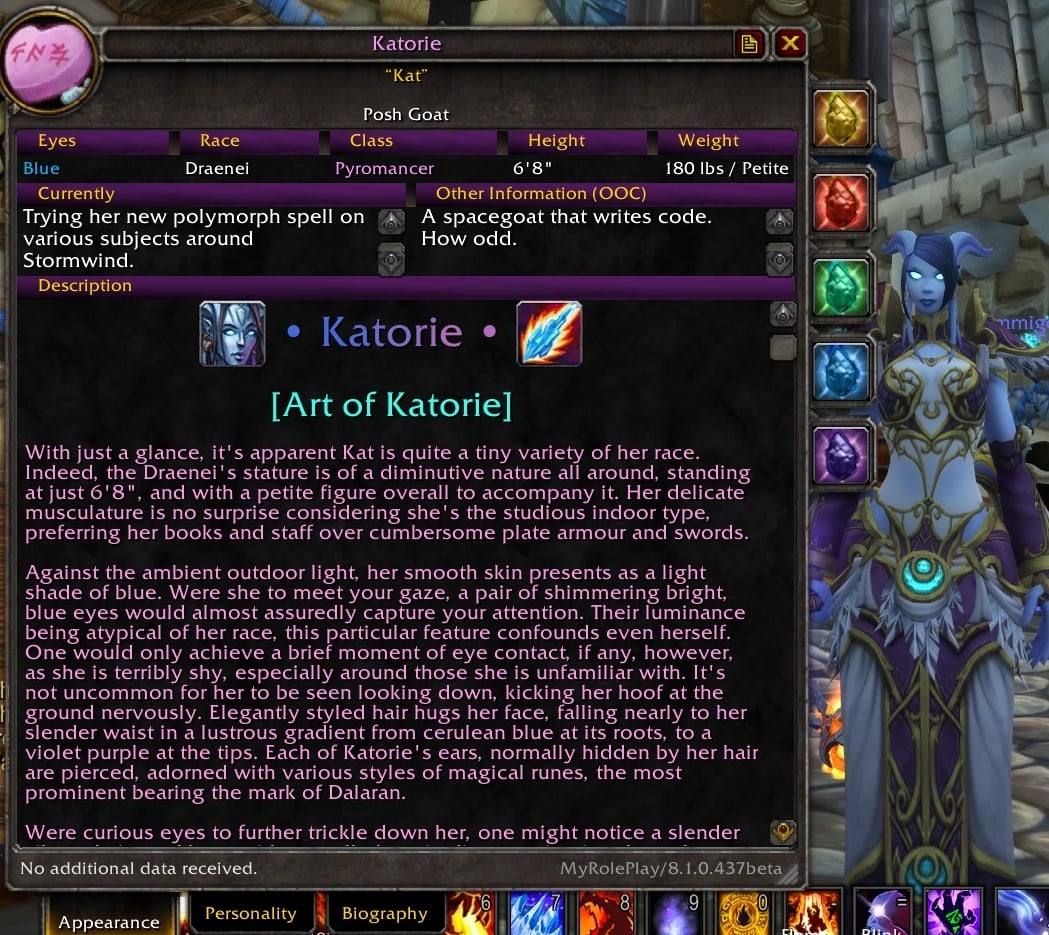
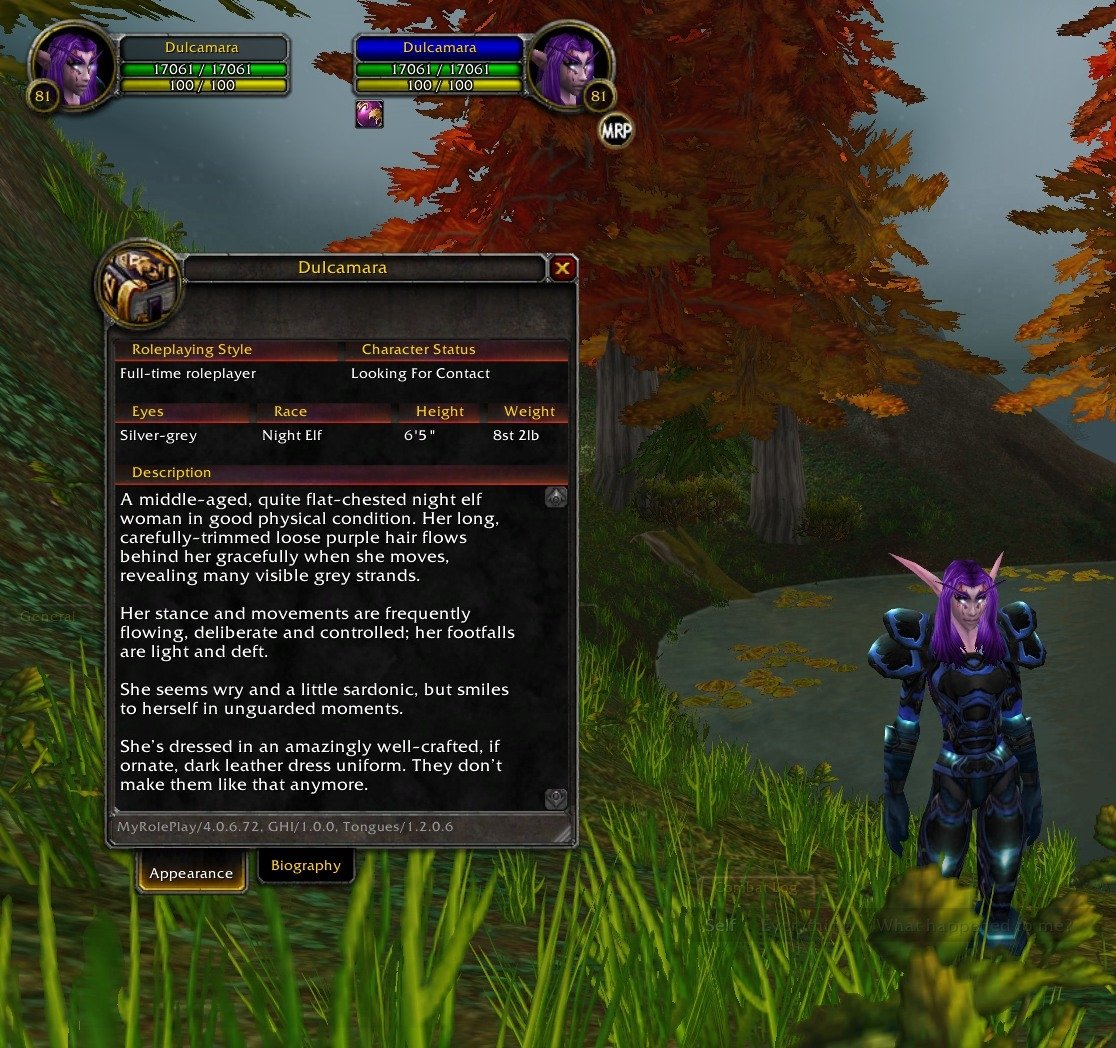
MyRolePlay is a roleplaying UI AddOn for World of Warcraft. It lets you make a roleplaying “profile” about your character that other users of MyRolePlay (and other compatible AddOns supporting MSP) can see in the tooltip, and in a more detailed window. It’s fast, light, and powerful.
  • Spot other roleplayers at a glance, see which RP AddOns they are using, and get a quick overview of their character in the tooltip!
  • Change your character’s name; add a last name—or whatever you wish!
  • Mark your preferred style of roleplaying (casual, full–time, beginner, or a custom style…), or your status (in character, out of character, being a storyteller…)
  • Exercise your creativity further—describe your character’s appearance! Eye colour, height, weight…
  • Give people a taste of your character’s story, if you wish—add biographical information like their age, hometown, birthplace, and maybe even some tidbits of history to make people hungry to discover more by interacting with your character and roleplaying with you? Or hide others’ biography, if you prefer to discover that kind of thing through interaction.
What if your character’s appearance changes, say when they wear different clothes, or shapeshift into different forms? No problem: simply add another ‘profile’, and just change the fields you want to be different in that alternate profile. Select freely between the default and alternate profiles suit your character’s mood, dress, form and so on! If you name a profile after an equipment set (Blizzard’s, ItemRack or Outfitter) or a form (druid, shaman, warlock, priest or worgen) MyRolePlay can even automatically change profile for you when you switch!

MyRolePlay has tremendous scope for creativity. It’s extremely fast and flexible—a roleplaying AddOn that lets you express your character however you wish! Use it as an aid to roleplaying, fleshing out your character’s “feel” or just helping you stumble into more roleplay… how you choose to use it is up to you!

Editing your profiles

Bring up the Character Sheet (“C” by default), and select the new MyRolePlay tab underneath. Click on a field to edit it.

Alternate profiles management: [+] to add a new alternate profile, [-] to delete or clear the profile, [R] to rename it. Fields that appear dimmed out are ‘inherited’ from the default profile—simply change the fields you want to modify from that.

Further options (such as a choice of units to display height/weight) can be found in the Interface Options, AddOns tab, under MyRolePlay.

Where can I see other people’s details?

When you mouseover someone who has MyRolePlay (or another compatible roleplaying addon), you’ll see some of the extra roleplaying details they added in the tooltip, which is a handy hint that they're a roleplayer!

When you mouseover someone who has MyRolePlay (or another compatible roleplaying addon), you’ll see some of the extra roleplaying details they added in the tooltip, plus if they use MRP or another RP AddOn such as GHI (GryphonHeart Items) or T (Tongues), which is a handy hint that they're a roleplayer!

If you want more information about their character than the tooltip provides, like the full description or history (where applicable), target them and click on the “MRP” information button that appears by the target frame, to browse their profile in a resizeable description window. (Alternatively set a key combination in Key Bindings to bring up that window, or: /mrp show <charactername> or just /mrp show when you have them targeted.)

You can target yourself and view your own profile as it appears to others in there, if you like, and if you want to move the MRP button, right-click to unlock it, drag it where you want it, and right–click again to lock it in place.

(Users are reminded that profiles may be seen by other players and Blizzard, and are subject to the Terms of Use, and policies of the realm(s) you play on. Please have fun and remember to exercise your creative freedom responsibly and respectfully.)
Fixed a small bug reported by Haleth.

5.3.0.103
  • Do still proactively fetch ?TT data even when tooltip modification is disabled, else other tooltip addons which may use MSP data, and chat, won't work properly.


Known Issues:
  • Do not run more than one RP AddOn which supports MSP simultaneously. This is a bad idea: it will break things, you’ll be warned that it will break things, and you don’t need to anyway as all MSP AddOns are already compatible with each other. Just pick one you like!
  • Blizzard currently do not allow AddOns to communicate between players on different realms—even though you may actually be able to see, interact, and talk with each other otherwise, due to cross-realm battlegrounds/instances/groups/coalesced zones, etc. If you would like cross-realm support, please petition Blizzard to support cross-realm (by "Name-Realm") SendAddOnMessage() whispers in circumstances where they allow normal whispers—MRP is already ready for the feature, when Blizzard are…
  • Tooltip: Other UI AddOns which modify the player tooltips, such as TipTac or GearScore, may fight with the more advanced tooltip styles over who gets to draw the tooltip (MRP usually wins). “Light” or “Flag-style” tooltips may be more compatible as they just add to the default tooltip instead of replacing it, but they look simpler because of that. In a pinch, you can entirely disable the tooltip support by selecting Blizzard Default tooltips. (Without getting every AddOn author to agree on a common API for tooltip management and modification—a potential nightmare—this may be rather hard to fix.)
  • Long “Currently” fields (as in TotalRP2) don’t show up well in MRP’s tooltip or browser. I’d like to fix that, but it does require rewriting the tooltip and browser to do it… maybe later.
  • Shapeshifting (Worgen): Unfortunately, Blizzard provide no API for telling us whether your worgen is currently human-shaped or furry. Therefore, MyRolePlay uses advanced gnomish “GuessWork™” technology to detect Human or Worgen forms. Like all gnomish technology, this can in rare circumstances backfire. You will need to force yourself into Worgen form by using Running Wild, casting Darkflight or getting into combat before it will be able to keep track. If it gets out of sync (it shouldn’t usually, but might in unusual circumstances), try doing one of those three things again to get it back into shape, or try changing profile manually. (All other forms should work OK, as these have an API and do not require advanced gnomish “GuessWork™”.)
  • Profile changes show up instantly for you, but can sometimes take up to 6 seconds to appear for other players. (This is by design, so the Mary Sue Protocol stays fast and doesn’t slow your computer down or flood the servers.)
  • Button: Can’t find the MRP button? Using custom/modified Unit Frames, perhaps? Try /mrp button reset or looking underneath the custom frames. Many popular ones (X-Perl, SUF, etc) are already supported: but if you still experience problems, please post about them and I’ll investigate.
  • RP Names: RP names only appear for players you have tooltip data of. They only appear in the principal RP channels: /say, /emote and /yell. (This means the RP name may not appear for the very first line someone speaks, if they haven’t spoken before near you in this session, requested your tooltip data, or you haven’t moused over them before in this session.) Note that having RP Names turned on may in rare circumstances make the Target function on right-click of a chat name unavailable, but I believe Blizzard have now fixed this taint bug.
  • Custom Buff Frames: Using a custom buff frame? Is your player tooltip showing up where your buff tooltips should? You’re not alone, but I can’t seem to reproduce it: maybe I’m not using the right ones. Please test with just MRP and your BuffFrames and see if it still happens. If so, let me know which UnitFrames and/or BuffFrames you’re using: it’s very probably their bug, but maybe I can work around it somehow or help them fix it.
  • Custom Chat Frames: Your custom chat frame AddOn may already have MSP support: check the options. If not, ask the author to talk to me and I can probably help them add it.
Post A Reply Comment Options
Old 05-23-13, 12:31 PM  
Etarna
Author of MyRolePlay
 
Etarna's Avatar
AddOn Author - Click to view AddOns

Forum posts: 1
File comments: 19
Uploads: 0
5.3.0.102

Just a TOC bump, really. Nothing to update for this patch, it seems. I do plan a feature update in time, however.
__________________
Etarna - Author of MyRolePlay
Argent Dawn-EU: Etarna (NE Druid), Dulcamara (NE Rogue), Sylandru (NE Hunter), Mimetia (Broken Shaman), Mornington (Worgen Warrior)
Etarna is offline Report comment to moderator  
Reply With Quote
Old 03-05-13, 02:19 PM  
Etarna
Author of MyRolePlay
 
Etarna's Avatar
AddOn Author - Click to view AddOns

Forum posts: 1
File comments: 19
Uploads: 0
Re: Buff Tooltips and Raven

Updated for 5.2; included new features (including a fix for that pesky browser-going-offscreen bug, the cause of which I’ve gone into on another site).

Originally Posted by Nikeia
Do you have any idea of what might be causing this?
MRP is confusing it with a UnitFrame, for some reason, and it’s even returning through UnitIsPlayer()?
Originally Posted by Nikeia
Further edit: author of Raven would be happy to co-operate in order to solve this issue; it'd be really nice to get the clash sorted out
I shall do. It never seems to happen for the Blizzard vanilla buff frames, but some of the third-party ones. Would love to find out why and get it fixed.
Originally Posted by Jasmer
I've been having a problem for ages now. I have weight set to display in lbs, and when I enter a weight it doubles it. I don't know if others are seeing the same apparently bugged weight. I've tried reinstalling, no dice. I do use RealUI, so maybe it's a UI conflict or something? All I know is I want my character to weigh 170 lbs, not 374. Any ideas what's happening?
…unless your character has adapted to Pandaria so well that they’re sneaking extra food under your nose, no—but I’ll have a look!

Originally Posted by shegeek
Just wanted to say I've been using MRP for a -very- long time... And I absolutely love it! Brilliant work!
You’re quite welcome!
__________________
Etarna - Author of MyRolePlay
Argent Dawn-EU: Etarna (NE Druid), Dulcamara (NE Rogue), Sylandru (NE Hunter), Mimetia (Broken Shaman), Mornington (Worgen Warrior)
Etarna is offline Report comment to moderator  
Reply With Quote
Old 02-14-13, 08:29 AM  
Nikeia
A Kobold Labourer

Forum posts: 0
File comments: 2
Uploads: 0
Buff Tooltips and Raven

Something I've noticed when using both MRP and Raven (http://www.wowinterface.com/download...242-Raven.html) at the same time is that all the enhanced tooltip options seem to interfere with the tooltips of my normal buffs. Hovering over the buff for the flying mount, for example, will give me the enhanced character tooltip instead of the flying mount tooltip I'd expect.

I've tested this with different addons enabled, but nothing else in my (admittedly heavily modified) UI causes similar behaviour. I have no way of telling which addon is causing the problem, but my workaround for it has been to simply not use anything but standard blizzard tooltips from the MRP settings.

Do you have any idea of what might be causing this?


Further edit: author of Raven would be happy to co-operate in order to solve this issue; it'd be really nice to get the clash sorted out
Last edited by Nikeia : 02-18-13 at 08:49 AM.
Nikeia is offline Report comment to moderator  
Reply With Quote
Old 01-18-13, 01:07 PM  
shegeek
A Defias Bandit
 
shegeek's Avatar

Forum posts: 2
File comments: 32
Uploads: 0
Just wanted to say I've been using MRP for a -very- long time... And I absolutely love it! Brilliant work!
shegeek is offline Report comment to moderator  
Reply With Quote
Old 01-01-13, 01:22 AM  
Jasmer
A Cyclonian
AddOn Author - Click to view AddOns

Forum posts: 47
File comments: 130
Uploads: 1
I've been having a problem for ages now. I have weight set to display in lbs, and when I enter a weight it doubles it. I don't know if others are seeing the same apparently bugged weight. I've tried reinstalling, no dice. I do use RealUI, so maybe it's a UI conflict or something? All I know is I want my character to weigh 170 lbs, not 374.

Any ideas what's happening?
Jasmer is offline Report comment to moderator  
Reply With Quote
Old 08-28-12, 03:46 AM  
Etarna
Author of MyRolePlay
 
Etarna's Avatar
AddOn Author - Click to view AddOns

Forum posts: 1
File comments: 19
Uploads: 0
Re: Compatibility

Updated for 5.0.4. You will need to update (a UI template has changed, so you’ll get Lua errors and the editor probably won’t work if you don’t).

Originally Posted by Monjh
Is this Add-On compatible with Lysidia's Kitty Chat (http://www.wowinterface.com/download...at.html#info)? What about Tongues (http://wow.curseforge.com/addons/tongues/)?

When I said compatible, I mean if I can use them while using MRP.
I use it with Tongues, so that definitely works. Should be just fine with the other, I think; give it a go.
__________________
Etarna - Author of MyRolePlay
Argent Dawn-EU: Etarna (NE Druid), Dulcamara (NE Rogue), Sylandru (NE Hunter), Mimetia (Broken Shaman), Mornington (Worgen Warrior)
Last edited by Etarna : 08-28-12 at 03:47 AM.
Etarna is offline Report comment to moderator  
Reply With Quote
Old 02-10-12, 12:31 PM  
Monjh
A Kobold Labourer
 
Monjh's Avatar

Forum posts: 0
File comments: 2
Uploads: 0
Compatibility

Is this Add-On compatible with Lysidia's Kitty Chat (http://www.wowinterface.com/download...at.html#info)? What about Tongues (http://wow.curseforge.com/addons/tongues/)?

When I said compatible, I mean if I can use them while using MRP.
Monjh is offline Report comment to moderator  
Reply With Quote
Old 11-29-11, 02:29 PM  
Etarna
Author of MyRolePlay
 
Etarna's Avatar
AddOn Author - Click to view AddOns

Forum posts: 1
File comments: 19
Uploads: 0
Re: Re: 4.2.0.92

Originally Posted by DJ Particle
MRP can't do it, but TRP can, though MRP still read the code entered into TRP. That was how I heard it, anyway.
I don’t want to go into why exactly, but passing pipe-codes from other users for display parsing may be potentially dangerous. There’s a reason it’s filtered out of chat.
__________________
Etarna - Author of MyRolePlay
Argent Dawn-EU: Etarna (NE Druid), Dulcamara (NE Rogue), Sylandru (NE Hunter), Mimetia (Broken Shaman), Mornington (Worgen Warrior)
Etarna is offline Report comment to moderator  
Reply With Quote
Old 11-18-11, 08:33 PM  
DJ Particle
A Wyrmkin Dreamwalker
 
DJ Particle's Avatar

Forum posts: 52
File comments: 1
Uploads: 0
Re: 4.2.0.92

Originally Posted by Etarna
4.2.0.92 fixes an important problem; some people had apparently embedded pipe control codes in their fields, to change the colour of their name. (It’s not possible to do this within MyRolePlay’s interface, but I suppose someone had edited the Lua directly.)
MRP can't do it, but TRP can, though MRP still read the code entered into TRP. That was how I heard it, anyway.
DJ Particle is offline Report comment to moderator  
Reply With Quote
Old 11-16-11, 03:19 PM  
Etarna
Author of MyRolePlay
 
Etarna's Avatar
AddOn Author - Click to view AddOns

Forum posts: 1
File comments: 19
Uploads: 0
4.2.0.92

4.2.0.92 fixes an important problem; some people had apparently embedded pipe control codes in their fields, to change the colour of their name. (It’s not possible to do this within MyRolePlay’s interface, but I suppose someone had edited the Lua directly.)

As this could conceivably pose a potential security/impersonation problem and certainly wasn’t intended, 4.2.0.92 fixes this. If a field is received with embedded pipe codes, the pipe code will be simply displayed (instead of executed by WoW).
__________________
Etarna - Author of MyRolePlay
Argent Dawn-EU: Etarna (NE Druid), Dulcamara (NE Rogue), Sylandru (NE Hunter), Mimetia (Broken Shaman), Mornington (Worgen Warrior)
Etarna is offline Report comment to moderator  
Reply With Quote
Old 10-26-11, 01:30 PM  
shegeek
A Defias Bandit
 
shegeek's Avatar

Forum posts: 2
File comments: 32
Uploads: 0
So...a friend of mine updated their version of MRP yesterday (when you updated). And he's saying that it's still giving him the message that it's out of date.

My version works perfect...no errors or out of date messages. He -did- uninstall the previous version and replaced it with the new one. Still got the message.

Any thoughts?
__________________
shegeek is offline Report comment to moderator  
Reply With Quote
Old 10-25-11, 12:35 PM  
Etarna
Author of MyRolePlay
 
Etarna's Avatar
AddOn Author - Click to view AddOns

Forum posts: 1
File comments: 19
Uploads: 0
4.2.0.90 fixes a Lua error that can arise when an incorrectly-scripted NPC (such as the Headless Horseman) speaks. (Thanks to Nawkar for reporting and testing!)
__________________
Etarna - Author of MyRolePlay
Argent Dawn-EU: Etarna (NE Druid), Dulcamara (NE Rogue), Sylandru (NE Hunter), Mimetia (Broken Shaman), Mornington (Worgen Warrior)
Etarna is offline Report comment to moderator  
Reply With Quote
Old 08-15-11, 07:30 PM  
aelorin
A Kobold Labourer
 
aelorin's Avatar

Forum posts: 0
File comments: 1
Uploads: 0
Exclamation MRP

i downloaded mrp and when i try to extract it to addons it dosnt appear in game am i doing sumthing ron????
aelorin is offline Report comment to moderator  
Reply With Quote
Old 07-03-11, 06:52 AM  
Etarna
Author of MyRolePlay
 
Etarna's Avatar
AddOn Author - Click to view AddOns

Forum posts: 1
File comments: 19
Uploads: 0
Re: Nameplates...

Originally posted by CdavidB
First let me say I love this addon! I'm new to RP but so far this addon alone has breathed new life into a game that was feeling stale.
Thank you very much! And thanks to the other roleplayers on your realm, of course!

I was wondering, is there any way to show the MRP names in the nameplates?
Sorry, there isn’t, and can never be. The nameplates are rendered as part of the 3D world. AddOns aren’t allowed to interact with the 3D world in any way—that’s exclusively Blizzard’s department, and we can’t even try to appear to mess with it. (Besides, as a game mechanic, I’m not sure I’d want them on when RPing myself.)
__________________
Etarna - Author of MyRolePlay
Argent Dawn-EU: Etarna (NE Druid), Dulcamara (NE Rogue), Sylandru (NE Hunter), Mimetia (Broken Shaman), Mornington (Worgen Warrior)
Etarna is offline Report comment to moderator  
Reply With Quote
Old 07-02-11, 05:54 PM  
CdavidB
A Kobold Labourer

Forum posts: 0
File comments: 6
Uploads: 0
Nameplates...

First let me say I love this addon! I'm new to RP but so far this addon alone has breathed new life into a game that was feeling stale.

I was wondering, is there any way to show the MRP names in the nameplates?
CdavidB is offline Report comment to moderator  
Reply With Quote
Post A Reply


Category Jump:


