| Go to Page... |

| Compatibility: | Fury of Hellfire (6.2) The Adventure Continues (6.1) Warlords of Draenor Pre-Patch (6.0.2) |
| Updated: | 09-13-15 06:37 PM |
| Created: | 04-30-11 06:21 PM |
| Downloads: | 10,368 |
| Favorites: | 27 |
| MD5: |
oUF Lanerra 

Description
Supported oUF Version: oUF 1.6.5
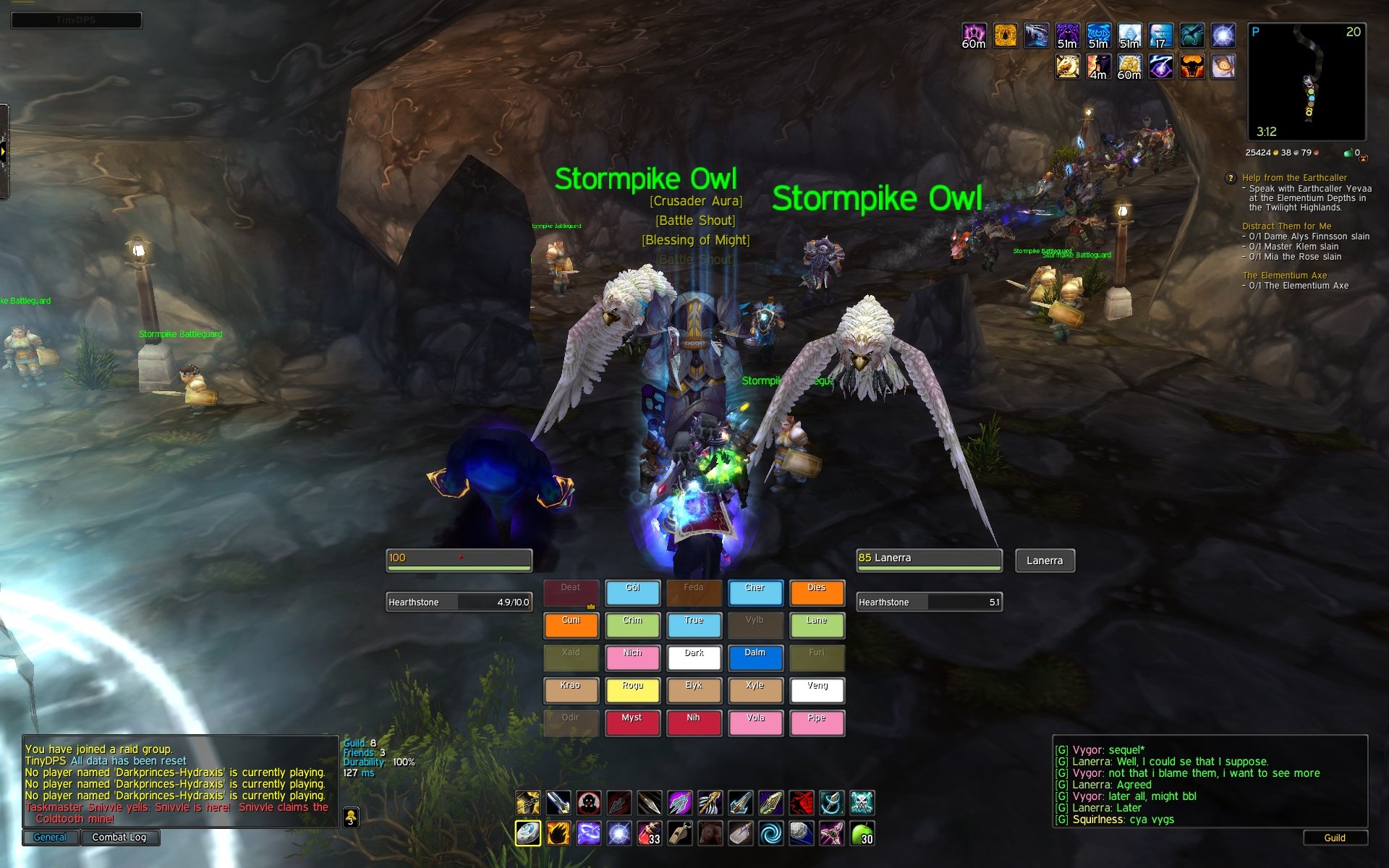
A simple unit frame addon based off of the oUF core framework. The design and purpose of these unit frames is to allow as much configuration as possible via an attached configuration lua to alter certain settings of the unit frames, while remaining as light on memory usage as possible.
It also has a toggle-able 'healer mode' that alters the location of the raid and party frames dependent on whether the "Healer" option has been toggled to true in the config for party or raid.
Please Note
Some knowledge of Lua is required for customization of these frames beyond the configuration file. To alter options in the configuration file, simple open it in your favorite text editor and change options from false to true, or vice versa. Also of note, for the displaying of health, more than one health option cannot be functional at a time so please choose only one.
Supported Units
* Player
* Target
* Pet
* Target of Target
* Focus
* Party
* Raid
Supported Modules
* DebuffHighlight
* DruidPower
* Smooth
* RuneBar
Currently Known Issues
* None currently known.
Quick Note
Please do not hesitate to leave feedback. I don't really know what you guys need or want from my unit frames unless you suggest or critique. I'm open to suggestions and would definitely like to know if something is broken somewhere. Your assistance is greatly appreciated and improves the experience for everyone.
- TOC Bump for 6.2
- Update copyright year
While not a change, I just wanted to let everyone know I am likely going to be rewriting a good deal of this addon to make it a bit more efficient. I realize it's quite clunky and a bit wasteful resource-wise and I plan to alleviate that in the near future.
------------- 1.5.92 ----------
- Version bump and TOC update to 6.1
- Everything else appears to be working alright. Let me know, though, if it doesn't
------------- 1.5.91 ----------
- Blizzard apparently changed what UnitClass returns
- Finally fixed combo point display and, inadvertently, several other bugs
------------- 1.5.9 -----------
- Fix bug in colors table
- Accidentally removed a necessary function. Oops.
------------- 1.5.8 -----------
- Fixed a crippling bug I forgot about in the last version. Sorry.
------------- 1.5.7 -----------
- Remove screwed up code in Tags.lua
- Make power value text a little more responsive
- Code cleanup
- Add back in 'Set Focus' option for frames
- Correct power bar color issue when class color health is enabled
------------- 1.5.5 -----------
- Add class color option to health bars
- Added tapped color for unit frames
- Updated to 6.0
------------- 1.5.4 -----------
- Version bump to 1.5.4
- Fix a couple of taint issues
- Code cleanup
- Added party buffs/debuffs option (still needs tuning)
- Fixed non-healer layout for raid
- Fixed predictive healing display for raid frames
- Remove Dismiss Pet option from pet frame, since all it does is throw errors and taint. Sadly, this can't be avoided due to an issue on Blizzard's side of the code. You must dismiss your pet, if a hunter, via the spellbook, or a button in your action bars.
------------- 1.5.3 -----------
- Made player power value mirror the target one for better symmetry
- Added option to enable/disable showing target buffs
- Some code cleanup and optimization
- Implemented rune bar support (finally, sorry about that)
- Fixed some backdrop alpha issues
------------- 1.5.2 -----------
- Version 1.5.2
- As it turns out, there hasn't been Rune bar support for sometime. This has now been fixed
------------- 1.5.1 -----------
- Updated DispelHighlight module
- Updated ThreatHighlight module
- Fixed Threat and Debuff highlighting not working
- Fixed small discrepancy on buff size on target frame
------------- 1.5 -------------
- Fixed and updated AuraFilter module
- Shortened offline raid name
- Reduced border size for better aesthetics
- Fixed and updated drawing and position of (de)buffs
- Fixed heal prediction sometimes not drawing correctly
- Fixed drawing of Status Icons
- Made various bars size dynamically with their associated frame
- Hopefully fixed raid/party tainting issues
- Repositioned party/raid name placement
- Adjusted raid/party positioning
- Hopefully kill Blizzard frames, cleanly
- Kill boss frames
------------- 1.4.2 -----------
- Finally fixed the raid layout
- Reverted texture change
- Version bump
------------- 1.4 -------------
- Fixed how tags were handled
- Now compatible with Mists of Pandaria
- TOC Bump
------------- 1.3.1 -----------
- Fixed deprecated functions no longer used in 5.0.4
- Removed UI option dimming for Unit Frames until I have time to work out the problem
- Version 1.3
- Other than this, it should function per normal. Let me know of any hiccups
------------- 1.2.3 -----------
- Fixed display of heal prediction on raid/group frames
- Added a HealerOverride option in the config to force display of heal prediction, regardless of role, for those who want it
------------- 1.2.1 -----------
- TOC Bump. No fixes were needed for 4.3
------------- 1.2 -------------
- Updated for 4.2
-------------1.19.1-----------
Fix update that did not warrant bump to 1.20
- Added shadow offset to buff/debuff text to improve readability
- Corrected elements of party/raid frames not hiding when party/raid is disabled in config
-------------1.19-------------
- Finally completely corrected display of 'Offline', 'Dead', 'Ghost' text on all unit frames
- Initial code put in place for interrupt coloring
- Color changes to Status Bar when units are offline, dead, or ghost
- Added option to display current health and percent at the same time on target frame
- Made it so power text is always shown (if enabled in Config)
- Adjusted border padding on all frames, looks much cleaner now
- Removed Pet power text
- Added option to show or hide player buffs/debuffs (disabled by default)
- Fixed buff/debuff overlap issue
- Added option to change backdrop color for unit frames
- Repositioned ToT name to allow health text to show clearly
- Adjust health position on other frames just slightly to line up better.
- Prioritized the displaying of debuff border color over aggro color. No longer will you not know if the tank has a debuff or not
- Fixed Druid Power not working properly
- Added functionality that detects if you're a healing class or not, and if so show one more buff and one less debuff to help keep track of HOTs and the like. Debuff border coloring works regardless
- Fixed raid icons not displaying on target frame
- Fixed a long standing problem with an improperly terminated 'if' statement in the oUF_RuneBar support
- Added code for killing the default Blizzard Group/Raid frames
- Bumping to 1.19
-------------1.18-------------
- Fixed quirk in display of shortnames on TargetTarget frame
- Redid the menu creation method for right-clicking in order to make it a bit more stable and intuitive.
- Clarified Healer option in config file
- Remove Blizzard options rendered useless by unit frames
- Attempt to fix status (Dead, Offline, etc.) not displaying as it should
- Restored custom UpdatePower function in anticipation of changing how power value is displayed
- Removed superfluous code in PowerText display code, optimized it for better functionality
- Consolidated Name code to make it a bit more optimized, and make ready for future power text change
- Added option to show PowerText for pet
- Target power text will now display properly, but I have yet to work out a good place for it.
- Changed position of Power Text for Target Frame
- Added option for Vertical Healthbar toggle for Focus Frame
- Added functionality that hides pet's name with either or both Health/Power displayed on that frame
- Version bump to 1.18
 |
Comment Options |
 07-03-11, 05:47 PM
|
||
|
A Kobold Labourer
 Forum posts: 1
File comments: 59
Uploads: 1
|
Re: Chatframe

__________________

|
|

|

|
| Lanerra |
| View Public Profile |
| Send a private message to Lanerra |
| Find More Posts by Lanerra |
| Add Lanerra to Your Buddy List |
|
07-03-11, 04:14 PM
|
|
|
A Defias Bandit
Forum posts: 2
File comments: 5
Uploads: 0
|
Chatframe
Could I kindly ask what chat addon you are using? =) Been looking for a addon putting the chat tabs below for weeks now...
Creds for the frames, awesome layout |
|
|
|
| alaerwen |
| View Public Profile |
| Send a private message to alaerwen |
| Find More Posts by alaerwen |
| Add alaerwen to Your Buddy List |
|
06-28-11, 04:02 PM
|
|
|
A Kobold Labourer
Forum posts: 1
File comments: 59
Uploads: 1
|
oUF_Lanerra 1.2
oUF_Lanerra 1.2
------------------- - Updated for 4.2 ------------------- Pretty sure I got everything, but please let me know if there are any bugs that I've missed. I'll try to get around to adding the requested features as soon as I have enough time to sit down and really crunch it out.
__________________
|
|
|
|
| Lanerra |
| View Public Profile |
| Send a private message to Lanerra |
| Find More Posts by Lanerra |
| Add Lanerra to Your Buddy List |
|
06-20-11, 11:30 PM
|
||
|
A Kobold Labourer
Forum posts: 1
File comments: 59
Uploads: 1
|
If oUF_Lanerra.lua line 579 - line 590 is where the power text is defined for player and target frames. That can be used as a basis to create the power text for party/raid, if you like. Just use something like those lines and insert them into the StylishGroup(line 1001) and/or StylishRaid(line 1262) immediately following where self.Health.Value is defined. Then, it's a matter of positioning and sizing the text how you like. If you want to have the power text for party/raid frames behave a certain way, you'll need to write your own PostUpdatePower function for the PostUpdate of the Power.Value portion of the code. If you choose not to have a custom function for that (and just want default oUF behavior for the power value), make sure you don't copy the self.Power.PostUpdate = UpdatePower line into StylishGroup and StylishRaid. That should do the trick for you. If it doesn't...then essentially explaining further would mean writing the actual code for it into the unit frames, themselves, thusly making this a moot point. Also, for those of you who are wondering, I have made an update to my unit frames that is compatible with 4.2 and am just waiting until 4.2 drops to push it to WoWInterface/Curse. Sorry for the wait and all, but I don't want to push an update only to have a PTR build break it and then I have to wind up releasing multiple versions to correct it as the PTR progresses.
__________________
|
|
|
|
|
| Lanerra |
| View Public Profile |
| Send a private message to Lanerra |
| Find More Posts by Lanerra |
| Add Lanerra to Your Buddy List |
|
06-19-11, 04:20 AM
|
||
|
A Murloc Raider
 Forum posts: 5
File comments: 39
Uploads: 1
|
|
|
|
|
|
| adaroundtown |
| View Public Profile |
| Send a private message to adaroundtown |
| Find More Posts by adaroundtown |
| Add adaroundtown to Your Buddy List |
|
06-14-11, 10:24 AM
|
||
|
A Kobold Labourer
Forum posts: 1
File comments: 59
Uploads: 1
|
__________________
|
|
|
|
|
| Lanerra |
| View Public Profile |
| Send a private message to Lanerra |
| Find More Posts by Lanerra |
| Add Lanerra to Your Buddy List |
|
06-13-11, 08:36 PM
|
||
|
A Murloc Raider
Forum posts: 5
File comments: 39
Uploads: 1
|
|
|
|
|
|
| adaroundtown |
| View Public Profile |
| Send a private message to adaroundtown |
| Find More Posts by adaroundtown |
| Add adaroundtown to Your Buddy List |
|
06-12-11, 02:37 AM
|
||
|
A Kobold Labourer
Forum posts: 1
File comments: 59
Uploads: 1
|
As for where to begin adding the mana bars yourself, you can use the Stylish function as a start. Just locate the section that defines the power bar for other frames (self.Power) and copy it to the Party/Raid frames (StylishGroup or StylishRaid) as you like. Just remember that when adding the power bar you have to adjust the size (or orientation in the case of the raid frames, possibly) to accommodate the room the power bar will take up. I'll let you know in advance, though, that it can be a bit of a pain to make everything proportional and lined up right, just for starters. If you use the code that's already there for the other frames though, you should have a pretty good comparison for a starting point to base the code off of for the party/raid frames as you like. Hope this helps.
__________________
|
|
|
|
|
| Lanerra |
| View Public Profile |
| Send a private message to Lanerra |
| Find More Posts by Lanerra |
| Add Lanerra to Your Buddy List |
|
06-11-11, 03:26 PM
|
|
|
A Murloc Raider
Forum posts: 5
File comments: 39
Uploads: 1
|
[quote]Originally posted by Lanerra
[b]I'm not a big fan of mana bars on party/raid frames. I can understand the party frames, perhaps, but I just can't see a mana bar on the raid frames. I don't really like squishing things together too much, because then they just look too 'busy'. I believe there's a placeholder option in the Config for a party mana bar, but I just haven't done the code for it yet, since I've been rather busy, and haven't heard any bug or feature requests lately so I thought things were just working smoothly. Thanks for your reply. Fair enough if it's something you're not a fan of. I'd be willing to try adding in some code myself (though i am incredibly n00by when it comes to such things). i wouldn't want to screw up the work you've done, though, since it is by far the most beautiful i've seen in terms of unit frames (the colours you achieved are really amazing. so vivid, yet not so much so that they're hard on the eyes). if you could point me in the direction of some code that could be added in, that would be greatly appreciated. the best thing i can think of would be simply some text on frames which would indicate percentages (of health and mana - having just one would seem unfinished i think). all that said, i'll truck along without it if you haven't the time to help out and will continue to hunt forums and the like for info. since finding your unit frames, i've been playing with the rest of my ui to match their theme. happy with the results, i have to say. will post a screenshot here once it's all done if you're interested in seeing it. keep up the great work! |
|
|
|
| adaroundtown |
| View Public Profile |
| Send a private message to adaroundtown |
| Find More Posts by adaroundtown |
| Add adaroundtown to Your Buddy List |
|
06-10-11, 10:24 PM
|
||
|
A Kobold Labourer
Forum posts: 1
File comments: 59
Uploads: 1
|
I believe there's a placeholder option in the Config for a party mana bar, but I just haven't done the code for it yet, since I've been rather busy, and haven't heard any bug or feature requests lately so I thought things were just working smoothly. I had planned on writing in aura indicators for debuffs on the raid frames, but as I said I've been rather busy lately. Sadly, my available time for WoW has been greatly diminished since I began looking for new work. My apologies to those who've been waiting for features/updates/bug fixes. I will do what I can, when I can. If there are any problems please let me know, and I'll try to push out a bugfix update when I get a chance.
__________________
|
|
|
|
|
| Lanerra |
| View Public Profile |
| Send a private message to Lanerra |
| Find More Posts by Lanerra |
| Add Lanerra to Your Buddy List |
|
06-10-11, 04:28 PM
|
|
|
A Murloc Raider
Forum posts: 5
File comments: 39
Uploads: 1
|
Hey, everything looks amazing. Was reading through the comments and you'd mentioned you were working on a complete UI. would love to see it, and hopes it's coming along well. just a request, if it's not too much work: ever thought of adding a power/mana bar to party/raid frames? as a druid, sometimes guildies call on me to help them out with an innervate or two. having a better idea of their mana status, this would be very helpful
|
|
|
|
| adaroundtown |
| View Public Profile |
| Send a private message to adaroundtown |
| Find More Posts by adaroundtown |
| Add adaroundtown to Your Buddy List |
|
05-17-11, 03:58 PM
|
||
|
A Kobold Labourer
Forum posts: 1
File comments: 59
Uploads: 1
|
Code:
local d = offset or (floor(size / 2 + 0.5) - 2) What that bit of math does mentioned above, is ensure a nice clean proportion in relation to the border size and the offset as a sort of failsafe. That way it doesn't throw errors and screw up the whole thing if you (or I, I suppose in this case) forget to put an offset into the function call.
__________________
|
|
|
|
|
| Lanerra |
| View Public Profile |
| Send a private message to Lanerra |
| Find More Posts by Lanerra |
| Add Lanerra to Your Buddy List |
|
05-17-11, 06:12 AM
|
||
|
A Defias Bandit
Forum posts: 3
File comments: 2
Uploads: 0
|
Hi Lanerra,
 Why "size / 2 + 0.5"? xD Thanks!
__________________
Felipe R. I'm from Brazil and my native language is portuguese. Thus, sorry for my poor english!
Last edited by felipers : 05-17-11 at 09:40 AM.
|
|
|
|
|
| felipers |
| View Public Profile |
| Send a private message to felipers |
| Find More Posts by felipers |
| Add felipers to Your Buddy List |
|
05-17-11, 03:13 AM
|
||
|
A Kobold Labourer
Forum posts: 1
File comments: 59
Uploads: 1
|
__________________
|
|
|
|
|
| Lanerra |
| View Public Profile |
| Send a private message to Lanerra |
| Find More Posts by Lanerra |
| Add Lanerra to Your Buddy List |
|
05-16-11, 12:44 PM
|
|
|
A Defias Bandit
Forum posts: 3
File comments: 2
Uploads: 0
|
Hi Lanerra, thx for the awesome layout.
I know it's a lot to ask, but could you explain [at least a bit] about the AddBorder mechanism? Especially the part: Code:
(floor(size / 2 + 0.5) - 2) Borders.lua:88 Thanks! -- Sry in advance if this is not where I'm supposed to post things like that!
Last edited by felipers : 05-16-11 at 12:45 PM.
|
|
|
|
| felipers |
| View Public Profile |
| Send a private message to felipers |
| Find More Posts by felipers |
| Add felipers to Your Buddy List |
|
Support AddOn Development!
You have just downloaded by the author . If you like this AddOn why not consider supporting the author? This author has set up a donation account. Donations ensure that authors can continue to develop useful tools for everyone.
*Clicking the donate button above will take you to PayPal.com

*Clicking the donate button above will take you to Pledgie.com
