Download
(292 Kb)
Download
Updated: 03-23-13 01:16 AM
Pictures
File Info
Compatibility:
Thunder Isle (5.2)
Updated:03-23-13 01:16 AM
Created:unknown
Downloads:756,602
Favorites:3,692
MD5:
Bartender4  Popular! (More than 5000 hits)
Version: 4.5.9
by: Nevcairiel [More]
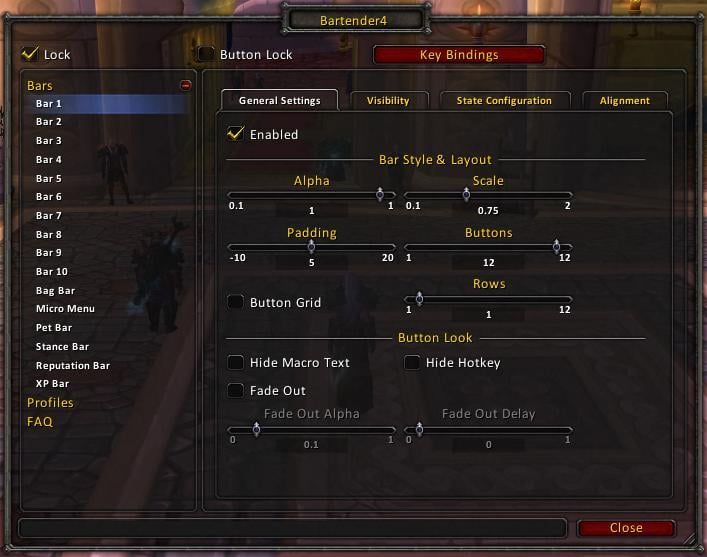
Bartender4 is a full ActionBar replacement mod. It provides you with all the features needed to fully customization most aspects of your action and related bars.

WoW 5.0 and Mists of Pandaria
Since version 4.5.0, Bartender4 is fully compatible with WoW 5.0 and Mists of Pandaria. Note however that this version is no longer compatible with WoW 4.3/Cataclysm.

Features
  • Support for all Action Bars and all related bars

    - 10 Action Bars
    - Stance Bar
    - Pet Bar
    - Bag Bar
    - Micro Menu
    - XP/Reputation Bar
  • All Bars are fully customizable (Scale, Alpha, Fade-Out settings, ...)
  • Very flexible and customizable Show/Hide driver based on Macro Conditions
  • Additional Layout and Paging settings for Action Bars

    - Page all bars based on Stance or Modifier
    - Possess Bar support
    - Custom State driver support with Macro Conditions
  • Options to hide specific elements of the buttons (Macro Text, HotKey, more could be added on demand)
  • StickyFrames support
  • Masque/ButtonFacade support!
  • Easy Hotkey Binding using KeyBound
  • Options to control the hiding of the default blizzard artwork (you might still want that to be displayed..)

FAQ
Q: How do i access the Configuration?
A: You can open the configuration with the Slash Commands (/bt or /bar) or through the Bartender4 LDB plugin.

Q: Can Bartender4 import settings from Bartender3?
A: No. Those two mods are too different to be able to import settings.

Q: Where are my keybindings? And how do i bind new keys?
A: BT3 Keybindings will not be ported over either, you have to use the new KeyBound to re-bind your keys. You can access KeyBound by its slash command (/kb) or through the button in the BT4 config. Hover a button, press key → voila!

Q: CyCircled Support? I like my button skins?
A: No reason to cry! There is a sparkling new skinning addon/library out there! ButtonFacade is way easier to work with as a action-bar author, and its easier to write skins for it too! Alot of cyCircled Skins have already been ported to ButtonFacade, and more are on their way! After installing ButtonFacade just use its configuration to change the skin of the BT4 buttons (/bf)

Q: How do i disable the snapping of the bars?
A: Currently, you can temporarily override the snapping by holding down the Shift Key while moving your bars, or uncheck the option in the popup when your bars are unlocked.

Feature Requests/Bug Tracker
Please submit Bugs and/or Feature Requests using the Ticket System on the WoWAce Project page or in the Bartender4 Forum Thread.
Please provide as many information as possible, including your client language, the exact version you are running, how to reproduce any errors, and a stack trace, if applicable.

Links
WoWAce Project: Bartender4 on WoWAce
Custom State Header: Info page on WoWAce
Forums: Bartender4 Forum Thread
ButtonFacade: WoWAce ButtonFacade Project
=== Changelog ===

4.5.9
* Updated for 5.2

4.5.8
* Fixed a Lua error related to spell flyouts

4.5.7
* Fixed a Lua error when entering vehicles

4.5.6
* Support for WoW 5.1, Loss Of Control Cooldowns and the works!

4.5.5
* Fixed Enabling/Disabling of the Pet Bar

4.5.4
* Added an option to hide the pet bars button grid (empty buttons)
* Fixed Fadeout with Flyout actions
* Fixed action range display when using the self-cast modifier for bar paging
* Using spanish translation for mexican WoW clients

4.5.3
* Improved handling of Override ActionBars which are not classified as vehicles (Darkmoon Faire games, and others)
* Added a visibility option to hide the bars when an override bar is active
* Fixed Shadowdance stance paging
* Even more fixes for the Reputation and XP bar

4.5.2
* Added a separate stance option for Shadowdance
* Fixed Incarnation: Tree of Life paging
* More fixes for the Reputation and XP bar

4.5.1
* Fixed the reputation and XP bars
* Removed the empty Totem Bar
* Improved Vehicle/Possess Bar handling

4.5.0
* Full support for WoW 5.0 and Mist of Pandaria
* Support for Pet Battles (all Bartender bars are hidden when the Pet Battle UI is shown)
* Full support for Monk stances
* Updated all stance code for changes in 5.0
* Support for spec-based profiles using LibDualSpec-1.0
* Added an option to change the direction of button flyouts (eg. summon demon/pet)
* Improved Vehicle Bar (no more missing "Leave Vehicle" button on some vehicles)
* Improved Masque integration

4.4.20.1
* Updated for 4.3

4.4.19
* Updated for 4.2

4.4.18
* Updated for 4.1

4.4.17
* Fixed disappearing Micro Menu

4.4.16
* Updates for the 4.0.6 patch

4.4.15
* Re-Added the "Leave Vehicle" button on Button 12 of the Possess Bar
* Added an option to toggle spells on key-down instead of key-up
* Cosmetic and internal fixes

4.4.14
* Fixed Blizzard Vehicle UI taint issues
* Fixed alot of keybinding related problems.
* Added an option to hide the "Equipped" border on buttons

4.4.13
* Fixed right-click self casting on modifier switched bars
* Fixed Vehicle UI button rebinding
* Bartender will now apply the "Blizzard" preset to new profiles
* Fixed hotkey out-of-range mode
* The "NormalTexture" is hidden once again now (the extra border around buttons)

4.4.12
* Fixed another issue with button locks
* Fixed an issue that tainted the UI and caused shaman totem bars to break

4.4.11
* Fixed the "Show Grid" option
* Fixed spell flyout buttons
* Convert old keybindings on Bar 1 to the new format

4.4.10
* Fixed self casting
* Fixed Show/Hide of HotKeys and Macro Names
* Fixed Button Locking
* Fixed keybinding shortening

4.4.9
* Support for the 4.0 Cataclysm Patch!
* Alot of internal changes for future plans
* New "Presets" module and "Blizzard Art" bar

4.4.2
* Support for the 3.3.0 Content Patch!
* Fixed the offset of the Totem Bar Drag Handle

4.4.1
* Fixed a condition that could potentially taint the Totem Bar and resulting in loss of functionality in Combat

4.4.0
* Support for the 3.2.0 Content Patch, including the new Totem Bar!
* Alot of Performance Tweaks
* Fixes and new localizations

4.3.3
* Fixed a glitch with the default vehicle UI to prevent taint from other addons.

4.3.2
* Added support for Page Swapping for Shadow Dance.
* Fixed Range Coloring and HotKey display for vehicle buttons.
* Fixed an error in the action button code.
* Fixed an error with the micro menu in vertical layout.

4.3.1
* Update all buttons when the talent spec is changed

4.3.0
* Fully updated for the 3.1.0 Content Patch!
* Refactored Positioning system. This //might// cause your saved bar positions to shift slightly. This is a one time change, but it was necessary for new features to come.
* Implemented a new "Positioning" Tab located on the options page of every individual bar.
[/b] Adjust the position of the bars with an absolute precision.
[/b] Options to center Bars both vertically and horizontally.
* Added an option to use the default Blizzard Vehicle Art on vehicles.
* Alot of internal refactoring of the state system and related functions.
* Numerous fixes and enhacements.

4.2.6
* Enabled the Chat Command interface, you can now use the /bt4 slash command to change various options in macros
* Localization Updates
* Internal tweaks and fixes

4.2.5
* Fixed a bug with Click-Through not properly applying after login

4.2.4
* Fixed Hotkey Range-Indicator
* Added Click-Through Support for a number of bars

4.2.3
* Fixed error in Button-Alignment with certain numbers of Rows
* Added "Hide on Vehicles" preset to visibility options

4.2.2
* Resolved "Black Button" issue with spells that require Rage/Mana/etc
* Improved behavior of the "Leave Vehicle" button to also cancel Mind Control etc.

4.2.1
* Added a Vehicle Bar with an additional "Leave Vehicle" button and the Pitch-Control buttons
* Potential fix for the issues with Possess/Vehicle Buttons not working properly

4.2.0
* Refactored ActionButton code (now using the Blizzard Template)
[/b] Empty Buttons are now completly click-through
[/b] Errors with empty buttons/wrong textures with ButtonFacade should be fixed
* MicroMenu now uses the ButtonBar prototype, allowing full Row/Padding control
* Added the keybindings to the Blizzard Keybinding Menu in addition to KeyBound
* Added support for Focus-Casting
* Added a minimap Icon to access the configuration
* Added support for specifying the fade-out alpha within a custom conditional string
* Fixed Hotkey on Pet and Stance Bar
* Re-arranged alot of options
* Fixed alot of errors with option handling

4.1.2
* Added new Popup Dialog in "Unlock Mode" that allows you to quickly lock the bars again and disable snapping
* Fixed initial starting positions of the bars, should no longer overlap. If they still do in rare cases, just move them ;)

4.1.1
* Fixed bugs with switching profiles
* Fixed a bug that caused the visibility to not properly refresh when unlocking/locking bars

4.1.0
* First public release for Patch 3.0
Archived Files (8)
File Name
Version
Size
Author
Date
4.5.8
291kB
Nevcairiel
11-28-12 02:31 PM
4.5.5
290kB
Nevcairiel
09-22-12 01:54 AM
4.5.4
290kB
Nevcairiel
09-16-12 05:04 AM
4.5.3
296kB
Nevcairiel
09-02-12 01:31 AM
4.5.2
295kB
Nevcairiel
09-01-12 12:42 AM
4.5.1
295kB
Nevcairiel
08-30-12 09:40 AM
4.5.0
297kB
Nevcairiel
08-28-12 01:22 AM
4.4.20.1
273kB
Nevcairiel
11-29-11 02:38 PM


Post A Reply Comment Options
Old 10-27-10, 11:41 PM  
Chamenas
Premium Member
 
Chamenas's Avatar
Premium Member
AddOn Author - Click to view AddOns

Forum posts: 14
File comments: 43
Uploads: 4
Odd little bug:

do a /reload when one of your abilities is highlighted. A good example of such an ability is any of the Moonkin abilities which get highlighted when you get an Eclipse (either Lunar or Solar) it's the little Blizzard animation over the specific ability frame. Moonkins are the best to test this with also since it actually does it indefinitely until you lose the buff.

After the reload is finished you should note that one of the animations for the ability is much larger than the actual ability frame itself. Moving the ability from the slot and back into the slot corrects this. It doesn't do this on Blizzard's default bar UI.
Chamenas is offline Report comment to moderator  
Reply With Quote
Old 10-27-10, 10:44 PM  
Nexus2089
A Kobold Labourer

Forum posts: 0
File comments: 6
Uploads: 0
Just wanted to report another issue with bartender. As of this new beta patch 13221 bartender causes about 7 seconds worth of lag anytime i switch specs, learn a spell from a trainer, or change auras. In fact all my other buttons are unresponsive excluding my stance bar which just causes a ton of lag.


This is with having just updated bartender via Curse client on the 27th
Last edited by Nexus2089 : 10-27-10 at 10:45 PM.
Nexus2089 is offline Report comment to moderator  
Reply With Quote
Old 10-27-10, 05:58 PM  
Mook
A Murloc Raider
AddOn Compiler - Click to view compilations

Forum posts: 6
File comments: 120
Uploads: 1
Re: Re: Green Border?

Originally posted by AnrDaemon
Yeah, disable all other addons.
Whatever I tried, I can't get anything similar to what you describing.
Apologies AnrDaemon - it turned out to be an option I hadn't seen before in Raven buffbars called 'Highlights'. The description reads, "If you are using Bartender4, Dominos, or Macaroon then you can enable button highlights to indicate...". This apparently didn't function with the version of Bartender I was using, but once I updated this morning it suddenly started working, leading me to assume it was Bartender4.

Sorry 'bout that.
Mook is offline Report comment to moderator  
Reply With Quote
Old 10-27-10, 05:50 PM  
Bareno
A Defias Bandit

Forum posts: 1
File comments: 27
Uploads: 0
Looks like bartender4 (and possibly other bar mods) are broken with this new beta patch Get this error with entering game world / reloadUI.

Code:
Date: 2010-10-27 17:48:18
ID: 1
Error occured in: Global
Count: 331
Message: ..\FrameXML\RestrictedExecution.lua line 414:
   Invalid working environment
Debug:
   [C]: ?
   [C]: ?
   ..\FrameXML\RestrictedExecution.lua:414:
      ..\FrameXML\RestrictedExecution.lua:412
   (tail call): ?
   ..\FrameXML\SecureHandlers.lua:418:
      ..\FrameXML\SecureHandlers.lua:413
   (tail call): ?
   [C]: SetAttribute()
   ..\FrameXML\SecureStateDriver.lua:114:
      ..\FrameXML\SecureStateDriver.lua:95
   ..\FrameXML\SecureStateDriver.lua:164:
      ..\FrameXML\SecureStateDriver.lua:146
   [C]: SetAttribute()
   ..\FrameXML\SecureStateDriver.lua:11:
      ..\FrameXML\SecureStateDriver.lua:8
   (tail call): ?
   PitBull4\Main.lua:1552: in main chunk
AddOns:
  Swatter, v3.1.15 (<%codename%>)
  AddonChatMessageHider, v1.10
  WowheadLooter, v40003
  Ace3, v
  AckisRecipeList, v2.0.4-9-g8ac4303
  ActionBarSaver, v
  Align, v
  Ampere, v3.1.0.15
  ArkInventory, v3.02
  ArkInventoryRules, v
  Atlas, v1.17.1
  AtlasBattlegrounds, v1.17.1
  AtlasDungeonLocs, v1.17.1
  AtlasOutdoorRaids, v1.17.1
  AtlasTransportation, v1.17.1
  AtlasLoot, vv5.11.07
  AtlasLootFu, vv5.11.07
  AtlasLootReverse, v1.7
  Babylonian, v5.1.DEV.130
  BankStack, vv20-1
  Bartender4, v4.4.11-3-g00dda03
  BetterInbox, v
  BigBrother, v
  BonusScanner, v5.3
  ButtonFacade, v4.0.340
  ButtonFacadeCaith, v4.0.62
  ButtonFacadeRenaitre, vv4.0.3.13117
  ClassTimer, v2.3
  Configator, v5.1.DEV.278
  CTCore, v4.001 (CTMod 4.0)
  DXELoader, v
  EnhancedColourPicker, vb1.9056.1
  EnsidiaFails, v
  Fizzle, vv1.5.1
  ForteCasting, v
  ForteCooldown, v
  ForteCore, v1.966.2
  ForteDeathKnight, v
  ForteTalent, v
  ForteTimer, v
  ForteVehicle, v
  FriendsWithBenefits, v3.2.0.4
  Gatherer, v3.1.15
  Grid, vr1376
  HelmNCloak, v40000-1
  LibSharedMedia30, v3.0-60
  MagicRunes, v1.0.73
  MagicRunesIconDisplay, v1.0.73
  MagicRunesRuneBars, v1.0.73
  Mapster, v1.3.11
  MikScrollingBattleText, v5.5.83
  MoveAnything, v11.2
  Omen, v3.0.11
  OmniCC, v3.1.4
  oRA3, v
  PassLoot, v4.1
  PCDefileOnMe, v1.0
  PitBull4, vv4.0.0-beta14
  SharedMedia, v3.0
  SharedMediaBlizzard, v1.4
  SharedMediaLib, v1.0
  SlideBar, v3.1.15 (<%codename%>)
  TipTac, v10.10.14
  BlizRuntimeLib_enUS v4.0.3.40000 <public-beta.logon.battle.net>
  (ck=601)
Pretty much makes using bartender4 unusable.
Bareno is offline Report comment to moderator  
Reply With Quote
Old 10-27-10, 04:59 PM  
AnrDaemon
A Flamescale Wyrmkin
AddOn Author - Click to view AddOns

Forum posts: 103
File comments: 2288
Uploads: 6
Re: Green Border?

Originally posted by Mook
After updating BT4 this morning, buttons that hold a macro for an effect I am currently under have a bright green border around them.
...
Is there a way to disable this?
Yeah, disable all other addons.
Whatever I tried, I can't get anything similar to what you describing.
AnrDaemon is offline Report comment to moderator  
Reply With Quote
Old 10-27-10, 02:18 PM  
Mook
A Murloc Raider
AddOn Compiler - Click to view compilations

Forum posts: 6
File comments: 120
Uploads: 1
Green Border?

After updating BT4 this morning, buttons that hold a macro for an effect I am currently under have a bright green border around them. For example, a button holding a mouseover macro for casting Arcane Brilliance has a bright green border while I have Arcane Brilliance buffing me, and the border goes away when I cancel that aura.

Is there a way to disable this? It wasn't doing it before I updated, and I can't seem to find the option.

Thanks!
Last edited by Mook : 10-27-10 at 02:23 PM.
Mook is offline Report comment to moderator  
Reply With Quote
Old 10-27-10, 11:55 AM  
AnrDaemon
A Flamescale Wyrmkin
AddOn Author - Click to view AddOns

Forum posts: 103
File comments: 2288
Uploads: 6
/lick in the waiting for an update.
AnrDaemon is offline Report comment to moderator  
Reply With Quote
Old 10-27-10, 08:08 AM  
S@thi
A Theradrim Guardian
 
S@thi's Avatar

Forum posts: 69
File comments: 15
Uploads: 0
Hey i'm a having a issue with the latest minor wow patch.
Suddenly I have 2 UI's ... I turned BT off in addon control panel and all was fine but when I re-enable BT I have the same issue.

I'll post a screenie in a moment
S@thi is offline Report comment to moderator  
Reply With Quote
Old 10-27-10, 04:31 AM  
matfu
A Kobold Labourer

Forum posts: 0
File comments: 1
Uploads: 0
Anyone got a issue with buttonfacade not working with bartender?
matfu is offline Report comment to moderator  
Reply With Quote
Old 10-26-10, 05:40 PM  
Eronian23
A Kobold Labourer

Forum posts: 1
File comments: 80
Uploads: 0
Re: Re: Hotkey / Macro / Item Amount #'s screwed up

Originally posted by AnrDaemon
Should be no problem, aside recently discovered issue with vehicle exit button (set it's anchor to center to bring it back to screen)


Read JUST A FEW COMMENTS BELOW YOURS FFS!!!
No reason to be a dick about this. No one has posted a fix to the issue with the hotkeys, macros or item numbers showing up displaced from the bars.

Your suggestion that you use the same fix for the vehicle bar is wrong. It is already set to centered. (And just for S&G I clicked center again to see if that helped ... what do you know. It didn't work.)

If you cannot help but be condescending to people asking for help, then don't reply to them.
Eronian23 is offline Report comment to moderator  
Reply With Quote
Old 10-26-10, 04:54 PM  
sneakmrsneak
A Kobold Labourer

Forum posts: 0
File comments: 1
Uploads: 0
Not Loading on a Mac

I heard that someone was having an issue similar to mine, but I couldn't find it on here, so sorry if this has been answered already.

I'm using a Mac, and after downloading Bartender4 and moving the files into my addons folder (along with all of my other addons that work perfectly fine), for some reason bartender isn't appearing under addons on my character screen, or obviously, in game. Is there something that I haven't done, or does the code for Bartender clash with Macs?

If you could provide an answer or just copy-paste from where it's been answered before that'd be great.

Thanks,
Sneak
sneakmrsneak is offline Report comment to moderator  
Reply With Quote
Old 10-25-10, 11:13 PM  
AnrDaemon
A Flamescale Wyrmkin
AddOn Author - Click to view AddOns

Forum posts: 103
File comments: 2288
Uploads: 6
Re: Re: Re: Exit Vehicle button

Originally posted by Ladydragon
Well i maybe stupid but i can't find anything about it........or did you mean that the addon have a few problem and that is one of them? or can you show me where you have write about it
It was written right before your post.
The vehicle control panel have small issue with positioning, to bring it to the place, you have to set anchoring point to "CENTER". For me, it solved the issue and I can now change it to any and it will still be visible.

i also have problem with the wehicle button i can't click to leave the wehicle a bit annoying
"Can't click" is a bit vague description of the issue.

and i really hope that you can fix it
I'm not *this* addon author. And don't know Lua enough to fix it's bugs. Reading Lua documentation, I'm more and more convinced that it's written to make learning experience as hard as possible. (Which menas - language documentation style closely resembling language itself)
AnrDaemon is offline Report comment to moderator  
Reply With Quote
Old 10-25-10, 10:26 PM  
Ladydragon
A Kobold Labourer

Forum posts: 0
File comments: 12
Uploads: 0
Exclamation Re: Re: Exit Vehicle button

Originally posted by AnrDaemon
That's another case of "Read before post" issue.
Well i maybe stupid but i can't find anything about it........or did you mean that the addon have a few problem and that is one of them? or can you show me where you have write about it

i also have problem with the wehicle button i can't click to leave the wehicle a bit annoying and i really hope that you can fix it

and last thanks for a great addon i love it
Ladydragon is offline Report comment to moderator  
Reply With Quote
Old 10-25-10, 10:00 PM  
TedEBear
A Kobold Labourer

Forum posts: 1
File comments: 3
Uploads: 0
Re: Re: Paging issue

Originally posted by AnrDaemon
Don't you have "Alt key = focus cast" ?
Thanks for the suggestion. The problem was even though I had Right Click self-casting enabled and the self-casting modifier disabled, if it was set to ALT it'd generate the "Invalid Target" error, even though it is disabled. Changing it resolved the issue.
TedEBear is offline Report comment to moderator  
Reply With Quote
Old 10-25-10, 07:16 PM  
AnrDaemon
A Flamescale Wyrmkin
AddOn Author - Click to view AddOns

Forum posts: 103
File comments: 2288
Uploads: 6
Re: Read before you post...

Originally posted by Chasim
And where would I have read? It's not covered in the FAQs and I did see the posts 2 pages back (including yours) about resetting the bar to get it to appear, with no mention of it now no longer being part of the AddOn.
"2 pages back" means "I've skipped first two pages and read some after them"?
The answer was at the very top before you posted your initial message.
AnrDaemon is offline Report comment to moderator  
Reply With Quote
Post A Reply


Category Jump:

Support AddOn Development!

You have just downloaded by the author . If you like this AddOn why not consider supporting the author? This author has set up a donation account. Donations ensure that authors can continue to develop useful tools for everyone.


